Don't miss your chance to take the Fabric Data Engineer (DP-600) exam for FREE! Find out how by attending the DP-600 session on April 23rd (pacific time), live or on-demand.
Learn moreJoin the FabCon + SQLCon recap series. Up next: Power BI, Real-Time Intelligence, IQ and AI, and Data Factory take center stage. All sessions are available on-demand after the live show. Register now
Hi,
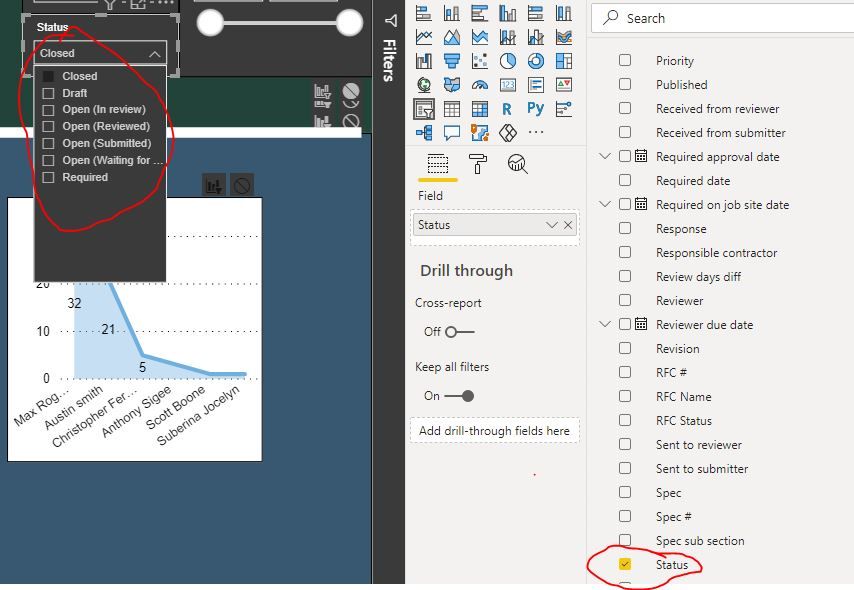
Trying to create a Ball in Court filter. I currently have a Status column with multiple statuses (i.e., closed, draft, open (in review), etc.)
If Status =
Closed = AW
Draft = AW
Open (In review) = BC
Open (Reviewed) = AW
Open (Submitted) = AW
Open (Waiting for Submission) = Sub
Thanks,
Pablo
Solved! Go to Solution.
Hi Pablo,
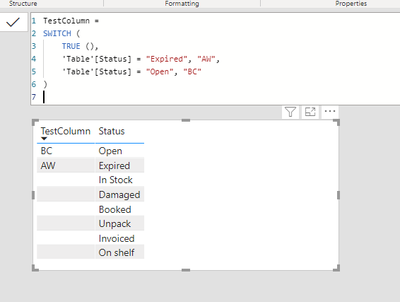
here's a reference formula based on test data. If you complete it with your case categories it should work.
TestColumn =
SWITCH (
TRUE (),
'Table'[Status] = "Expired", "AW",
'Table'[Status] = "Open", "BC"
)
Best regards,
Tim
Proud to be a Super User!
Hi Pablo,
I am not sure if I got your question correct: You want to aggregate the different status e.g. Open (reviewed) and Open (Submitted) should be summarized as "AW"?
If so, I would suggest to create a calculated column in DAX that uses the SWITCH-function (https://docs.microsoft.com/en-us/dax/switch-function-dax).
The formula could look like this:
= SWITCH ( [Status_short], "Closed" = "AW", "Draft" = "AW" [...further expressions])
Looking forward to see if I was able to help you!
Cheers
Robin
@PabloGiraldo I guess you are trying create three groups basis the status. I would suggest you to use the group function. Right click on the status column and select new group
then you can create three groups for your values and you can use it instead of values of status column. I hope it helps you
Proud to be a Super User!
Hi Pablo,
here's a reference formula based on test data. If you complete it with your case categories it should work.
TestColumn =
SWITCH (
TRUE (),
'Table'[Status] = "Expired", "AW",
'Table'[Status] = "Open", "BC"
)
Best regards,
Tim
Proud to be a Super User!
Got it working. Thanks!
Check out the April 2026 Power BI update to learn about new features.
If you have recently started exploring Fabric, we'd love to hear how it's going. Your feedback can help with product improvements.
A new Power BI DataViz World Championship is coming this June! Don't miss out on submitting your entry.
| User | Count |
|---|---|
| 48 | |
| 40 | |
| 38 | |
| 20 | |
| 16 |
| User | Count |
|---|---|
| 68 | |
| 67 | |
| 30 | |
| 26 | |
| 26 |