Don't miss your chance to take the Fabric Data Engineer (DP-700) exam on us!
Learn moreNext up in the FabCon + SQLCon recap series: The roadmap for Microsoft SQL and Maximizing Developer experiences in Fabric. All sessions are available on-demand after the live show. Register now
Hello,
I have a list with outstanding custumors invoices. With the formula "Datediff" i have calculated the days between invoice date and date of today.
Now i want to create columns which shows the invoices with outstanding days:
0-30;31-60;61-90;>90
How can i achieve that?
Solved! Go to Solution.
Hi @marsclone,
Based on my test, you can refer to below steps:
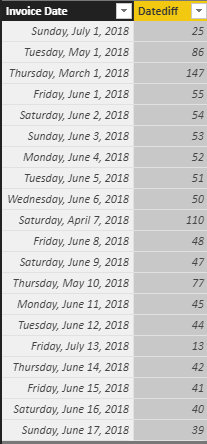
1. I have entered some sample data like the picture below and I have calculated the [Datediff] column with this formula: Datediff = DATEDIFF('Sheet2'[Invoice Date],TODAY(),DAY)
2.Create four columns and you can see the correct result.
0~30 = IF('Sheet2'[Datediff]<=30,[Invoice Date])
31~60 = IF('Sheet2'[Datediff]<=30,BLANK(),IF('Sheet2'[Datediff]<=60,[Invoice Date]))
61~90 = IF('Sheet2'[Datediff]<=30,BLANK(),IF('Sheet2'[Datediff]<=60,BLANK(),IF('Sheet2'[Datediff]<=90,[Invoice Date])))
>90 = IF([Datediff]>90,'Sheet2'[Invoice Date])
You can also download the PBIX file to have a view.
https://www.dropbox.com/s/qel02b27s4jp5bb/Create%20Day%20Interval%20Columns.pbix?dl=0
Regards,
Daniel He
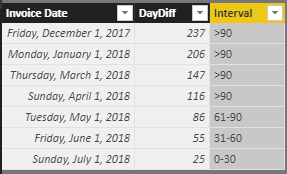
Do you want to get the following tag results? If it is, you can use the DAX below:
Interval =
IF (
Invoice[DayDiff] <= 30,
"0-30",
IF (
Invoice[DayDiff] >= 31
&& Invoice[DayDiff] <= 60,
"31-60",
IF ( Invoice[DayDiff] >= 61 && Invoice[DayDiff] <= 90, "61-90", ">90" )
)
)
Hi @marsclone,
could you please tell me if your problem has been solved? If it is, could you please mark the helpful replies as Answered?
Regards,
Daniel He
Do you want to get the following tag results? If it is, you can use the DAX below:
Interval =
IF (
Invoice[DayDiff] <= 30,
"0-30",
IF (
Invoice[DayDiff] >= 31
&& Invoice[DayDiff] <= 60,
"31-60",
IF ( Invoice[DayDiff] >= 61 && Invoice[DayDiff] <= 90, "61-90", ">90" )
)
)
Hi @marsclone,
Based on my test, you can refer to below steps:
1. I have entered some sample data like the picture below and I have calculated the [Datediff] column with this formula: Datediff = DATEDIFF('Sheet2'[Invoice Date],TODAY(),DAY)
2.Create four columns and you can see the correct result.
0~30 = IF('Sheet2'[Datediff]<=30,[Invoice Date])
31~60 = IF('Sheet2'[Datediff]<=30,BLANK(),IF('Sheet2'[Datediff]<=60,[Invoice Date]))
61~90 = IF('Sheet2'[Datediff]<=30,BLANK(),IF('Sheet2'[Datediff]<=60,BLANK(),IF('Sheet2'[Datediff]<=90,[Invoice Date])))
>90 = IF([Datediff]>90,'Sheet2'[Invoice Date])
You can also download the PBIX file to have a view.
https://www.dropbox.com/s/qel02b27s4jp5bb/Create%20Day%20Interval%20Columns.pbix?dl=0
Regards,
Daniel He
If you have recently started exploring Fabric, we'd love to hear how it's going. Your feedback can help with product improvements.
A new Power BI DataViz World Championship is coming this June! Don't miss out on submitting your entry.
Share feedback directly with Fabric product managers, participate in targeted research studies and influence the Fabric roadmap.
| User | Count |
|---|---|
| 50 | |
| 44 | |
| 42 | |
| 18 | |
| 18 |
| User | Count |
|---|---|
| 69 | |
| 68 | |
| 32 | |
| 32 | |
| 32 |