
cancel
Showing results for 
Search instead for 
Did you mean: 

The Power BI Data Visualization World Championships is back! Get ahead of the game and start preparing now! Learn more

Reply
BoonPin
Frequent Visitor

Create DAX to Calculate "% Grand Total" that can Dynamically Change According to Filter

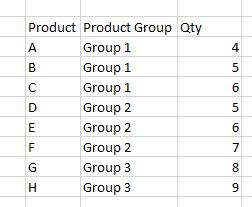
Data Set:

BoonPin_0-1696842582763.png

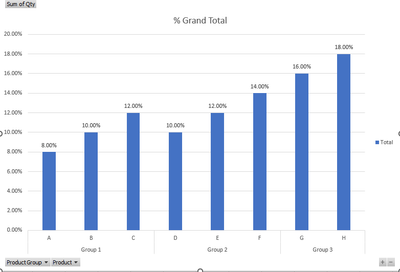
Expectation 1: With All Data. The percentage is shown as per Visual 1.

BoonPin_1-1696842632264.png

Visual 1


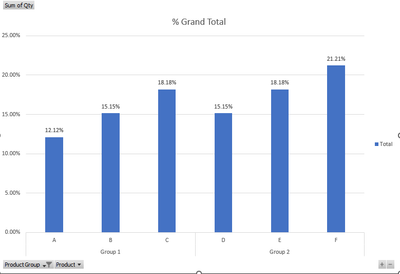
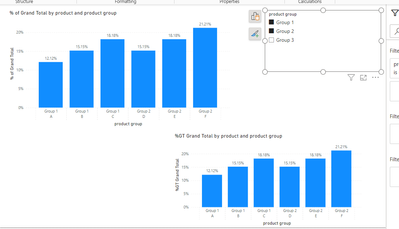
Expectation 2: Product Group 3 is filtered. The percentage should be shown as per Visual 2.

BoonPin_2-1696842690122.png

Visual 2


Query: Is it possible to do it with DAX? I think for Visual 1 is possible with REMOVEFILTERS()


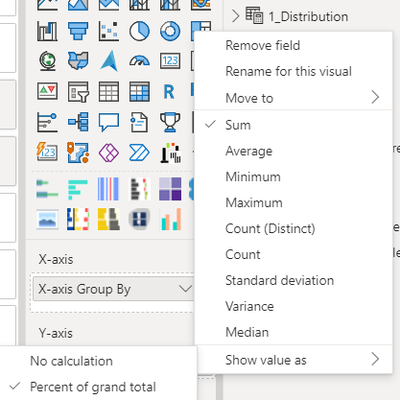
I know we can do it with "Show value as > Percent of grand total". I would like to know the other alternative methods to achieve the same result.

BoonPin_3-1696842845328.png


1 ACCEPTED SOLUTION

@BoonPin 


you are correct. Use ALLSELECTED instead of ALL. This will work. 


rubayatyasmin_0-1696924195077.png


Working DAX,


% of Grand Total =
DIVIDE(
    SUM(Table1[qty]),
    CALCULATE(SUM(Table1[qty]), ALLSELECTED(Table1)
)
)
 
rubayatyasmin_0-1689517080227.png

Did I answer your question? Mark my post as a solution!super-user-logo

Proud to be a Super User!


View solution in original post

3 REPLIES 3
BoonPin
Frequent Visitor

The DAX is working for Visual 1 but not Visual 2. The total % of Visual 2 is not equal 100% if i am using the same DAX. The Visual 2 example that provided above will sum to 100%. 


For Visual 2, the denumerator will exclude Product Group 3's QTY. So the total QTY is 33. Eg, Product A % would be 12.12%. 


My understanding for ALL() function is that the function will take all QTY including the filtered Product Group. Please correct me if I am wrong. 

@BoonPin 


you are correct. Use ALLSELECTED instead of ALL. This will work. 


rubayatyasmin_0-1696924195077.png


Working DAX,


% of Grand Total =
DIVIDE(
    SUM(Table1[qty]),
    CALCULATE(SUM(Table1[qty]), ALLSELECTED(Table1)
)
)
 
rubayatyasmin_0-1689517080227.png

Did I answer your question? Mark my post as a solution!super-user-logo

Proud to be a Super User!


rubayatyasmin
Super User
Super User

Hi, @BoonPin 


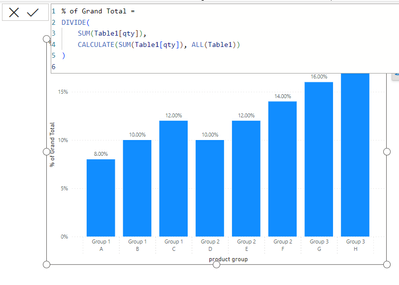
use this dax, this shows exact values that you will get after using 'show value as percentage of grand total' 


% of Grand Total =
DIVIDE(
    SUM(Table1[qty]),
    CALCULATE(SUM(Table1[qty]), ALL(Table1))
)
 
rubayatyasmin_0-1696846036901.png


rubayatyasmin_0-1689517080227.png


Did I answer your question? Mark my post as a solution!super-user-logo

Proud to be a Super User!


Helpful resources

Announcements
Power BI DataViz World Championships

Power BI Dataviz World Championships

The Power BI Data Visualization World Championships is back! Get ahead of the game and start preparing now!

November Power BI Update Carousel

Power BI Monthly Update - November 2025

Check out the November 2025 Power BI update to learn about new features.

FabCon Atlanta 2026 carousel

FabCon Atlanta 2026

Join us at FabCon Atlanta, March 16-20, for the ultimate Fabric, Power BI, AI and SQL community-led event. Save $200 with code FABCOMM.