Get certified for free when you join Fabric Data Days 2026 and dive into Fabric, Power BI, SQL, AI, and other essential data skills.
Join nowTry your skills in the Power BI Dataviz World Championship! Round one ends June 26. Join now
I am trying to create a new column Days to review.
Days to Review = Posting close date - Actual Date.
Not sure how to perform this in DAX (I am new to Power BI) - I tried regular subtraction but it's giving me an error due to "N/A".
Is there a way I can exclude "N/A" from calculations and perform the subtraction/difference.
Posting Close Date | Actual Date Review Completed | Days to review |
11/5/2018 | 11/6/2018 |
|
N/A | 12/4/2018 |
|
2/11/2019 | 2/12/2019 |
|
11/5/2018 | 11/6/2018 |
|
N/A | 12/4/2018 |
|
N/A | 12/4/2018 |
|
5/7/2018 | 5/10/2018 |
|
Thank you for your help.
Solved! Go to Solution.
Hi @P_B
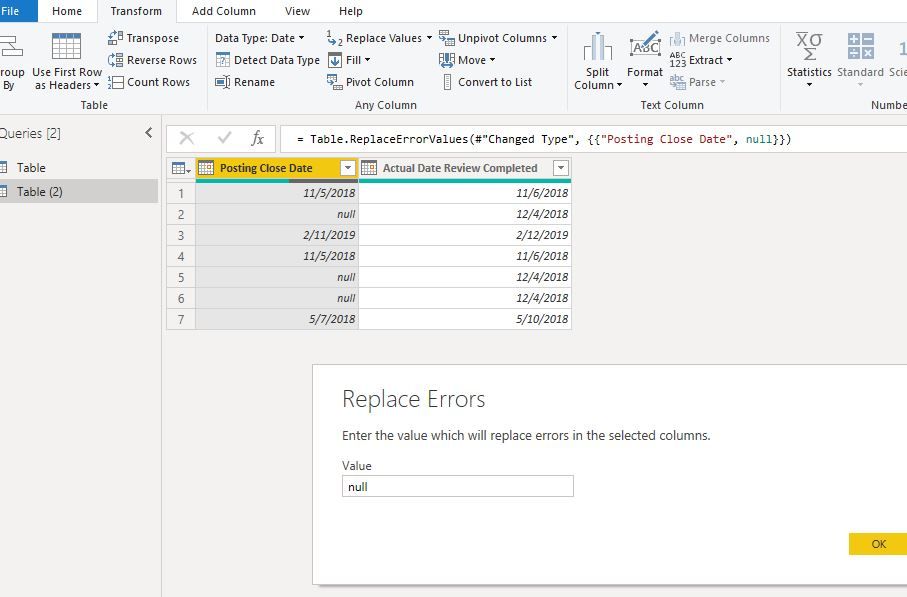
In Edit queries, change data type as "date",
the "N/A" field will become "error",
Replace error with null
File->Close&&Apply
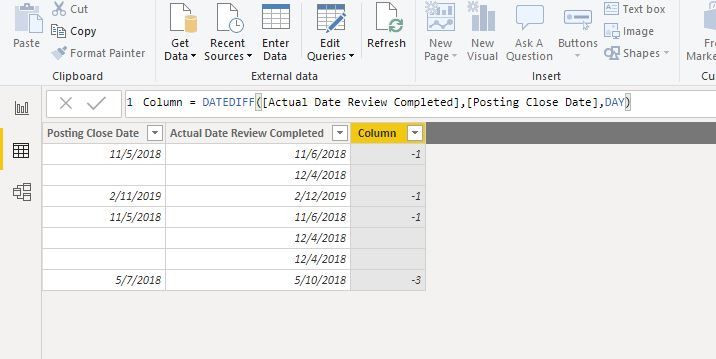
You could create a column
Best Regards
Maggie
Community Support Team _ Maggie Li
If this post helps, then please consider Accept it as the solution to help the other members find it more quickly.
Hi @P_B
In Edit queries, change data type as "date",
the "N/A" field will become "error",
Replace error with null
File->Close&&Apply
You could create a column
Best Regards
Maggie
Community Support Team _ Maggie Li
If this post helps, then please consider Accept it as the solution to help the other members find it more quickly.
Hi @P_B ,
Try replacing N/As with Null or Blank or zero thru power query editor.
And then perform the subtraction logic..
Thanks,
Tejaswi
| User | Count |
|---|---|
| 23 | |
| 22 | |
| 21 | |
| 18 | |
| 11 |
| User | Count |
|---|---|
| 56 | |
| 54 | |
| 43 | |
| 36 | |
| 35 |