cancel
Showing results for 
Search instead for 
Did you mean: 

Learn from the best! Meet the four finalists headed to the FINALS of the Power BI Dataviz World Championships! Register now

Reply
P_B
Frequent Visitor

Create Calculated Column - Difference between two columns and exclude certain rows

I am trying to create a new column Days to review. 


Days to Review = Posting close date - Actual Date. 


Not sure how to perform this in DAX (I am new to Power BI) - I tried regular subtraction but it's giving me an error due to "N/A". 

Is there a way I can exclude "N/A" from calculations and perform the subtraction/difference. 


Posting Close Date

Actual Date Review Completed

Days to review

11/5/2018

11/6/2018


N/A

12/4/2018


2/11/2019

2/12/2019


11/5/2018

11/6/2018


N/A

12/4/2018


N/A

12/4/2018


5/7/2018

5/10/2018


Thank you for your help. 

1 ACCEPTED SOLUTION
v-juanli-msft
Community Support
Community Support

Hi @P_B 

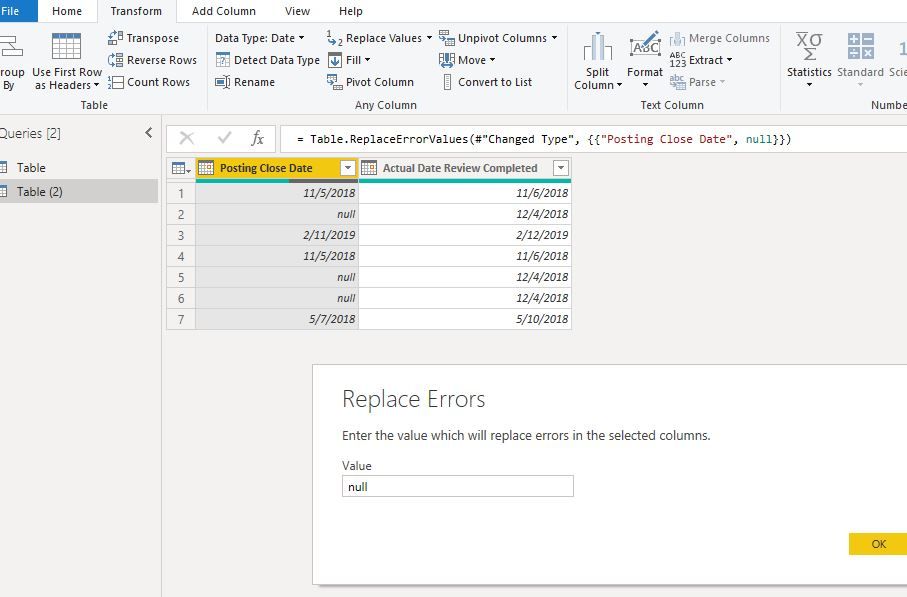
In Edit queries, change data type as "date",

the "N/A" field will become "error", 

Replace error with null

Capture6.JPG

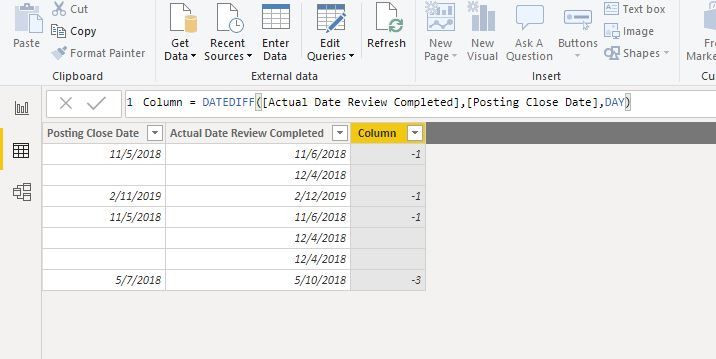
File->Close&&Apply

You could create a column

Capture7.JPG


Best Regards
Maggie


Community Support Team _ Maggie Li
If this post helps, then please consider Accept it as the solution to help the other members find it more quickly.

View solution in original post

2 REPLIES 2
v-juanli-msft
Community Support
Community Support

Hi @P_B 

In Edit queries, change data type as "date",

the "N/A" field will become "error", 

Replace error with null

Capture6.JPG

File->Close&&Apply

You could create a column

Capture7.JPG


Best Regards
Maggie


Community Support Team _ Maggie Li
If this post helps, then please consider Accept it as the solution to help the other members find it more quickly.

Anonymous
Not applicable

Hi @P_B ,


Try replacing N/As with Null or Blank or zero thru power query editor.

And then perform the subtraction logic..


Thanks,

Tejaswi

Helpful resources

Announcements
Power BI DataViz World Championships carousel

Power BI DataViz World Championships - June 2026

A new Power BI DataViz World Championship is coming this June! Don't miss out on submitting your entry.

Join our Fabric User Panel

Join our Fabric User Panel

Share feedback directly with Fabric product managers, participate in targeted research studies and influence the Fabric roadmap.

March Power BI Update Carousel

Power BI Community Update - March 2026

Check out the March 2026 Power BI update to learn about new features.