Don't miss your chance to take the Fabric Data Engineer (DP-700) exam on us!
Learn moreWe've captured the moments from FabCon & SQLCon that everyone is talking about, and we are bringing them to the community, live and on-demand. Starts on April 14th. Register now
Hello, I am having some trouble using the R visual to create a bar chart. Yes, I know I could do it with the vanilla tool, but because of certain end user requests, I can't use it because it lacks certain aesthetics. So, I thought I would try using the R visualization.
I have a table with lots of transactional data, 'Monthly'. 7 of the columns in this table record the volumes made on a day-of-week basis; MON_VOL, TUE_VOl, .... FRI_VOL, SAT_VOL. I want the sums of each of these DOW volumes to be its own vertical bar, with a label pertaining to the DOW; "Mon", "Tue", ...
I also want the sums to be responsive to a date slicer. Will this be the case by default, since in theory only the data filtered by the data slicer should go to the R visual, or will I have to code that as well?
I know very little about R, so I would apprecite any help you can provide.
I did some googling when I thought of the idea, and this is what I have so far:
1) It looks like I'll have to tell R that each of those columns is a column (they're objects?).
The main obstacle I'm having to getting started is that I keep getting the error: "object not found"
2) Then I'll have to have it sum each column.
3) Then I can actually create the barplot:
barplot(dataset, main="Day of Week Volume",
xlab="Day of Week")
The greyed out section of the code was provided by Power BI. These are some notes I had from a discussion with a friend who dabbles in R.
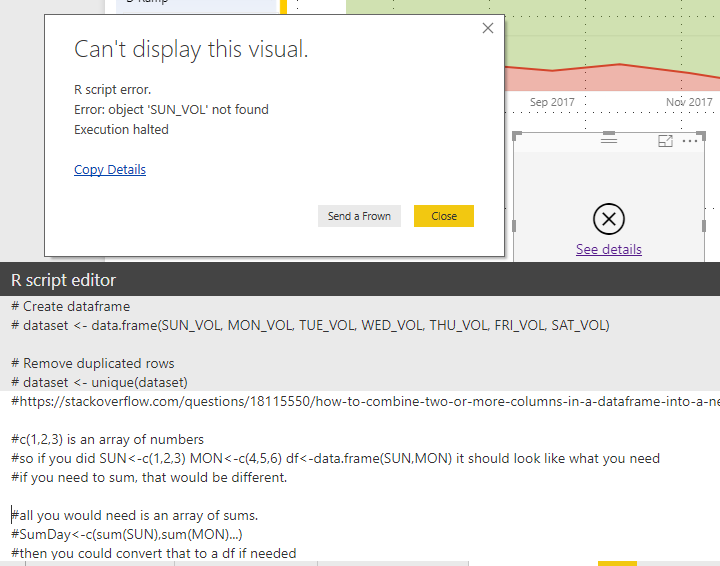
Addition: Getting a little closer now. Still not sure what's going on:
Hi @BillyT_350,
Try the demo in the attachment, please. The names aren't the legend in your expected result.
bar_names <- c("MON", "TUE", "WED", "THU", "FRI", "SAT", "SUN")
bar_height <- unlist(dataset[1, ])
barplot(dataset, main = "Day of Week Volumn", xlab = "Day of Week", height = bar_height, width = 3000, col = 'red', beside = FALSE, names.arg = bar_names)
Best Regards,
Dale
@v-jiascu-msft Dale,
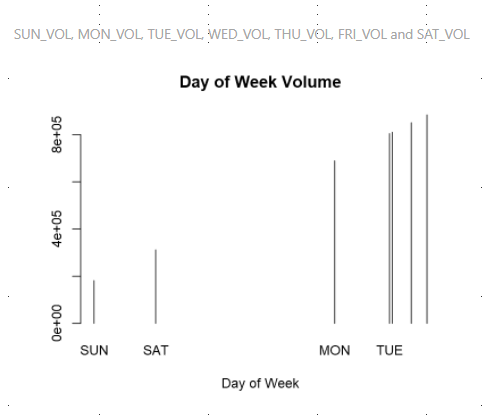
Thank you for the suggestion. However, using that code, I get the following result, which was very similar to one of the ones that I posted in the OP. Also, I notice that the data seems to be in ascending order, rather than by the order in which they were coded into the visual, or the labels. Is there a way to change this?
Hi @BillyT_350,
Can you share your data? A dummy one is enough? It would also be great if you can share the expected result?
Best Regards,
Dale
@v-jiascu-msft No, a dummy chart will not work. The chart needs to update depending on the selections of the user.
Let me see what I can put together for you as far as dummy data.
If you have recently started exploring Fabric, we'd love to hear how it's going. Your feedback can help with product improvements.
A new Power BI DataViz World Championship is coming this June! Don't miss out on submitting your entry.
Share feedback directly with Fabric product managers, participate in targeted research studies and influence the Fabric roadmap.
| User | Count |
|---|---|
| 57 | |
| 37 | |
| 34 | |
| 19 | |
| 17 |
| User | Count |
|---|---|
| 74 | |
| 70 | |
| 37 | |
| 35 | |
| 25 |