This time we’re going bigger than ever. Fabric, Power BI, SQL, AI and more. We're covering it all. You won't want to miss it.
Learn moreDid you hear? There's a new SQL AI Developer certification (DP-800). Start preparing now and be one of the first to get certified. Register now
Hello, I am having some trouble using the R visual to create a bar chart. Yes, I know I could do it with the vanilla tool, but because of certain end user requests, I can't use it because it lacks certain aesthetics. So, I thought I would try using the R visualization.
I have a table with lots of transactional data, 'Monthly'. 7 of the columns in this table record the volumes made on a day-of-week basis; MON_VOL, TUE_VOl, .... FRI_VOL, SAT_VOL. I want the sums of each of these DOW volumes to be its own vertical bar, with a label pertaining to the DOW; "Mon", "Tue", ...
I also want the sums to be responsive to a date slicer. Will this be the case by default, since in theory only the data filtered by the data slicer should go to the R visual, or will I have to code that as well?
I know very little about R, so I would apprecite any help you can provide.
I did some googling when I thought of the idea, and this is what I have so far:
1) It looks like I'll have to tell R that each of those columns is a column (they're objects?).
The main obstacle I'm having to getting started is that I keep getting the error: "object not found"
2) Then I'll have to have it sum each column.
3) Then I can actually create the barplot:
barplot(dataset, main="Day of Week Volume",
xlab="Day of Week")
The greyed out section of the code was provided by Power BI. These are some notes I had from a discussion with a friend who dabbles in R.
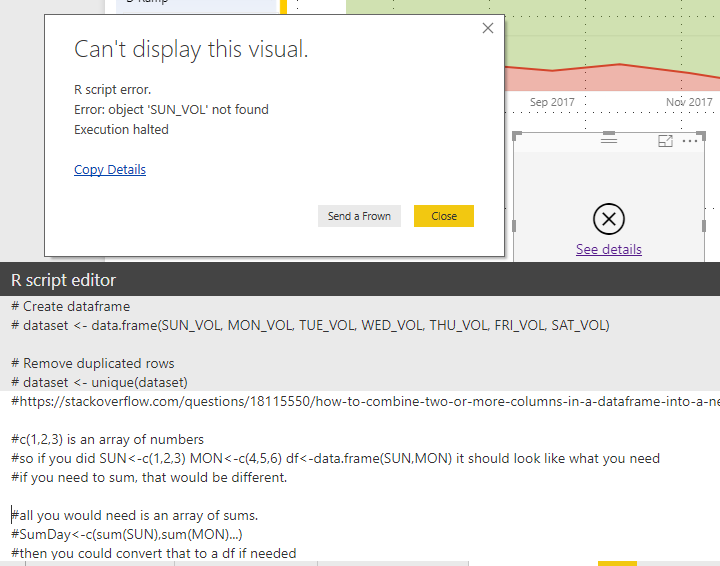
Addition: Getting a little closer now. Still not sure what's going on:
Hi @BillyT_350,
Try the demo in the attachment, please. The names aren't the legend in your expected result.
bar_names <- c("MON", "TUE", "WED", "THU", "FRI", "SAT", "SUN")
bar_height <- unlist(dataset[1, ])
barplot(dataset, main = "Day of Week Volumn", xlab = "Day of Week", height = bar_height, width = 3000, col = 'red', beside = FALSE, names.arg = bar_names)
Best Regards,
Dale
@v-jiascu-msft Dale,
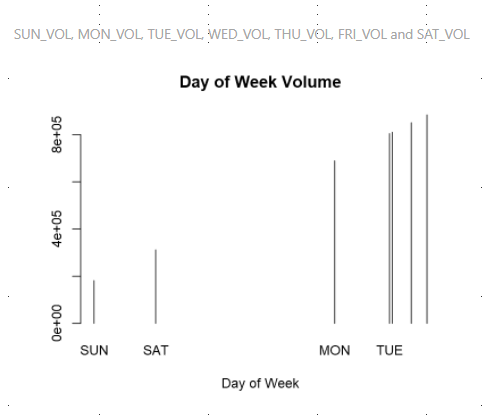
Thank you for the suggestion. However, using that code, I get the following result, which was very similar to one of the ones that I posted in the OP. Also, I notice that the data seems to be in ascending order, rather than by the order in which they were coded into the visual, or the labels. Is there a way to change this?
Hi @BillyT_350,
Can you share your data? A dummy one is enough? It would also be great if you can share the expected result?
Best Regards,
Dale
@v-jiascu-msft No, a dummy chart will not work. The chart needs to update depending on the selections of the user.
Let me see what I can put together for you as far as dummy data.
Check out the April 2026 Power BI update to learn about new features.
Sign up to receive a private message when registration opens and key events begin.
If you have recently started exploring Fabric, we'd love to hear how it's going. Your feedback can help with product improvements.
| User | Count |
|---|---|
| 34 | |
| 31 | |
| 25 | |
| 20 | |
| 16 |
| User | Count |
|---|---|
| 60 | |
| 48 | |
| 29 | |
| 23 | |
| 23 |