Get certified for free when you join Fabric Data Days 2026 and dive into Fabric, Power BI, SQL, AI, and other essential data skills.
Join nowData Days is here! Join us now for 60+ days of learning, challenges, and connection. Learn more
Gentleman, I have faced some difficulties in finding Carrier Number.
From below sample table, I wanted Carrier operated per month by Customer shown in 2nd Table.
Customer Carrier Jan'19 Feb'19 Mar'19
A A1 400 500
B A1 500 200
C A2 400 300 400
D A3 700 600 700
Here I want to find out no of Carrier by per month by Customers. e.g if Career A1 used in Mar'19 by Two customer A & B, but it should be only one(no duplicate count) and same assigned to highest sales to Customer A.
| Customer | Carrier Jan | Carrier Feb | Carrier Mar |
| A | 1 | 1 | |
| B | 1 | 0 | 0 |
| C | 1 | 1 | 1 |
| D | 1 | 1 | 1 |
Kindly Help to formulate CountX DAX function
Thanks,
K
Solved! Go to Solution.
Hi @Anonymous ,
Take a try of this:
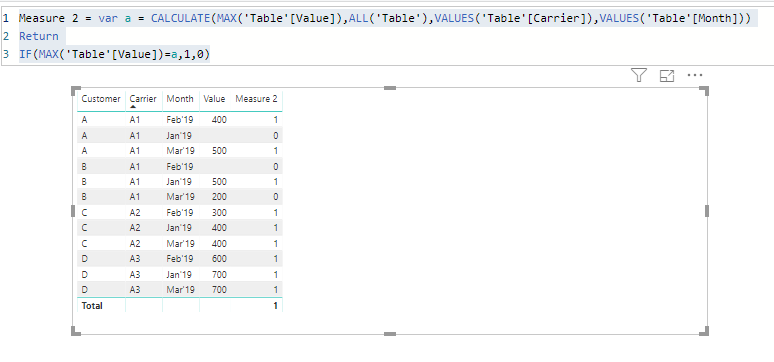
Measure 2 = var a = CALCULATE(MAX('Table'[Value]),ALL('Table'),VALUES('Table'[Carrier]),VALUES('Table'[Month]))
Return
IF(MAX('Table'[Value])=a,1,0)Best regards,
Dina Ye
Hi @Anonymous ,
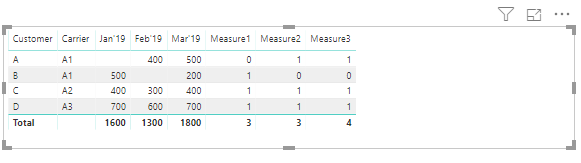
I created a sample as your requested, plz use below measures to generate the results:
Measure1 = IF(ISBLANK(MAX([Jan'19])),0,COUNTX(Table1,[Jan'19]))
Measure2 = IF(ISBLANK(MAX([Feb'19])),0,COUNTX(Table1,[Feb'19]))
Measure3 = var a = CALCULATE(MAX([Mar'19]),ALL(Table1),VALUES(Table1[Carrier])) var b = IF(MAX(Table1[Mar'19])=a,MAX(Table1[Mar'19]),BLANK()) Return IF(ISBLANK(COUNTX(table1,b)),0,COUNTX(table1,b))
Best regards,
Dina Ye
Thanks Dina, its really workout out.
Need one more help. which i have tried to do but couldn't get any success.
Suppose, if my Table is in another formate like instead of the month in Column it is in Row format then? i have tired to apply same code but failed.
appreciate your help if you can
| Customer | Carrier | Month | Value | Carrier Count** |
| A | A1 | Jan'19 | 0 | |
| B | A1 | Jan'19 | 500 | 1 |
| C | A2 | Jan'19 | 400 | 1 |
| D | A3 | Jan'19 | 700 | 1 |
| A | A1 | Feb'19 | 400 | 1 |
| B | A1 | Feb'19 | 0 | |
| C | A2 | Feb'19 | 300 | 1 |
| D | A3 | Feb'19 | 600 | 1 |
| A | A1 | Mar'19 | 500 | 1 |
| B | A1 | Mar'19 | 200 | 0 |
| C | A2 | Mar'19 | 400 | 1 |
| D | A3 | Mar'19 | 700 | 1 |
Hi @Anonymous ,
Take a try of this:
Measure 2 = var a = CALCULATE(MAX('Table'[Value]),ALL('Table'),VALUES('Table'[Carrier]),VALUES('Table'[Month]))
Return
IF(MAX('Table'[Value])=a,1,0)Best regards,
Dina Ye
Thanks its works absolutely 🙂
Don't miss out on Data Days, June 15 through August 7. Learn Fabric, Power BI, SQL, AI and more.
Check out the May 2026 Power BI update to learn about new features.
| User | Count |
|---|---|
| 23 | |
| 23 | |
| 21 | |
| 17 | |
| 13 |
| User | Count |
|---|---|
| 58 | |
| 50 | |
| 38 | |
| 29 | |
| 24 |