Join us in Barcelona for FabCon and SQLCon, September 28 - October 1, 2026.
This is best Fabric, Power BI, SQL and AI community event. How do we know? The last event sold out! Save €200 with code FABCMTY200.
Register now- Power BI forums
- Get Help with Power BI
- Desktop
- Service
- Report Server
- Power Query
- Mobile Apps
- Developer
- DAX Commands and Tips
- Custom Visuals Development Discussion
- Health and Life Sciences
- Power BI Spanish forums
- Translated Spanish Desktop
- Training and Consulting
- Instructor Led Training
- Dashboard in a Day for Women, by Women
- Galleries
- Data Stories Gallery
- Themes Gallery
- Contests Gallery
- QuickViz Gallery
- Quick Measures Gallery
- Visual Calculations Gallery
- Fabric Apps Gallery
- Notebook Gallery
- Translytical Task Flow Gallery
- TMDL Gallery
- R Script Showcase
- Webinars and Video Gallery
- Ideas
- Custom Visuals Ideas (read-only)
- Issues
- Issues
- Events
- Upcoming Events
The Fabric community is upgrading! Read all of the details including the timeline and what you can expect. Learn more
- Power BI forums
- Forums
- Get Help with Power BI
- Desktop
- Countrows last date
- Subscribe to RSS Feed
- Mark Topic as New
- Mark Topic as Read
- Float this Topic for Current User
- Bookmark
- Subscribe
- Printer Friendly Page


- Mark as New
- Bookmark
- Subscribe
- Mute
- Subscribe to RSS Feed
- Permalink
- Report Inappropriate Content
Countrows last date
I have this table
| id | state | date |
| 1 | active | 01/01/2020 |
| 1 | reserved | 05/01/2020 |
| 1 | suspended | 08/01/2020 |
| 1 | sold | 15/01/2020 |
| 2 | active | 02/01/2020 |
| 2 | suspended | 03/01/2020 |
| 2 | active | 05/01/2020 |
| 3 | active | 05/01/2020 |
| 4 | active | 06/01/2020 |
| 4 | sold | 08/01/2020 |
I want count rows of distinct IDs where last date equal to "active"
Result expected is: 2 (last date from these 2 IDs have the state "active".
Can you help me?
Thanks
Solved! Go to Solution.


- Mark as New
- Bookmark
- Subscribe
- Mute
- Subscribe to RSS Feed
- Permalink
- Report Inappropriate Content
Hi @youconnect ,
I am understanding your logic and have made the following calculation:
count_active_id =
var last_active_date = CALCULATE(MAX(Sheet2[date]),FILTER(ALLEXCEPT(Sheet2,Sheet2[id],Sheet2[date]),Sheet2[state]="active"))
var last_date = CALCULATE(MAX(Sheet2[date]),ALLEXCEPT(Sheet2,Sheet2[id]))
return CALCULATE(COUNTROWS(FILTER(Sheet2,last_active_date=last_date)))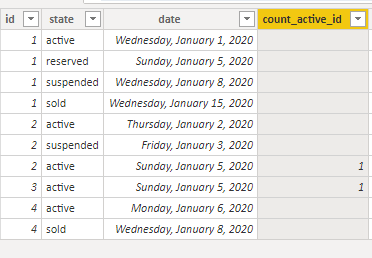
Best Regards,
Liang
If this post helps, then please consider Accept it as the solution to help the other members find it more quickly.


- Mark as New
- Bookmark
- Subscribe
- Mute
- Subscribe to RSS Feed
- Permalink
- Report Inappropriate Content
This will do what you describe, but it is 1, not 2.
Latest Record Count =
VAR LatestDate =
CALCULATE(
    LASTDATE('Sample Data'[Date]),
    'Sample Data'[state] = "active"
)
VAR ActiveIDCount =
CALCULATE(
    DISTINCTCOUNT('Sample Data'[id]),
    FILTER(
        'Sample Data',
        'Sample Data'[Date] = LatestDate
    )
)
RETURN
COALESCE(ActiveIDCount,0)
the last date of an active item is Jan 6, 2020, and only one ID has that date.
How are you getting 2?
Did I answer your question? Mark my post as a solution!
Did my answers help arrive at a solution? Give it a kudos by clicking the Thumbs Up!
DAX is for Analysis. Power Query is for Data Modeling
Proud to be a Super User!
MCSA: BI Reporting- Mark as New
- Bookmark
- Subscribe
- Mute
- Subscribe to RSS Feed
- Permalink
- Report Inappropriate Content
No.
last date for id 1 is 15/01/2020 and state is not active, not count
last date for id 2 is 05/01/2020 and state is active, count
last date for id 3 is 05/01/2020 and state is active, count
last date for id 4 is 08/01/2020 and state is not active, not count.
So count is 2
- Mark as New
- Bookmark
- Subscribe
- Mute
- Subscribe to RSS Feed
- Permalink
- Report Inappropriate Content
Hi @youconnect ,
I am understanding your logic and have made the following calculation:
count_active_id =
var last_active_date = CALCULATE(MAX(Sheet2[date]),FILTER(ALLEXCEPT(Sheet2,Sheet2[id],Sheet2[date]),Sheet2[state]="active"))
var last_date = CALCULATE(MAX(Sheet2[date]),ALLEXCEPT(Sheet2,Sheet2[id]))
return CALCULATE(COUNTROWS(FILTER(Sheet2,last_active_date=last_date)))
Best Regards,
Liang
If this post helps, then please consider Accept it as the solution to help the other members find it more quickly.
- Mark as New
- Bookmark
- Subscribe
- Mute
- Subscribe to RSS Feed
- Permalink
- Report Inappropriate Content
Thanks @V-lianl-msft it worked like a charm.
Another question: If I want only the records before 01-01-2020 how do that?
- Mark as New
- Bookmark
- Subscribe
- Mute
- Subscribe to RSS Feed
- Permalink
- Report Inappropriate Content
I suspect there is an cleaner way to do this, but this does the trick.
Counting Measure =
VAR FirstTable =
    ADDCOLUMNS (
        SUMMARIZECOLUMNS ( 'Sample Data'[id] ),
        "Date2", LASTDATE ( 'Sample Data'[Date] )
    )
VAR CombinedTable =
    NATURALINNERJOIN (
        'Sample Data',
        firsttable
    )
VAR RowCount =
    COUNTROWS (
        FILTER (
            FILTER (
                CombinedTable,
                [Date] = [Date2]
            ),
            [state] = "active"
        )
    )
RETURN
COALESCE( RowCount, 0)
Did I answer your question? Mark my post as a solution!
Did my answers help arrive at a solution? Give it a kudos by clicking the Thumbs Up!
DAX is for Analysis. Power Query is for Data Modeling
Proud to be a Super User!
MCSA: BI Reporting- Mark as New
- Bookmark
- Subscribe
- Mute
- Subscribe to RSS Feed
- Permalink
- Report Inappropriate Content

Helpful resources

FabCon & SQLCon – Barcelona 2026
Join us in Barcelona for FabCon and SQLCon, the Fabric, Power BI, SQL, and AI community event. Save €200 with code FABCMTY200.

Power BI DataViz World Championships - June 2026
A new Power BI DataViz World Championship is coming this June! Don't miss out on submitting your entry.

| User | Count |
|---|---|
| 23 | |
| 22 | |
| 14 | |
| 14 | |
| 13 |


| User | Count |
|---|---|
| 47 | |
| 39 | |
| 24 | |
| 22 | |
| 20 |


