Join us at FabCon Atlanta from March 16 - 20, 2026, for the ultimate Fabric, Power BI, AI and SQL community-led event. Save $200 with code FABCOMM.
Register now!Get Fabric Certified for FREE during Fabric Data Days. Don't miss your chance! Request now
Hi,
I'm trying to replicate the Excel function COUNTIF, to count how many times a manager's name appears in a table. I have read numerous guides on this, and tried a few different ways of solving it, but all end up in the same way. Counting all rows, instead of the ones filtered.
Here is one of the measures I use in a column:
Solved! Go to Solution.
@Anonymous , the Above formula, should work for what you shown in excel
Team size = CALCULATE(COUNT(Table2[Manager]),FILTER(allselected(Table2),Table2[Manager]=max(Table2[Manager])))
or
Team size = CALCULATE(COUNT(Table2[Manager]),Allexcept(Table2,Table2[Manager]))
@Anonymous , the expected output is not clear . But try like
Team size = CALCULATE(COUNTROWS(Table2),FILTER(allselected(Table2),Table2[Manager]=max(Table2[Manager])))
Thanks @amitchandak. It did not work, unfortunately. It outputed the same value in all rows as well.
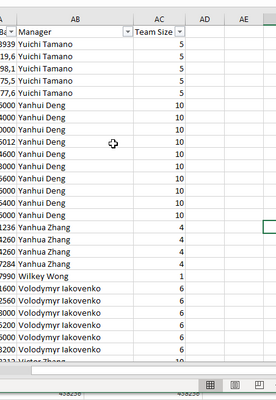
I'm adding a print screen of an excel with my wanted output, hope it explains.
@Anonymous , the Above formula, should work for what you shown in excel
Team size = CALCULATE(COUNT(Table2[Manager]),FILTER(allselected(Table2),Table2[Manager]=max(Table2[Manager])))
or
Team size = CALCULATE(COUNT(Table2[Manager]),Allexcept(Table2,Table2[Manager]))
Check out the November 2025 Power BI update to learn about new features.
Advance your Data & AI career with 50 days of live learning, contests, hands-on challenges, study groups & certifications and more!