Get certified for free when you join Fabric Data Days 2026 and dive into Fabric, Power BI, SQL, AI, and other essential data skills.
Join nowData Days is here! Join us now for 60+ days of learning, challenges, and connection. Learn more
Hello all,
I'm using PowerBI Desktop and trying to generate an Clustered Column Chart from a CSV file that I receive from an external company.
The CSV looks like:
| ID | DateAdd | LastModified | CurrentStatus |
| 1 | 8/25/2019 | 8/26/2019 | Closed |
| 2 | 8/27/2019 | 9/1/2019 | Closed |
| 3 | 9/1/2019 | 9/7/2019 | Closed |
| 4 | 9/5/2019 | 9/6/2019 | InProgress |
| 5 | 9/5/2019 | 9/9/2019 | InProgress |
| 6 | 9/15/2019 | 9/15/2019 | New |
My goal is to have a Slicer and when I select dates 9/1/2019 and 9/10/2019, it will have on the first column the count of DateAdd (3 in this example) and on the second column the count of LastModified and Status = "Closed" (2 in this example).
I can do it separated but having trouble when trying to get it together.
Can someone help me?
Thanks in advice.
Solved! Go to Solution.
Hi @Anonymous ,
At first, you need to create a calendar table as a slicer.
Calendar = CALENDAR ( MIN ( 'Table'[DateAdd] ), MAX ( 'Table'[LastModified] ) )
Then create two new measures to get counts.
Count1 =
VAR minselect =
CALCULATE ( MIN ( 'Calendar'[Date] ), ALLSELECTED ( 'Calendar'[Date] ) )
VAR maxselect =
CALCULATE ( MAX ( 'Calendar'[Date] ), ALLSELECTED ( 'Calendar'[Date] ) )
RETURN
COUNTROWS (
FILTER (
'Table',
'Table'[DateAdd] >= minselect
&& 'Table'[DateAdd] <= maxselect
)
)
Count2 =
VAR minselect =
CALCULATE ( MIN ( 'Calendar'[Date] ), ALLSELECTED ( 'Calendar'[Date] ) )
VAR maxselect =
CALCULATE ( MAX ( 'Calendar'[Date] ), ALLSELECTED ( 'Calendar'[Date] ) )
RETURN
COUNTROWS (
FILTER (
'Table',
'Table'[LastModified] >= minselect
&& 'Table'[LastModified] <= maxselect
&& 'Table'[CurrentStatus] = "Closed"
)
)
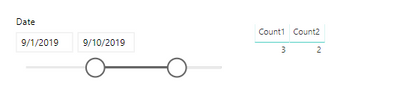
Here is the result.
I uploaded my test file as a attachment, you can download and refer to it.
Hi @Anonymous ,
At first, you need to create a calendar table as a slicer.
Calendar = CALENDAR ( MIN ( 'Table'[DateAdd] ), MAX ( 'Table'[LastModified] ) )
Then create two new measures to get counts.
Count1 =
VAR minselect =
CALCULATE ( MIN ( 'Calendar'[Date] ), ALLSELECTED ( 'Calendar'[Date] ) )
VAR maxselect =
CALCULATE ( MAX ( 'Calendar'[Date] ), ALLSELECTED ( 'Calendar'[Date] ) )
RETURN
COUNTROWS (
FILTER (
'Table',
'Table'[DateAdd] >= minselect
&& 'Table'[DateAdd] <= maxselect
)
)
Count2 =
VAR minselect =
CALCULATE ( MIN ( 'Calendar'[Date] ), ALLSELECTED ( 'Calendar'[Date] ) )
VAR maxselect =
CALCULATE ( MAX ( 'Calendar'[Date] ), ALLSELECTED ( 'Calendar'[Date] ) )
RETURN
COUNTROWS (
FILTER (
'Table',
'Table'[LastModified] >= minselect
&& 'Table'[LastModified] <= maxselect
&& 'Table'[CurrentStatus] = "Closed"
)
)
Here is the result.
I uploaded my test file as a attachment, you can download and refer to it.
Hello @v-eachen-msft,
Thank you so much for your prompt reply. Your suggestion worked like a charm.
I'm trying to create a Clustered Column chart, grouping by Month/Year, but all I got is a sum on all months.
Is there anything I should to get the chart?
Thanks!
Hi @Anonymous ,
You can use ALLEXCEPT() funtion to group by date.
Hello @v-eachen-msft ,
Thanks for your help. This is what I've done and it is working for me:
Calendar = CALENDAR ( MIN ( Table[DateAdd]), TODAY() )
From: Table (DateAdded (bins)) To: Calendar (Date) Cardinality: Many to one (*:1) Cross filter direction: Single Active: yes
From: Table (LastModified (bins)) To: Calendar (Date) Cardinality: Many to one (*:1) Cross filter direction: Single Active: no
CountCreated =
VAR minselect1 =
CALCULATE ( MIN ( Calendar[Date (bins)] ), ALLSELECTED ( Calendar[Date (bins)] ) )
VAR maxselect1 =
CALCULATE ( MAX ( Calendar[Date (bins)] ), ALLSELECTED ( Calendar[Date (bins)] ) )
RETURN
CALCULATE(
COUNTROWS (
FILTER (
Table,
Table[DateAdd (bins)] >= minselect1
&& Table[DateAdd (bins)] <= maxselect1
)
),
USERELATIONSHIP('Calendar'[Date], Table[DateAdd (bins)]))CountClosed =
VAR minselect =
CALCULATE ( MIN ( 'Calendar'[Date (bins)] ), ALLSELECTED ( 'Calendar'[Date (bins)] ) )
VAR maxselect =
CALCULATE ( MAX ( 'Calendar'[Date (bins)] ), ALLSELECTED ( 'Calendar'[Date (bins)] ) )
RETURN
CALCULATE(
COUNTROWS (
FILTER (
Table,
Table[LastModified (bins)] >= minselect
&& Table[LastModified (bins)] <= maxselect
&& Changes[CurrentStatus] = "Closed"
)
),
USERELATIONSHIP('Calendar'[Date], Table[LastModified (bins)]))
To have the Clustered Column Chart, I added Date (bins) from Calendar Table on Axis and CountCreated and CountClosed on Value.
Don't miss out on Data Days, June 15 through August 7. Learn Fabric, Power BI, SQL, AI and more.
Check out the May 2026 Power BI update to learn about new features.
| User | Count |
|---|---|
| 23 | |
| 23 | |
| 21 | |
| 17 | |
| 13 |
| User | Count |
|---|---|
| 58 | |
| 51 | |
| 39 | |
| 29 | |
| 24 |