Join us at FabCon Atlanta from March 16 - 20, 2026, for the ultimate Fabric, Power BI, AI and SQL community-led event. Save $200 with code FABCOMM.
Register now!The Power BI Data Visualization World Championships is back! Get ahead of the game and start preparing now! Learn more
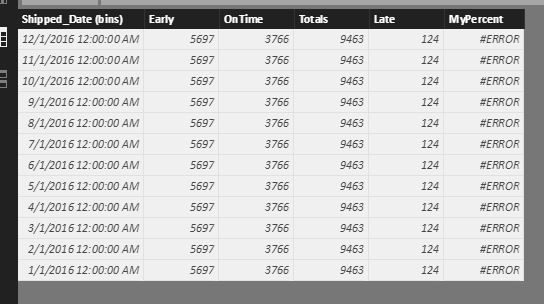
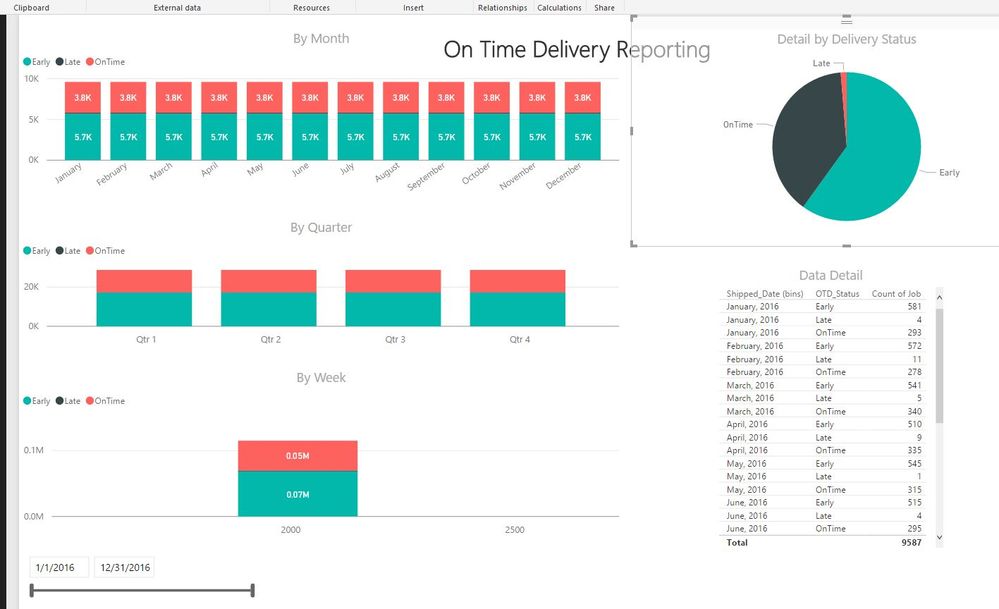
I have a delivery table that contains a date column and a status column. I'm looking to graph that data by status by month and rolling week. The data appears correctly on the Data Detail table I made (pictured), but will not graph accordingly. I've created a table (OTD) that bins the data by month, but does not sum the status correctly by month as it should. Being new to DAX, I'm not sure how to capture both the date range and the status in my column. Any help would be gratefully appreciated.OTD Power BI Table
Graphs
vw_PBI-OnTimeDelivery SQL View
@Phil_Seamark Here's my code for the OTD table.
OTD = DISTINCT('vw_PBI-OnTimeDelivery'[Shipped_Date (bins)])
Hi @kyleldi,
If you want to get the distinct count of selected date range, you can try to use below formula:
Count of Selected DateRange=
var selectedMin=FIRSTDATE(ALLSELECTED('Table'[Date]))
var selectedMax=LASTDATE(ALLSELECTED('Table'[Date]))
return
CALCULATE(DISTINCTCOUNT('vw_PBI-OnTimeDelivery'[Shipped_Date (bins)]),FILTER(ALL('Table'),[Date]>=selectedMin&&[Date]<=selectedMax))
Notice: table is the source table of the date slicer.
Regards,
Xiaoxin Sheng
The Power BI Data Visualization World Championships is back! Get ahead of the game and start preparing now!
| User | Count |
|---|---|
| 40 | |
| 35 | |
| 34 | |
| 31 | |
| 28 |
| User | Count |
|---|---|
| 137 | |
| 102 | |
| 68 | |
| 66 | |
| 64 |