
Join us at FabCon Atlanta from March 16 - 20, 2026, for the ultimate Fabric, Power BI, AI and SQL community-led event. Save $200 with code FABCOMM.
Register now!The Power BI Data Visualization World Championships is back! Get ahead of the game and start preparing now! Learn more
Hi,
I need to count the number of concurrent calls.
I have a start datetime of each call and an end datetime of each call, anyone have any ideas on counting the amount of concurrent calls?
Thanks
Solved! Go to Solution.
Hi @timwilson,
Maybe you can try to use "countrows" function with calculate column to get the count of concurrent call.
Sample:
Concurrent Calls= COUNTROWS(FILTER('Table',[StartDate]>=EARLIER('Table'[StartDate])&&[EndDate]<=EARLIER('Table'[EndDate])))
Regards,
Xiaoxin Sheng
Hi @timwilson,
Maybe you can try to use "countrows" function with calculate column to get the count of concurrent call.
Sample:
Concurrent Calls= COUNTROWS(FILTER('Table',[StartDate]>=EARLIER('Table'[StartDate])&&[EndDate]<=EARLIER('Table'[EndDate])))
Regards,
Xiaoxin Sheng
Can someone help..
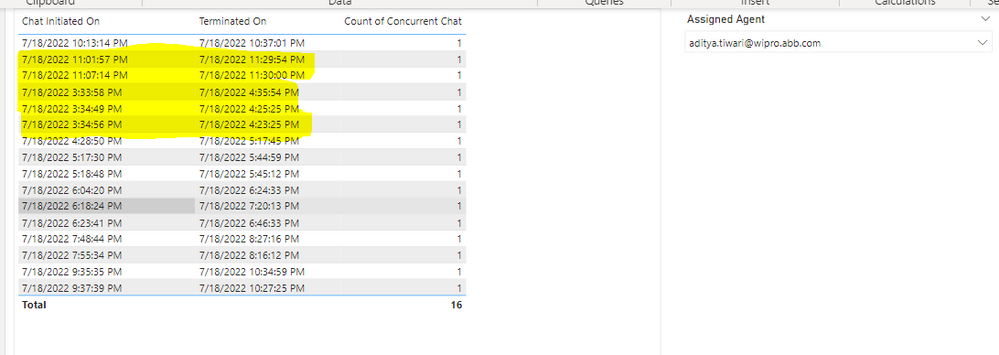
I am trying to calculate concurrent chat an agent was between start time and end time but it always shows as 1.
Attached is the DAX and measure error as the yellow colou shows that the agent was in more than 1 chat, but still the DAX is showing just 1, what am I missing - Please helpDAX error as it doesnt count the concurrent chats correctly
DAX used
DAX used is :
is it possible to further filter this by user? to count the concurent events of each user, not of everyone.
Generally, I will advice you to bing/google for the terms "dax events in progress"... and see where that gets you... 🙂
Check out the November 2025 Power BI update to learn about new features.
Advance your Data & AI career with 50 days of live learning, contests, hands-on challenges, study groups & certifications and more!
| User | Count |
|---|---|
| 58 | |
| 45 | |
| 42 | |
| 21 | |
| 18 |
| User | Count |
|---|---|
| 172 | |
| 107 | |
| 92 | |
| 54 | |
| 46 |