Get certified for free when you join Fabric Data Days 2026 and dive into Fabric, Power BI, SQL, AI, and other essential data skills.
Join nowTry your skills in the Power BI Dataviz World Championship! Round one ends June 26. Join now
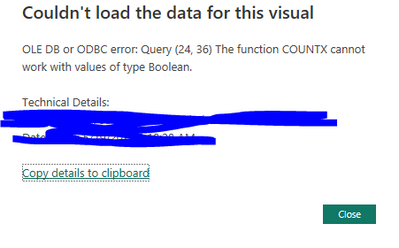
How do I work around this (I cannot change the table) as I want to be able to show the count of a true or false - in this case false
Kind Regards,
Andrew
Solved! Go to Solution.
Hi @agd50 ,
How about the following:
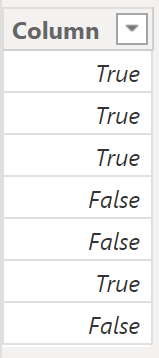
Here the example table:
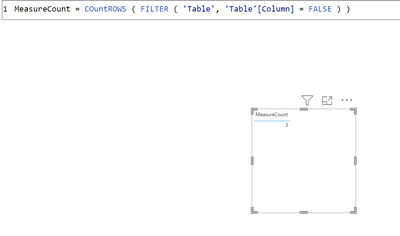
Here the measure:
MeasureCount = COuntROWS ( FILTER ( 'Table', 'Table'[Column] = FALSE ) )
Here the result:
Let me know if this solves your issue 🙂
/Tom
https://www.tackytech.blog/
https://www.instagram.com/tackytechtom/
| Did I answer your question❓➡️ Please, mark my post as a solution ✔️ |
| Also happily accepting Kudos 🙂 |
| Feel free to connect with me on LinkedIn! | |
| #proudtobeasuperuser | |
Hi @agd50 ,
How about the following:
Here the example table:
Here the measure:
MeasureCount = COuntROWS ( FILTER ( 'Table', 'Table'[Column] = FALSE ) )
Here the result:
Let me know if this solves your issue 🙂
/Tom
https://www.tackytech.blog/
https://www.instagram.com/tackytechtom/
| Did I answer your question❓➡️ Please, mark my post as a solution ✔️ |
| Also happily accepting Kudos 🙂 |
| Feel free to connect with me on LinkedIn! | |
| #proudtobeasuperuser | |
Well done champ!
| User | Count |
|---|---|
| 24 | |
| 22 | |
| 22 | |
| 18 | |
| 13 |
| User | Count |
|---|---|
| 68 | |
| 55 | |
| 45 | |
| 42 | |
| 30 |