This time we’re going bigger than ever. Fabric, Power BI, SQL, AI and more. We're covering it all. You won't want to miss it.
Learn moreLevel up your Power BI skills this month - build one visual each week and tell better stories with data! Get started
Hi.
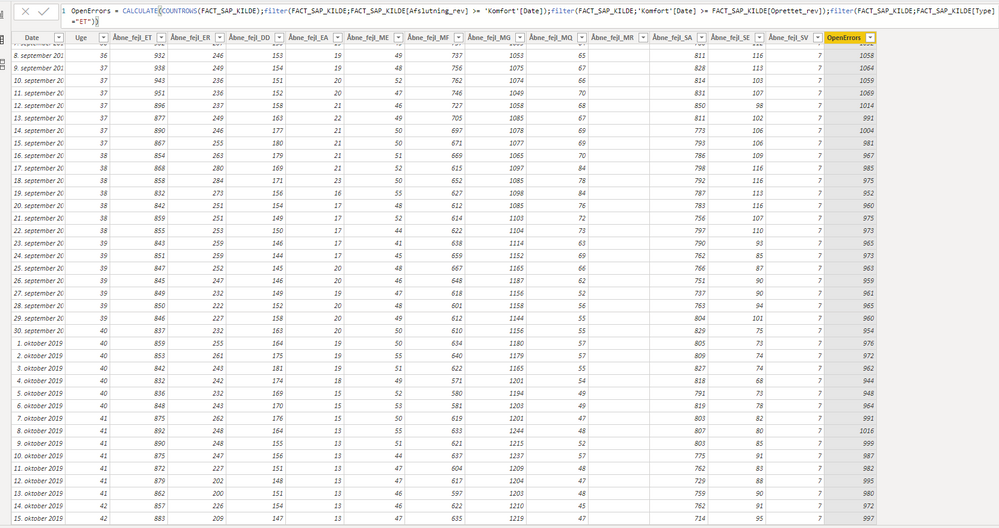
Im trying to count the rows of open errors in the table shown below (figure 1). The table shows a train computer logging errors from different trains.
Figure 1. ( table of FACT_SAP_KILDE)
I have tried doing an external table and counting the rows of open errors like figure 2 below, and i works great! problem is, i can't relate to the table above (Figure 1) and define which train or which group it belongs to.
Figure 2 ( Table of Komfort )
My question is if there is a way to make the same calulation for Figure 1 as performed in Figure 2, so the details from the train can be available?
Hope you guys can help.
Solved! Go to Solution.
Hi @damj ,
We can put the train field and the following measure into a table visual, then put the 'Komfort'[Date] into a slicer to meet your requirement:
OpenErrorsCount =
CALCULATE (
COUNTROWS ( 'FACT_SAP_KILDE' ),
FILTER (
'FACT_SAP_KILDE',
[Afsluting_rev] >= MAX ( 'Komfort'[Date] )
&& [Opretted_rev] <= MIN ( 'Komfort'[Date] )
&& [type] = "ET"
)
)
We can also use the 'Komfort'[Date] as the row field of matrix, train as the column field, use the measure as the value.
Best regards,
Community Support Team _ Dong Li
If this post helps, then please consider Accept it as the solution to help the other members find it more quickly.
Hi @damj ,
How about the result after you follow the suggestions mentioned in my original post?Could you please provide more details about it If it doesn't meet your requirement?
Best regards,
Community Support Team _ Dong Li
If this post helps, then please consider Accept it as the solution to help the other members find it more quickly.
Hi @damj ,
We can put the train field and the following measure into a table visual, then put the 'Komfort'[Date] into a slicer to meet your requirement:
OpenErrorsCount =
CALCULATE (
COUNTROWS ( 'FACT_SAP_KILDE' ),
FILTER (
'FACT_SAP_KILDE',
[Afsluting_rev] >= MAX ( 'Komfort'[Date] )
&& [Opretted_rev] <= MIN ( 'Komfort'[Date] )
&& [type] = "ET"
)
)
We can also use the 'Komfort'[Date] as the row field of matrix, train as the column field, use the measure as the value.
Best regards,
Community Support Team _ Dong Li
If this post helps, then please consider Accept it as the solution to help the other members find it more quickly.
Check out the April 2026 Power BI update to learn about new features.
Sign up to receive a private message when registration opens and key events begin.
If you have recently started exploring Fabric, we'd love to hear how it's going. Your feedback can help with product improvements.
| User | Count |
|---|---|
| 35 | |
| 32 | |
| 26 | |
| 21 | |
| 18 |
| User | Count |
|---|---|
| 68 | |
| 37 | |
| 32 | |
| 25 | |
| 23 |