Get Fabric or SQL Certified for Free.
Get certified for free when you join Fabric Data Days 2026 and dive into Fabric, Power BI, SQL, AI, and other essential data skills.
Join now- Power BI forums
- Get Help with Power BI
- Desktop
- Service
- Report Server
- Power Query
- Mobile Apps
- Developer
- DAX Commands and Tips
- Custom Visuals Development Discussion
- Health and Life Sciences
- Power BI Spanish forums
- Translated Spanish Desktop
- Training and Consulting
- Instructor Led Training
- Dashboard in a Day for Women, by Women
- Galleries
- Data Stories Gallery
- Themes Gallery
- Contests Gallery
- QuickViz Gallery
- Quick Measures Gallery
- Visual Calculations Gallery
- Fabric Apps Gallery
- Notebook Gallery
- Translytical Task Flow Gallery
- TMDL Gallery
- R Script Showcase
- Webinars and Video Gallery
- Ideas
- Custom Visuals Ideas (read-only)
- Issues
- Issues
- Events
- Upcoming Events
July 28 - August 9 | Final Round of the Power BI Dataviz World Championships. This is your chance. Learn more
- Power BI forums
- Forums
- Get Help with Power BI
- Desktop
- Counting Active Processes
- Subscribe to RSS Feed
- Mark Topic as New
- Mark Topic as Read
- Float this Topic for Current User
- Bookmark
- Subscribe
- Printer Friendly Page

- Mark as New
- Bookmark
- Subscribe
- Mute
- Subscribe to RSS Feed
- Permalink
- Report Inappropriate Content
Counting Active Processes
I want to create a calculated table or measure or visual which takes in a date and returns the count of the amount of processes which were in progress on that date.
For example:
| Process | start time | end time | time period | Count active | |
| A | 1 | 5 | 1 | 2 | |
| B | 2 | 4 | 2 | 4 | |
| C | 6 | 9 | 3 | 3 | |
| D | 1 | 2 | 4 | 4 | |
| E | 4 | 7 | 5 | 5 | |
| F | 2 | 9 | 6 | 4 | |
| G | 5 | 5 | 7 | 4 | |
| H | 5 | 7 | 8 | 2 | |
| 9 | 2 |
I want to turn the data on the left into the data on the right.
This would be easy enought to do in power query, however I need the table on the right to change when a user filters the table on the left.
Any Ideas on how to get this done? It might be possible to create a custom visual to do it, but I'm checking whether there is a better way before I dive into that.
Solved! Go to Solution.
- Mark as New
- Bookmark
- Subscribe
- Mute
- Subscribe to RSS Feed
- Permalink
- Report Inappropriate Content
I managed to get this to work how I wanted it to.
the table on the left is named ExampleData.
First I created a table of times from the data:
- Mark as New
- Bookmark
- Subscribe
- Mute
- Subscribe to RSS Feed
- Permalink
- Report Inappropriate Content
I managed to get this to work how I wanted it to.
the table on the left is named ExampleData.
First I created a table of times from the data:


- Mark as New
- Bookmark
- Subscribe
- Mute
- Subscribe to RSS Feed
- Permalink
- Report Inappropriate Content
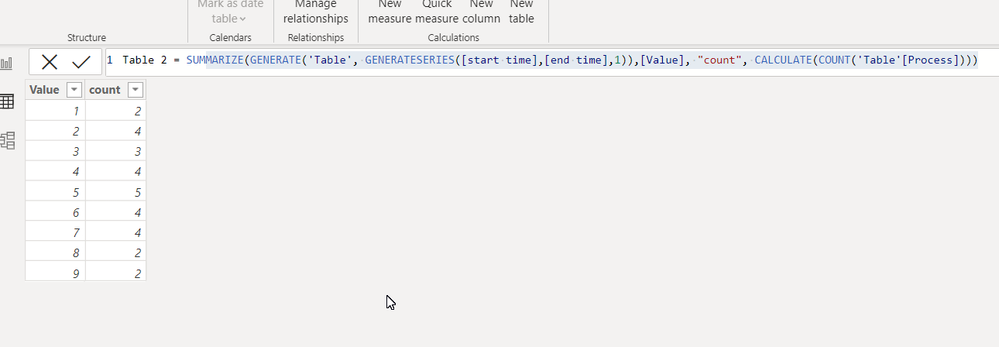
or need creat new tablr like this
Sample PBIX file attached
https://1drv.ms/u/s!AiUZ0Ws7G26RiSRyYZQRTai6JWa2?e=SKEWjz
Table 2 = SUMMARIZE(GENERATE('Table', GENERATESERIES([start time],[end time],1)),[Value], "count", CALCULATE(COUNT('Table'[Process])))
- Mark as New
- Bookmark
- Subscribe
- Mute
- Subscribe to RSS Feed
- Permalink
- Report Inappropriate Content
The problem is that the table doesn't change when I apply filters:
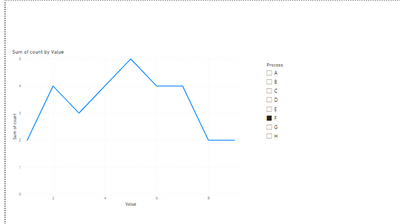
here with only process F selected I would want 0 for value = 1 and 1 for value > 1
- Mark as New
- Bookmark
- Subscribe
- Mute
- Subscribe to RSS Feed
- Permalink
- Report Inappropriate Content
- Mark as New
- Bookmark
- Subscribe
- Mute
- Subscribe to RSS Feed
- Permalink
- Report Inappropriate Content
It works, but it's not exactly what I was hoping for; the approach lacks flexibility.
It feels like a workaround to make what I'm trying to do work with equalities, but the workaround requires multiplying the sizes of tables. I would be going from 10,000s of rows to millions.
- Mark as New
- Bookmark
- Subscribe
- Mute
- Subscribe to RSS Feed
- Permalink
- Report Inappropriate Content
pls see my video
https://1drv.ms/v/s!AiUZ0Ws7G26RiSNORKRMHvAwGVLO?e=ooRecY
If this post helps, then please consider accepting it as the solution to help other members find it faster, and give a big thumbs up.
Helpful resources

Fabric Community Sticker Challenge - Barcelona 2026
If you love stickers, then you will definitely want to check out our community sticker challenge, Barcelona edition!

Power BI Monthly Update - July 2026
Check out the July 2026 Power BI update to learn about new features.

Power BI DataViz World Championships - June 2026
A new Power BI DataViz World Championship is coming this June! Don't miss out on submitting your entry.

| User | Count |
|---|---|
| 28 | |
| 28 | |
| 20 | |
| 19 | |
| 19 |


| User | Count |
|---|---|
| 35 | |
| 26 | |
| 19 | |
| 18 | |
| 17 |


