Don't miss your chance to take the Fabric Data Engineer (DP-600) exam for FREE! Find out how by attending the DP-600 session on April 23rd (pacific time), live or on-demand.
Learn moreNext up in the FabCon + SQLCon recap series: The roadmap for Microsoft SQL and Maximizing Developer experiences in Fabric. All sessions are available on-demand after the live show. Register now
I want to create a calculated table or measure or visual which takes in a date and returns the count of the amount of processes which were in progress on that date.
For example:
| Process | start time | end time | time period | Count active | |
| A | 1 | 5 | 1 | 2 | |
| B | 2 | 4 | 2 | 4 | |
| C | 6 | 9 | 3 | 3 | |
| D | 1 | 2 | 4 | 4 | |
| E | 4 | 7 | 5 | 5 | |
| F | 2 | 9 | 6 | 4 | |
| G | 5 | 5 | 7 | 4 | |
| H | 5 | 7 | 8 | 2 | |
| 9 | 2 |
I want to turn the data on the left into the data on the right.
This would be easy enought to do in power query, however I need the table on the right to change when a user filters the table on the left.
Any Ideas on how to get this done? It might be possible to create a custom visual to do it, but I'm checking whether there is a better way before I dive into that.
Solved! Go to Solution.
I managed to get this to work how I wanted it to.
the table on the left is named ExampleData.
First I created a table of times from the data:
I managed to get this to work how I wanted it to.
the table on the left is named ExampleData.
First I created a table of times from the data:
or need creat new tablr like this
Sample PBIX file attached
https://1drv.ms/u/s!AiUZ0Ws7G26RiSRyYZQRTai6JWa2?e=SKEWjz
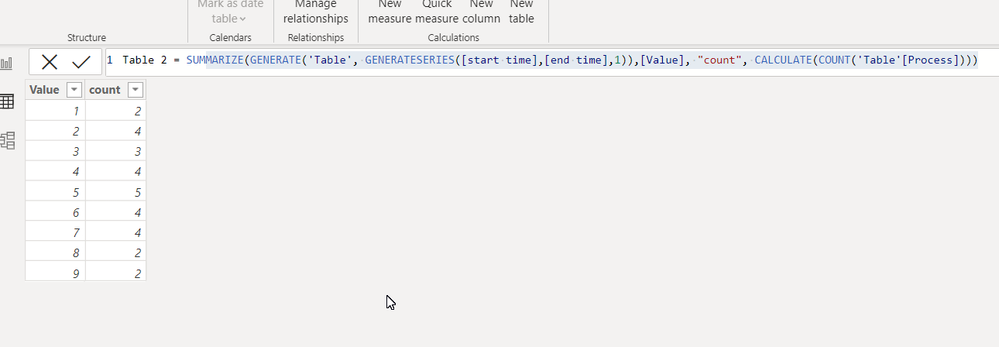
Table 2 = SUMMARIZE(GENERATE('Table', GENERATESERIES([start time],[end time],1)),[Value], "count", CALCULATE(COUNT('Table'[Process])))
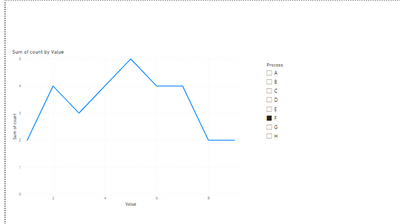
The problem is that the table doesn't change when I apply filters:
here with only process F selected I would want 0 for value = 1 and 1 for value > 1
It works, but it's not exactly what I was hoping for; the approach lacks flexibility.
It feels like a workaround to make what I'm trying to do work with equalities, but the workaround requires multiplying the sizes of tables. I would be going from 10,000s of rows to millions.
pls see my video
https://1drv.ms/v/s!AiUZ0Ws7G26RiSNORKRMHvAwGVLO?e=ooRecY
If this post helps, then please consider accepting it as the solution to help other members find it faster, and give a big thumbs up.
If you have recently started exploring Fabric, we'd love to hear how it's going. Your feedback can help with product improvements.
A new Power BI DataViz World Championship is coming this June! Don't miss out on submitting your entry.
| User | Count |
|---|---|
| 45 | |
| 43 | |
| 38 | |
| 19 | |
| 15 |
| User | Count |
|---|---|
| 67 | |
| 66 | |
| 31 | |
| 28 | |
| 24 |