
Join us at FabCon Atlanta from March 16 - 20, 2026, for the ultimate Fabric, Power BI, AI and SQL community-led event. Save $200 with code FABCOMM.
Register now!The Power BI Data Visualization World Championships is back! Get ahead of the game and start preparing now! Learn more
Hi All,
I want to use the CountIfs formula of Excel in Power BI for 3 criterias, which are Name, Company Name and Date. However, I am unable to do so in Power BI.
I am using the following formula in Power BI:
Count = Calculate(CountA(Table[Name]),Filter(Table), Table[Company Name],Table[Date])
After using the above formula, it says that there are too few arguments passed to the Filter function. The minimum argument is 2.
I am clueless as to what it means. Kindly please provide a solution or some other alternative for my problem.
Thank you,
Regards,
Saumitra Upadhyaya
I tried to Group By the columns : Name, Company and Date. In this however, the rows get reduced. So I was thinking if there is any formula to count the number of particular names?
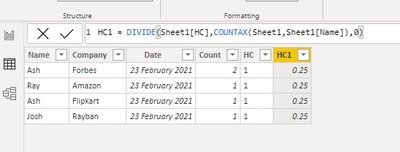
Here, since there are 4 rows, it is dividing by 4. However, I want only 2 counts for Ash and 1 each for Josh and Ray respectively. Is there any method to perform this?
Kindly please help.
Thank you,
Regards,
Saumitra Upadhyaya
@saumitra , Create three columns like
countif= countx(filter(Table, [name] =earlier([name]) && [company] =earlier([company] && [Date] <=earlier([Date])), [name])
HC = if([countif] <=1,1,0)
HC1 = divide([HC],Sumx(filter(Table, [name] =earlier([name])), [HC]))
Hi Amit,
Tried what you said but getting this error. Correct me if possible.
Thanks!
@saumitra , what is the filter for company and date ?
example meausre
Count = Calculate(CountA(Table[Name]),Filter(Table , Table[Company Name] = "ABC" && Table[Date] = date(2020,1,1)))
Can you share sample data and sample output in table format? Or a sample pbix after removing sensitive data.
Hi Amit,
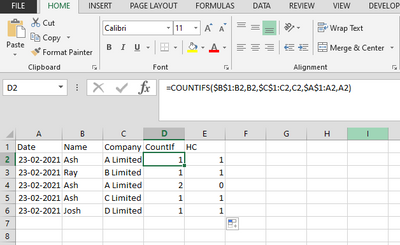
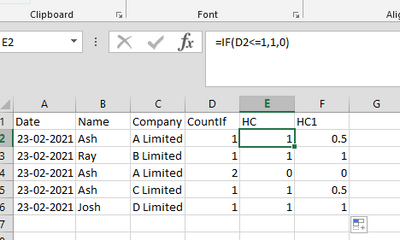
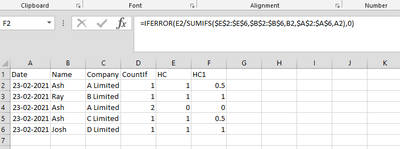
This is a sample of Excel data. These are the formulae I want to use in Power BI.
I hope this helps.
Thanks,
Regards,
Saumitra Upadhyaya
The Power BI Data Visualization World Championships is back! Get ahead of the game and start preparing now!
| User | Count |
|---|---|
| 39 | |
| 37 | |
| 33 | |
| 32 | |
| 29 |
| User | Count |
|---|---|
| 133 | |
| 88 | |
| 85 | |
| 68 | |
| 64 |