cancel
Showing results for 
Search instead for 
Did you mean: 

A new Data Days event is coming soon! This time we’re going bigger than ever. Fabric, Power BI, SQL, AI and more. Don't miss out.

Reply
Asim
Helper I
Helper I

Count with specific condition

Hi there,

Good day!

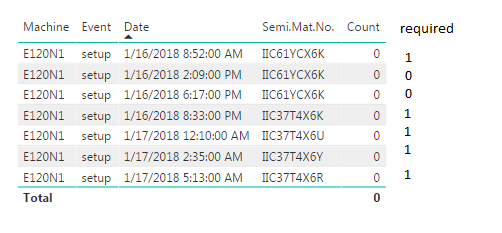
I have been facing problem while trying to calculate the count of semi material number.


I have been using below mentioned formula in a calculated column to calculate the count of semi material number but it is not giving me the desire result,

The logic is that if machine is under setup and previous row and current row have the semi material number then i want to have 1 otherwise 0 in my calculated column. 


Count = IF(
CALCULATE(
COUNTA(Eventlog[Machine_Material]),
FILTER(Eventlog,
Eventlog[Date] > EARLIER(Eventlog[Date])
&& (Eventlog[Machine_Material]) = EARLIER(Eventlog[Machine_Material])
)
)> 1,
0,
1
)


Is there someone help me out please.


Regards

Asim


Count.png


1 ACCEPTED SOLUTION
Anonymous
Not applicable

Hi @Asim,


I'd like to suggest you use below measure formula to instead.


Sample:

Count =
VAR filtered =
    COUNTROWS (
        FILTER (
            Eventlog,
            Eventlog[Date] > MAX ( Eventlog[Date] )
                && ( Eventlog[Machine_Material] ) = SELECTEDVALUE ( Eventlog[Machine_Material] )
        )
    )
RETURN
    IF ( filtered > 1, 0, 1 )

BTW, you can also use below formula if you had to use calculate column to achieve your requirement:

Count =
IF (
    CALCULATE (
        COUNTA ( Eventlog[Machine_Material] ),
        FILTER (
            ALL ( Eventlog ),
            Eventlog[Date] > EARLIER ( Eventlog[Date] )
                && ( Eventlog[Machine_Material] ) = EARLIER ( Eventlog[Machine_Material] )
        )
    )
        > 1,
    0,
    1
)


Regards,

Xiaoxin Sheng

View solution in original post

1 REPLY 1
Anonymous
Not applicable

Hi @Asim,


I'd like to suggest you use below measure formula to instead.


Sample:

Count =
VAR filtered =
    COUNTROWS (
        FILTER (
            Eventlog,
            Eventlog[Date] > MAX ( Eventlog[Date] )
                && ( Eventlog[Machine_Material] ) = SELECTEDVALUE ( Eventlog[Machine_Material] )
        )
    )
RETURN
    IF ( filtered > 1, 0, 1 )

BTW, you can also use below formula if you had to use calculate column to achieve your requirement:

Count =
IF (
    CALCULATE (
        COUNTA ( Eventlog[Machine_Material] ),
        FILTER (
            ALL ( Eventlog ),
            Eventlog[Date] > EARLIER ( Eventlog[Date] )
                && ( Eventlog[Machine_Material] ) = EARLIER ( Eventlog[Machine_Material] )
        )
    )
        > 1,
    0,
    1
)


Regards,

Xiaoxin Sheng

Helpful resources

Announcements
May Power BI Update Carousel

Power BI Monthly Update - May 2026

Check out the May 2026 Power BI update to learn about new features.

Fabric SQL PBI Data Days

Data Days 2026 coming soon!

Sign up to receive a private message when registration opens and key events begin.

New to Fabric survey Carousel

New to Fabric Survey

If you have recently started exploring Fabric, we'd love to hear how it's going. Your feedback can help with product improvements.

Power BI DataViz World Championships carousel

Power BI DataViz World Championships - June 2026

A new Power BI DataViz World Championship is coming this June! Don't miss out on submitting your entry.