Don't miss your chance to take the Fabric Data Engineer (DP-700) exam on us!
Learn moreNext up in the FabCon + SQLCon recap series: The roadmap for Microsoft SQL and Maximizing Developer experiences in Fabric. All sessions are available on-demand after the live show. Register now
Hi,
I need to count values in a column based on a measure.
Exemple : I've got a measure to count number of product A. I want to count number of others products (except A) for same Id
For John : 1 product A with my first measure. I must have 2 with the second measure
| Customer | Product | Date | Id |
| John | A | 10/01/2024 | John10012004 |
| Paul | B | 12/01/2024 | Paul12012024 |
| Sarah | A | 13/01/2024 | Sarah13012024 |
| Paul | B | 12/01/2024 | Paul12012024 |
| John | B | 10/01/2024 | John10012024 |
| Sarah | A | 13/01/2024 | Sarah13012024 |
| Paul | C | 12/01/2024 | Paul12012024 |
| John | C | 10/01/2024 | John10012024 |
Thanks for your help
Solved! Go to Solution.
Hi, @Guenfood77
Based on your description, I have created many measures to achieve the effect you are looking for. Following picture shows the effect of the display.
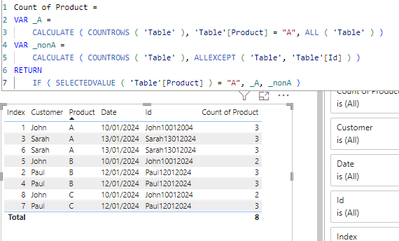
Measure:
Count of Product =
VAR _A =
CALCULATE ( COUNTROWS ( 'Table' ), 'Table'[Product] = "A", ALL ( 'Table' ) )
VAR _nonA =
CALCULATE ( COUNTROWS ( 'Table' ), ALLEXCEPT ( 'Table', 'Table'[Id] ) )
RETURN
IF ( SELECTEDVALUE ( 'Table'[Product] ) = "A", _A, _nonA )
If this does not work, could you please share some sample data without sensitive information and expected output(You can present the desired effect in a table, as well as a detailed description of the logic to achieve this effect).
How to provide sample data in the Power BI Forum - Microsoft Fabric Community
Best Regards,
Yang
Community Support Team
If there is any post helps, then please consider Accept it as the solution to help the other members find it more quickly.
If I misunderstand your needs or you still have problems on it, please feel free to let us know. Thanks a lot!
How to get your questions answered quickly -- How to provide sample data in the Power BI Forum
Thanks for your help. It works nice !
Hi, @Guenfood77
Based on your description, I have created many measures to achieve the effect you are looking for. Following picture shows the effect of the display.
Measure:
Count of Product =
VAR _A =
CALCULATE ( COUNTROWS ( 'Table' ), 'Table'[Product] = "A", ALL ( 'Table' ) )
VAR _nonA =
CALCULATE ( COUNTROWS ( 'Table' ), ALLEXCEPT ( 'Table', 'Table'[Id] ) )
RETURN
IF ( SELECTEDVALUE ( 'Table'[Product] ) = "A", _A, _nonA )
If this does not work, could you please share some sample data without sensitive information and expected output(You can present the desired effect in a table, as well as a detailed description of the logic to achieve this effect).
How to provide sample data in the Power BI Forum - Microsoft Fabric Community
Best Regards,
Yang
Community Support Team
If there is any post helps, then please consider Accept it as the solution to help the other members find it more quickly.
If I misunderstand your needs or you still have problems on it, please feel free to let us know. Thanks a lot!
How to get your questions answered quickly -- How to provide sample data in the Power BI Forum
If you have recently started exploring Fabric, we'd love to hear how it's going. Your feedback can help with product improvements.
A new Power BI DataViz World Championship is coming this June! Don't miss out on submitting your entry.
Share feedback directly with Fabric product managers, participate in targeted research studies and influence the Fabric roadmap.
| User | Count |
|---|---|
| 50 | |
| 44 | |
| 42 | |
| 19 | |
| 19 |
| User | Count |
|---|---|
| 69 | |
| 68 | |
| 33 | |
| 32 | |
| 32 |