Join us in Barcelona for FabCon and SQLCon, September 28 - October 1, 2026.
This is best Fabric, Power BI, SQL and AI community event. How do we know? The last event sold out! Save €200 with code FABCMTY200.
Register now- Power BI forums
- Get Help with Power BI
- Desktop
- Service
- Report Server
- Power Query
- Mobile Apps
- Developer
- DAX Commands and Tips
- Custom Visuals Development Discussion
- Health and Life Sciences
- Power BI Spanish forums
- Translated Spanish Desktop
- Training and Consulting
- Instructor Led Training
- Dashboard in a Day for Women, by Women
- Galleries
- Data Stories Gallery
- Themes Gallery
- Contests Gallery
- QuickViz Gallery
- Quick Measures Gallery
- Visual Calculations Gallery
- Fabric Apps Gallery
- Notebook Gallery
- Translytical Task Flow Gallery
- TMDL Gallery
- R Script Showcase
- Webinars and Video Gallery
- Ideas
- Custom Visuals Ideas (read-only)
- Issues
- Issues
- Events
- Upcoming Events
July 28 - August 9 | Final Round of the Power BI Dataviz World Championships. This is your chance. Learn more
- Power BI forums
- Forums
- Get Help with Power BI
- Desktop
- Re: Count unique values
- Subscribe to RSS Feed
- Mark Topic as New
- Mark Topic as Read
- Float this Topic for Current User
- Bookmark
- Subscribe
- Printer Friendly Page


- Mark as New
- Bookmark
- Subscribe
- Mute
- Subscribe to RSS Feed
- Permalink
- Report Inappropriate Content
Count unique values
Hi,
I am struggling with creation of the measure which will be recalculated after the filters in report via slicers will be selected.
I was able to get the same effect using calculated columns, however I had to hard code the filters in formulas which I wanted to use.
I need two measures which will calculate from the one column (string):
1. number of unique values but count only those which are available in column just one time
2. number of values which were repeated 3 or more times in column
Let's say, in colum A we store following information:
AA2
AA4
AA4
AA7
AA7
AA7
AA8
AA7
For 1 measure I will get: 2 (because just AA2 and AA8 are unique and not repeated)
For measure 2 I will get: 1 (because just AA7 is repeated 3 or more times)
Thanks a lot!
Solved! Go to Solution.


- Mark as New
- Bookmark
- Subscribe
- Mute
- Subscribe to RSS Feed
- Permalink
- Report Inappropriate Content
Hi,
Something like this should work (did not test it, writing it blind)
COUNTROWS (
    FILTER (
        VALUES ( Table[YourColumn] ),
        CALCULATE ( COUNTROWS ( Table ) = 1
     )
)

and

COUNTROWS (
    FILTER (
        VALUES ( Table[YourColumn] ),
        CALCULATE ( COUNTROWS ( Table ) >= 3
     )
)
Of course, by playing with the condition of FILTER, you can achievev different results.
Have fun with DAX!
Alberto Ferrari
http://www.sqlbi.com


- Mark as New
- Bookmark
- Subscribe
- Mute
- Subscribe to RSS Feed
- Permalink
- Report Inappropriate Content
Hi,
Try this
Measure 1
=COUNTROWS(FILTER(VALUES(Data[Data]),COUNTA([Data])=1))
Measure 2
=COUNTROWS(FILTER(VALUES(Data[Data]),COUNTA([Data])>=3))
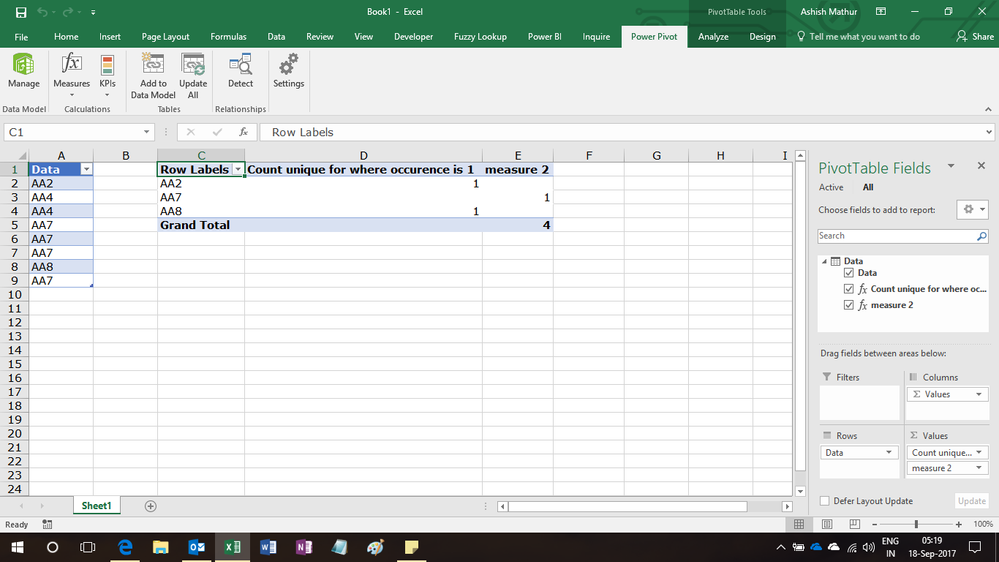
Regards,
Ashish Mathur
http://www.ashishmathur.com
https://www.linkedin.com/in/excelenthusiasts/
- Mark as New
- Bookmark
- Subscribe
- Mute
- Subscribe to RSS Feed
- Permalink
- Report Inappropriate Content
Hi,
Something like this should work (did not test it, writing it blind)
COUNTROWS (
    FILTER (
        VALUES ( Table[YourColumn] ),
        CALCULATE ( COUNTROWS ( Table ) = 1
     )
)

and

COUNTROWS (
    FILTER (
        VALUES ( Table[YourColumn] ),
        CALCULATE ( COUNTROWS ( Table ) >= 3
     )
)
Of course, by playing with the condition of FILTER, you can achievev different results.
Have fun with DAX!
Alberto Ferrari
http://www.sqlbi.com
- Mark as New
- Bookmark
- Subscribe
- Mute
- Subscribe to RSS Feed
- Permalink
- Report Inappropriate Content

- Mark as New
- Bookmark
- Subscribe
- Mute
- Subscribe to RSS Feed
- Permalink
- Report Inappropriate Content
hi @Cactus26,
Does this solve your issue..
Count Measure_1 =if(COUNT(Test[test])<=1,count(Test[test]),blank())
Count Measure_2 =if(COUNT(Test[test])<=3,count(Test[test]),blank())
I have put your test data in a table name Test & in a column in it name test.
Regards
- Mark as New
- Bookmark
- Subscribe
- Mute
- Subscribe to RSS Feed
- Permalink
- Report Inappropriate Content
Hi @Anonymous,
Unfortunately it did not work 😕 I am just receving blank as a value.
I have also tried with COUNTA as there are string in this column but the same.
I am out of ideas how it can be solved.
- Mark as New
- Bookmark
- Subscribe
- Mute
- Subscribe to RSS Feed
- Permalink
- Report Inappropriate Content
- Mark as New
- Bookmark
- Subscribe
- Mute
- Subscribe to RSS Feed
- Permalink
- Report Inappropriate Content
Hi @Anonymous,
I wanted to upload the sample file from PowerBI but is impossible.So, I will put screenshots then, it will be easier to explain.
Raw table:
Test Country Week
| AA2 | A | 1 |
| AA4 | A | 1 |
| AA4 | B | 1 |
| AA7 | B | 1 |
| AA7 | B | 1 |
| AA7 | A | 1 |
| AA8 | A | 1 |
| AA7 | A | 2 |
Measures:
Measure_1 = if(CALCULATE(COUNTA('Table'[Test])<=1),1,0)
Measure_2 = if(CALCULATE(COUNTA('Table'[Test])>=3),1,0)
Measure_3 = [Measure_2]/[Measure_1]
Basically, I need to create measures which will be dynamically changed after filters in slicers will be applied (week, country and many more not mentioned), so it is why I cannot make it as a calculated column as the values will be changed regardless of the filters. Using mentioned solution by you I am getting something like:
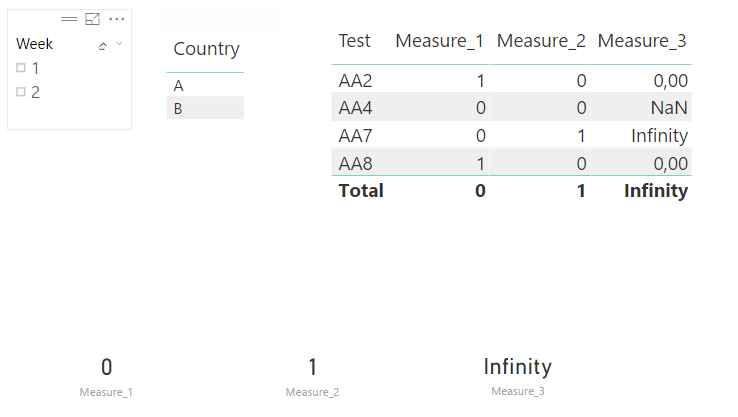
Here no filters where chosen. So I am expecting in Measure_1 for Total: 2 but is 0 and Measure_3 equal 0.5 but is infinity.
Measure_1 has to count the unique values (which has no duplicates) and this measure will be represented as KPI, as one value
Measure_2 has to count the number of values which occured 3 or more times.
Maybe you are right but sill I am not satisifed with the results and perhaps I do not understand it as I am still learning.
Thanks a lot!


- Mark as New
- Bookmark
- Subscribe
- Mute
- Subscribe to RSS Feed
- Permalink
- Report Inappropriate Content
Your post is a little unclear/confusing to me. To clarify;
i.e. If the slicer selection is Week 2 - then your Table Visual will display just 1 row AA7 ... and therefore a COUNTROW measure is = 1
is this correct?
- Mark as New
- Bookmark
- Subscribe
- Mute
- Subscribe to RSS Feed
- Permalink
- Report Inappropriate Content
Hi @CahabaData
Generally I am not interested in showing Table Visual but to visualise one number for each measure not like break down per each item like I showed in the screenshot.
Let's say when we filter week 2, only item AA7 will be filtered, so measure_1=1 (because AA7 is unique after filter set), measure_2=0(because there is just one item AA7 and for this measure I am interested in items which are repeated 3 or more times) and measure_3=0.
But let presume that we filter data and we have situation where such items are listed: AA2, AA7, AA7, AA7, AA7, AA3, then measure_1=2 (because AA2 and AA3 are unique), measure_2=1(becasue AA7 is repeated 4 times) and measure_3=1/2
I was thinking if we should create some variables to make it works correctly.
In calculated column I could do like this but unfortunatelty those numbers are static in column:
IF(
CALCULATE(
COUNTA('Table'[Test]);
FILTER('Table'; 'Table'[Test] = EARLIER('Table'[Test]))
)>=3;
1;
0
)
I hope that it more clear now.
- Mark as New
- Bookmark
- Subscribe
- Mute
- Subscribe to RSS Feed
- Permalink
- Report Inappropriate Content
@Anonymous
Is there a way to get one number of your proposition per each measure? It works just when it has reference to items in table but I need the total count for measure_1 and measure_2
Count Measure_1 =if(COUNT(Test[test])<=1,count(Test[test]),blank())
Count Measure_2 =if(COUNT(Test[test])<=3,count(Test[test]),blank())
I tried like this:
Measure_1 = SUMX('Table';IF(CALCULATE(COUNTA('Table'[Test]); FILTER('Table';COUNTA('Table'[Test])<=1))=0;0;1)) but it does not sum
Helpful resources

FabCon & SQLCon – Barcelona 2026
Join us in Barcelona for FabCon and SQLCon, the Fabric, Power BI, SQL, and AI community event. Save €200 with code FABCMTY200.

Fabric Community Sticker Challenge - Barcelona 2026
If you love stickers, then you will definitely want to check out our community sticker challenge, Barcelona edition!

Power BI Monthly Update - July 2026
Check out the July 2026 Power BI update to learn about new features.

Power BI DataViz World Championships - June 2026
A new Power BI DataViz World Championship is coming this June! Don't miss out on submitting your entry.

| User | Count |
|---|---|
| 25 | |
| 23 | |
| 19 | |
| 17 | |
| 14 |


| User | Count |
|---|---|
| 25 | |
| 23 | |
| 20 | |
| 20 | |
| 19 |


