Get Fabric or SQL Certified for Free.
Get certified for free when you join Fabric Data Days 2026 and dive into Fabric, Power BI, SQL, AI, and other essential data skills.
Join now- Power BI forums
- Get Help with Power BI
- Desktop
- Service
- Report Server
- Power Query
- Mobile Apps
- Developer
- DAX Commands and Tips
- Custom Visuals Development Discussion
- Health and Life Sciences
- Power BI Spanish forums
- Translated Spanish Desktop
- Training and Consulting
- Instructor Led Training
- Dashboard in a Day for Women, by Women
- Galleries
- Data Stories Gallery
- Themes Gallery
- Contests Gallery
- QuickViz Gallery
- Quick Measures Gallery
- Visual Calculations Gallery
- Fabric Apps Gallery
- Notebook Gallery
- Translytical Task Flow Gallery
- TMDL Gallery
- R Script Showcase
- Webinars and Video Gallery
- Ideas
- Custom Visuals Ideas (read-only)
- Issues
- Issues
- Events
- Upcoming Events
July 28 - August 9 | Final Round of the Power BI Dataviz World Championships. This is your chance. Learn more
- Power BI forums
- Forums
- Get Help with Power BI
- Desktop
- Re: Count unique values
- Subscribe to RSS Feed
- Mark Topic as New
- Mark Topic as Read
- Float this Topic for Current User
- Bookmark
- Subscribe
- Printer Friendly Page


- Mark as New
- Bookmark
- Subscribe
- Mute
- Subscribe to RSS Feed
- Permalink
- Report Inappropriate Content
Count unique values
Hi,
I am struggling with creation of the measure which will be recalculated after the filters in report via slicers will be selected.
I was able to get the same effect using calculated columns, however I had to hard code the filters in formulas which I wanted to use.
I need two measures which will calculate from the one column (string):
1. number of unique values but count only those which are available in column just one time
2. number of values which were repeated 3 or more times in column
Let's say, in colum A we store following information:
AA2
AA4
AA4
AA7
AA7
AA7
AA8
AA7
For 1 measure I will get: 2 (because just AA2 and AA8 are unique and not repeated)
For measure 2 I will get: 1 (because just AA7 is repeated 3 or more times)
Thanks a lot!
Solved! Go to Solution.


- Mark as New
- Bookmark
- Subscribe
- Mute
- Subscribe to RSS Feed
- Permalink
- Report Inappropriate Content
Hi,
Something like this should work (did not test it, writing it blind)
COUNTROWS (
    FILTER (
        VALUES ( Table[YourColumn] ),
        CALCULATE ( COUNTROWS ( Table ) = 1
     )
)

and

COUNTROWS (
    FILTER (
        VALUES ( Table[YourColumn] ),
        CALCULATE ( COUNTROWS ( Table ) >= 3
     )
)
Of course, by playing with the condition of FILTER, you can achievev different results.
Have fun with DAX!
Alberto Ferrari
http://www.sqlbi.com


- Mark as New
- Bookmark
- Subscribe
- Mute
- Subscribe to RSS Feed
- Permalink
- Report Inappropriate Content
Hi,
Try this
Measure 1
=COUNTROWS(FILTER(VALUES(Data[Data]),COUNTA([Data])=1))
Measure 2
=COUNTROWS(FILTER(VALUES(Data[Data]),COUNTA([Data])>=3))
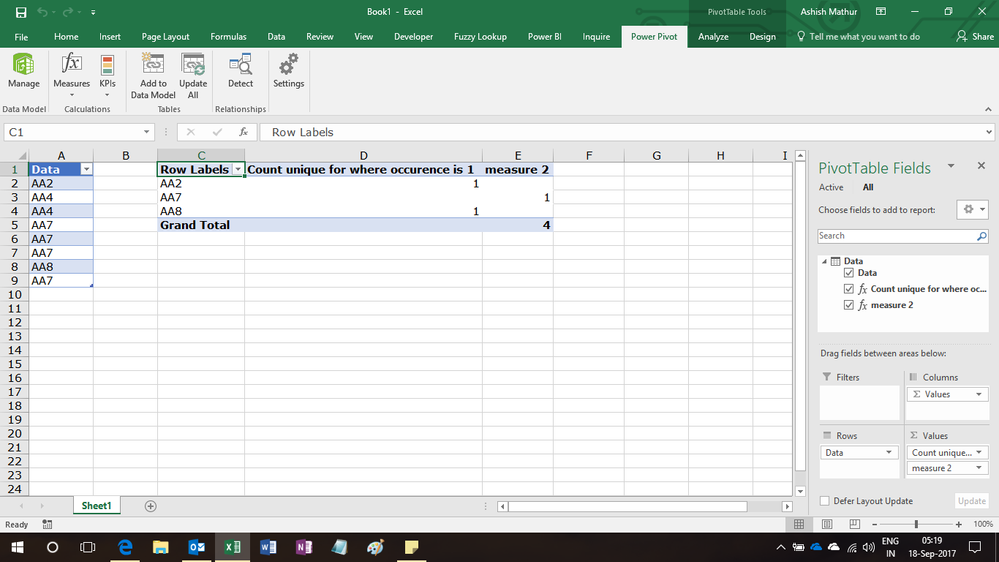
Regards,
Ashish Mathur
http://www.ashishmathur.com
https://www.linkedin.com/in/excelenthusiasts/
- Mark as New
- Bookmark
- Subscribe
- Mute
- Subscribe to RSS Feed
- Permalink
- Report Inappropriate Content
Hi,
Something like this should work (did not test it, writing it blind)
COUNTROWS (
    FILTER (
        VALUES ( Table[YourColumn] ),
        CALCULATE ( COUNTROWS ( Table ) = 1
     )
)

and

COUNTROWS (
    FILTER (
        VALUES ( Table[YourColumn] ),
        CALCULATE ( COUNTROWS ( Table ) >= 3
     )
)
Of course, by playing with the condition of FILTER, you can achievev different results.
Have fun with DAX!
Alberto Ferrari
http://www.sqlbi.com
- Mark as New
- Bookmark
- Subscribe
- Mute
- Subscribe to RSS Feed
- Permalink
- Report Inappropriate Content

- Mark as New
- Bookmark
- Subscribe
- Mute
- Subscribe to RSS Feed
- Permalink
- Report Inappropriate Content
hi @Cactus26,
Does this solve your issue..
Count Measure_1 =if(COUNT(Test[test])<=1,count(Test[test]),blank())
Count Measure_2 =if(COUNT(Test[test])<=3,count(Test[test]),blank())
I have put your test data in a table name Test & in a column in it name test.
Regards
- Mark as New
- Bookmark
- Subscribe
- Mute
- Subscribe to RSS Feed
- Permalink
- Report Inappropriate Content
Hi @Anonymous,
Unfortunately it did not work 😕 I am just receving blank as a value.
I have also tried with COUNTA as there are string in this column but the same.
I am out of ideas how it can be solved.
- Mark as New
- Bookmark
- Subscribe
- Mute
- Subscribe to RSS Feed
- Permalink
- Report Inappropriate Content
- Mark as New
- Bookmark
- Subscribe
- Mute
- Subscribe to RSS Feed
- Permalink
- Report Inappropriate Content
Hi @Anonymous,
I wanted to upload the sample file from PowerBI but is impossible.So, I will put screenshots then, it will be easier to explain.
Raw table:
Test Country Week
| AA2 | A | 1 |
| AA4 | A | 1 |
| AA4 | B | 1 |
| AA7 | B | 1 |
| AA7 | B | 1 |
| AA7 | A | 1 |
| AA8 | A | 1 |
| AA7 | A | 2 |
Measures:
Measure_1 = if(CALCULATE(COUNTA('Table'[Test])<=1),1,0)
Measure_2 = if(CALCULATE(COUNTA('Table'[Test])>=3),1,0)
Measure_3 = [Measure_2]/[Measure_1]
Basically, I need to create measures which will be dynamically changed after filters in slicers will be applied (week, country and many more not mentioned), so it is why I cannot make it as a calculated column as the values will be changed regardless of the filters. Using mentioned solution by you I am getting something like:
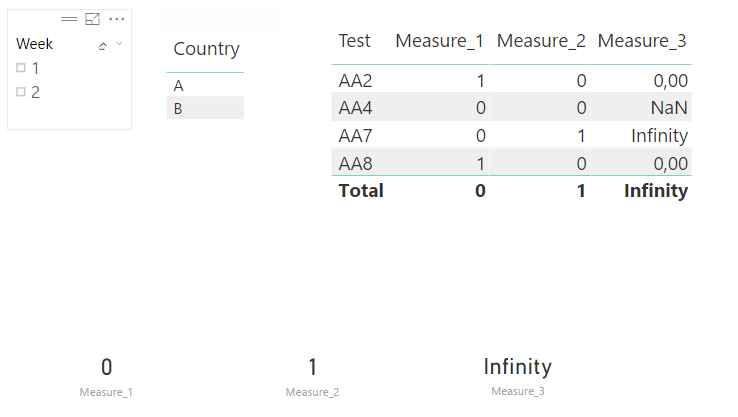
Here no filters where chosen. So I am expecting in Measure_1 for Total: 2 but is 0 and Measure_3 equal 0.5 but is infinity.
Measure_1 has to count the unique values (which has no duplicates) and this measure will be represented as KPI, as one value
Measure_2 has to count the number of values which occured 3 or more times.
Maybe you are right but sill I am not satisifed with the results and perhaps I do not understand it as I am still learning.
Thanks a lot!


- Mark as New
- Bookmark
- Subscribe
- Mute
- Subscribe to RSS Feed
- Permalink
- Report Inappropriate Content
Your post is a little unclear/confusing to me. To clarify;
i.e. If the slicer selection is Week 2 - then your Table Visual will display just 1 row AA7 ... and therefore a COUNTROW measure is = 1
is this correct?
- Mark as New
- Bookmark
- Subscribe
- Mute
- Subscribe to RSS Feed
- Permalink
- Report Inappropriate Content
Hi @CahabaData
Generally I am not interested in showing Table Visual but to visualise one number for each measure not like break down per each item like I showed in the screenshot.
Let's say when we filter week 2, only item AA7 will be filtered, so measure_1=1 (because AA7 is unique after filter set), measure_2=0(because there is just one item AA7 and for this measure I am interested in items which are repeated 3 or more times) and measure_3=0.
But let presume that we filter data and we have situation where such items are listed: AA2, AA7, AA7, AA7, AA7, AA3, then measure_1=2 (because AA2 and AA3 are unique), measure_2=1(becasue AA7 is repeated 4 times) and measure_3=1/2
I was thinking if we should create some variables to make it works correctly.
In calculated column I could do like this but unfortunatelty those numbers are static in column:
IF(
CALCULATE(
COUNTA('Table'[Test]);
FILTER('Table'; 'Table'[Test] = EARLIER('Table'[Test]))
)>=3;
1;
0
)
I hope that it more clear now.
- Mark as New
- Bookmark
- Subscribe
- Mute
- Subscribe to RSS Feed
- Permalink
- Report Inappropriate Content
@Anonymous
Is there a way to get one number of your proposition per each measure? It works just when it has reference to items in table but I need the total count for measure_1 and measure_2
Count Measure_1 =if(COUNT(Test[test])<=1,count(Test[test]),blank())
Count Measure_2 =if(COUNT(Test[test])<=3,count(Test[test]),blank())
I tried like this:
Measure_1 = SUMX('Table';IF(CALCULATE(COUNTA('Table'[Test]); FILTER('Table';COUNTA('Table'[Test])<=1))=0;0;1)) but it does not sum
Helpful resources

FabCon & SQLCon – Barcelona 2026
Join us in Barcelona for FabCon and SQLCon, the Fabric, Power BI, SQL, and AI community event. Save €200 with code FABCMTY200.

Fabric Community Sticker Challenge - Barcelona 2026
If you love stickers, then you will definitely want to check out our community sticker challenge, Barcelona edition!

Power BI Monthly Update - July 2026
Check out the July 2026 Power BI update to learn about new features.

Power BI DataViz World Championships - June 2026
A new Power BI DataViz World Championship is coming this June! Don't miss out on submitting your entry.

| User | Count |
|---|---|
| 25 | |
| 23 | |
| 22 | |
| 17 | |
| 14 |


| User | Count |
|---|---|
| 27 | |
| 24 | |
| 20 | |
| 20 | |
| 19 |


