We've captured the moments from FabCon & SQLCon that everyone is talking about, and we are bringing them to the community, live and on-demand. Starts on April 14th. Register now
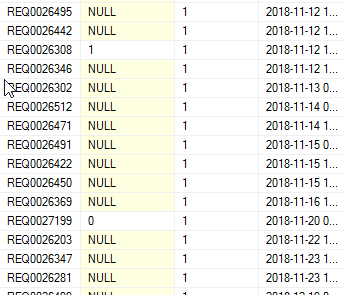
I have a table in a SQL database that contains 3 diffrent "values": Null, 0 and 1
I need to get the nu,ber of rows back where it only counts the no. 1. In PowerBi it shows as the values True or false instead of 0 and 1.
The tablename is NSP_Tickets and column name is u_misroutereport
Thanks!!
Hi @Anonymous ,
Try this one, please.
Counter = CALCULATE ( COUNT ( NSP_Tickets[u_misroutereport] ), NSP_Tickets[u_misroutereport] = TRUE () )
Best Regards,
Hi @Anonymous ,
Could you please mark the proper answers as solutions?
Best Regards,
create a measure to make condistional count as follows
Counter = CALCULATE(COUNT(NSP_Tickets[u_misroutereport]),NSP_Tickets[u_misroutereport] = 1)
this gives me the following error:
dxScript (Model) (4, 78) Calculation error in measure 'NSP_Tickets' [Counter]: True / False values cannot be compared with integer values in DAX comparisons. Consider using the VALUE or FORMAT function and converting one of the values.
Ok, seems the values are not integers, please state the type of this column (text, boolean, ..etc)
You can modify the formula to deal with the column type as follows
Counter = CALCULATE(COUNT(NSP_Tickets[u_misroutereport]),NSP_Tickets[u_misroutereport] = "1")
or
Counter = CALCULATE(COUNT(NSP_Tickets[u_misroutereport]),VALUE(NSP_Tickets[u_misroutereport]) = 1)
If you have recently started exploring Fabric, we'd love to hear how it's going. Your feedback can help with product improvements.
A new Power BI DataViz World Championship is coming this June! Don't miss out on submitting your entry.
Share feedback directly with Fabric product managers, participate in targeted research studies and influence the Fabric roadmap.
| User | Count |
|---|---|
| 53 | |
| 38 | |
| 33 | |
| 17 | |
| 17 |
| User | Count |
|---|---|
| 67 | |
| 63 | |
| 38 | |
| 34 | |
| 22 |