Join us at FabCon Atlanta from March 16 - 20, 2026, for the ultimate Fabric, Power BI, AI and SQL community-led event. Save $200 with code FABCOMM.
Register now!Learn from the best! Meet the four finalists headed to the FINALS of the Power BI Dataviz World Championships! Register now
Hello,
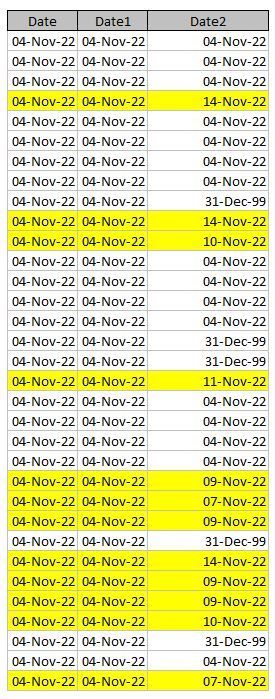
can someone help me with counting rows with different dates (Date1 and Date2) in it?
| Date | Date1 | Date2 |
| 04-Nov-22 | 04-Nov-22 | 04-Nov-22 |
| 04-Nov-22 | 04-Nov-22 | 04-Nov-22 |
| 04-Nov-22 | 04-Nov-22 | 04-Nov-22 |
| 04-Nov-22 | 04-Nov-22 | 14-Nov-22 |
| 04-Nov-22 | 04-Nov-22 | 04-Nov-22 |
| 04-Nov-22 | 04-Nov-22 | 04-Nov-22 |
| 04-Nov-22 | 04-Nov-22 | 04-Nov-22 |
| 04-Nov-22 | 04-Nov-22 | 04-Nov-22 |
| 04-Nov-22 | 04-Nov-22 | 31-Dec-99 |
| 04-Nov-22 | 04-Nov-22 | 14-Nov-22 |
| 04-Nov-22 | 04-Nov-22 | 10-Nov-22 |
| 04-Nov-22 | 04-Nov-22 | 04-Nov-22 |
| 04-Nov-22 | 04-Nov-22 | 04-Nov-22 |
| 04-Nov-22 | 04-Nov-22 | 04-Nov-22 |
| 04-Nov-22 | 04-Nov-22 | 04-Nov-22 |
| 04-Nov-22 | 04-Nov-22 | 31-Dec-99 |
| 04-Nov-22 | 04-Nov-22 | 31-Dec-99 |
| 04-Nov-22 | 04-Nov-22 | 11-Nov-22 |
| 04-Nov-22 | 04-Nov-22 | 04-Nov-22 |
| 04-Nov-22 | 04-Nov-22 | 04-Nov-22 |
| 04-Nov-22 | 04-Nov-22 | 04-Nov-22 |
| 04-Nov-22 | 04-Nov-22 | 04-Nov-22 |
| 04-Nov-22 | 04-Nov-22 | 09-Nov-22 |
| 04-Nov-22 | 04-Nov-22 | 07-Nov-22 |
| 04-Nov-22 | 04-Nov-22 | 09-Nov-22 |
| 04-Nov-22 | 04-Nov-22 | 31-Dec-99 |
| 04-Nov-22 | 04-Nov-22 | 14-Nov-22 |
| 04-Nov-22 | 04-Nov-22 | 09-Nov-22 |
| 04-Nov-22 | 04-Nov-22 | 09-Nov-22 |
| 04-Nov-22 | 04-Nov-22 | 10-Nov-22 |
| 04-Nov-22 | 04-Nov-22 | 31-Dec-99 |
| 04-Nov-22 | 04-Nov-22 | 04-Nov-22 |
| 04-Nov-22 | 04-Nov-22 | 07-Nov-22 |
I would like to count the yellow marked rows. These have different dates (Date1 and Date2) other than 31-DEC-99. This date must not be included in the count of rows.
Expected result for 04-NOV-22 is 12.
Thanks in advance.
Regards
Solved! Go to Solution.
@WLFRD ,
Should still work.
If you created a table with the "Date" column and the measure, you should get a count per date, for example:
And if you want the measure to return 0 when there is 0 rows returned (like on nov 6th in my example) then you can add a "+0" at the end of the meaure.
@WLFRD ,
Should still work.
If you created a table with the "Date" column and the measure, you should get a count per date, for example:
And if you want the measure to return 0 when there is 0 rows returned (like on nov 6th in my example) then you can add a "+0" at the end of the meaure.
Hi @WLFRD ,
Try this measure:
Measure = CALCULATE( COUNTROWS('Table'),'Table'[Date1]<>'Table'[Date2], 'Table'[Date2]<> DATE(1999, 12 , 31))
Thanks for your reply. What would be the measure if there are more dates than just the 11/04/2022 which are in the given example?
It should count the rows per day and return a single number per date for which Date2 and Date1 are not the same and exclude date2 when it is 31DEC99.
Share feedback directly with Fabric product managers, participate in targeted research studies and influence the Fabric roadmap.
Check out the February 2026 Power BI update to learn about new features.
| User | Count |
|---|---|
| 68 | |
| 61 | |
| 45 | |
| 19 | |
| 15 |
| User | Count |
|---|---|
| 108 | |
| 107 | |
| 39 | |
| 30 | |
| 26 |