This time we’re going bigger than ever. Fabric, Power BI, SQL, AI and more. We're covering it all. You won't want to miss it.
Learn moreDid you hear? There's a new SQL AI Developer certification (DP-800). Start preparing now and be one of the first to get certified. Register now
Hi guys,
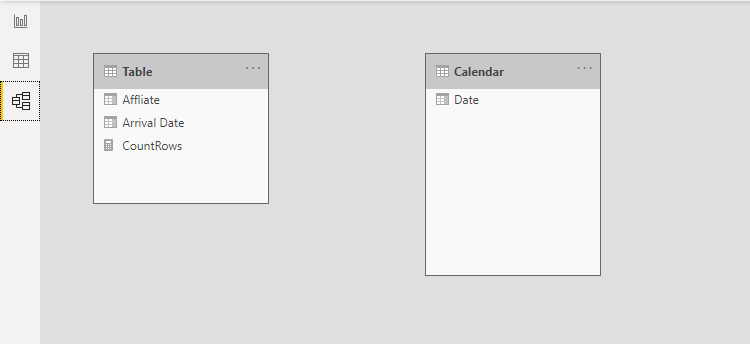
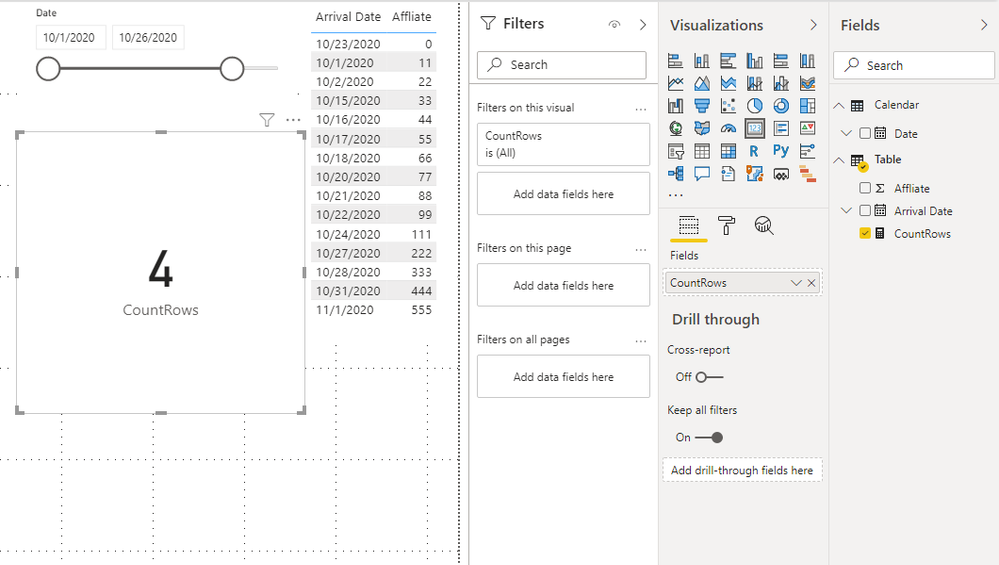
I have Table A which has Arrival Date, Affliate columns and calender table which i use for Slicer. Iam using Between view of slicer.
My requirement is to get the count of Affliates after end range of slicer. For ex:
if i select 1st Oct to 19th oct in slicer , it should give me the count of rows after 19th oct .
I tried with below measure , unfortunately it's not working.
Solved! Go to Solution.
Hi @Vamshi2020 ,
You may try this measure. There is no relationship between the calendar table and the main table.
CountRows =
CALCULATE (
COUNTROWS ( 'Table' ),
FILTER ( 'Table', NOT ( [Arrival Date] IN ALLSELECTED ( 'Calendar'[Date] ) ) )
)
You can check more details from here.
Best Regards,
Stephen Tao
If this post helps, then please consider Accept it as the solution to help the other members find it more quickly.
Hi @Vamshi2020 ,
Could you tell me if your problem has been solved?
If it is, kindly Accept it as the solution. More people will benefit from it.
Or you are still confused about it, please provide me with more details about your table and your problem or share me with your pbix file from your Onedrive for Business.
Best Regards,
Stephen Tao
Hi @Vamshi2020 ,
You may try this measure. There is no relationship between the calendar table and the main table.
CountRows =
CALCULATE (
COUNTROWS ( 'Table' ),
FILTER ( 'Table', NOT ( [Arrival Date] IN ALLSELECTED ( 'Calendar'[Date] ) ) )
)
You can check more details from here.
Best Regards,
Stephen Tao
If this post helps, then please consider Accept it as the solution to help the other members find it more quickly.
Hi,
Try this measure
=calculate(COUNTROWS('Data_Arrivals with Case Priorit'),datesbetween(calendar[date],max(calendar[date])+1,maxx(all(calendar),calendar[date])))
Hope this helps.
Copying DAX from this post? Click here for a hack to quickly replace it with your own table names
Has this post solved your problem? Please Accept as Solution so that others can find it quickly and to let the community know your problem has been solved.
If you found this post helpful, please give Kudos C
I work as a Microsoft trainer and consultant, specialising in Power BI and Power Query.
www.excelwithallison.com
Check out the April 2026 Power BI update to learn about new features.
Sign up to receive a private message when registration opens and key events begin.
If you have recently started exploring Fabric, we'd love to hear how it's going. Your feedback can help with product improvements.
| User | Count |
|---|---|
| 35 | |
| 32 | |
| 25 | |
| 23 | |
| 16 |
| User | Count |
|---|---|
| 65 | |
| 50 | |
| 30 | |
| 23 | |
| 23 |