cancel
Showing results for 
Search instead for 
Did you mean: 

The Power BI Data Visualization World Championships is back! Get ahead of the game and start preparing now! Learn more

Reply
Vamshi2020
Helper II
Helper II

Count rows except the selected date range

Hi guys,


I have Table A which has Arrival Date, Affliate columns and calender table which i use for Slicer. Iam using Between view of slicer.

My requirement is to get the count of Affliates after end range of slicer. For ex:

if i select 1st Oct to 19th oct in slicer , it should give me the count of rows after 19th oct .


I tried with below measure , unfortunately it's not working.

var a=MAXX(Calender,Calender[Date])
var b=CALCULATE(COUNTROWS('Data_Arrivals with Case Priorit'),'Data_Arrivals with Case Priorit'[Arrival Date]>=a)
return b
 
The measure just gives the value for default view, but not for slicer selection.

Please helpme on this.
 
TIA


1 ACCEPTED SOLUTION
Anonymous
Not applicable

Hi @Vamshi2020 ,


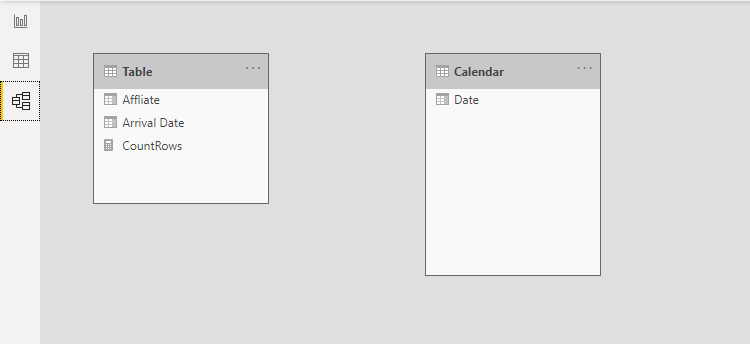
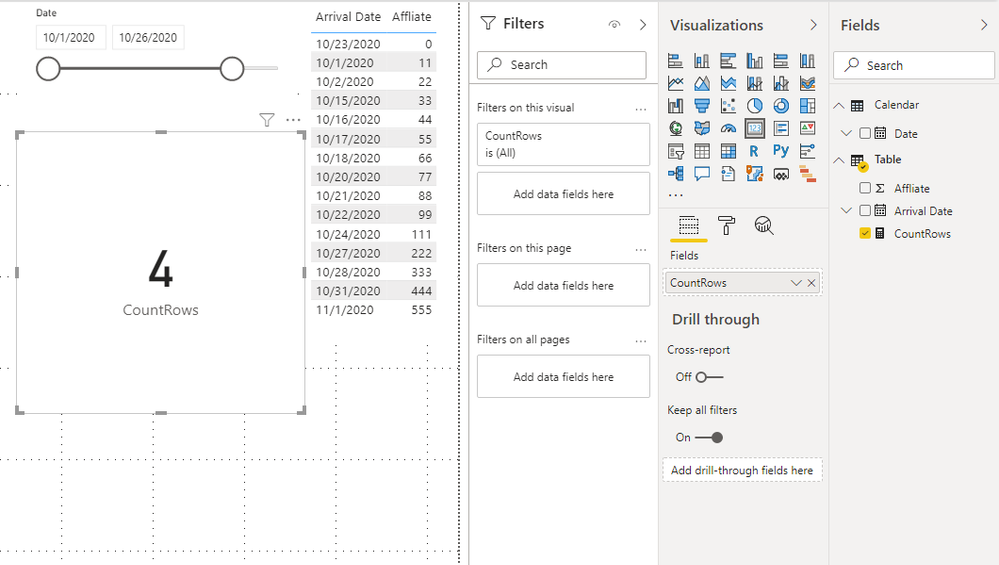
You may try this measure. There is no relationship between the calendar table and the main table.

5.png

CountRows =
CALCULATE (
    COUNTROWS ( 'Table' ),
    FILTER ( 'Table', NOT ( [Arrival Date] IN ALLSELECTED ( 'Calendar'[Date] ) ) )
)

4.png


You can check more details from here.


Best Regards,

Stephen Tao


If this post helps, then please consider Accept it as the solution to help the other members find it more quickly.


View solution in original post

4 REPLIES 4
Anonymous
Not applicable

Hi @Vamshi2020 ,

Could you tell me if your problem has been solved?
If it is, kindly Accept it as the solution. More people will benefit from it.
Or you are still confused about it, please provide me with more details about your table and your problem or share me with your pbix file from your Onedrive for Business.


Best Regards,
Stephen Tao

Anonymous
Not applicable

Hi @Vamshi2020 ,


You may try this measure. There is no relationship between the calendar table and the main table.

5.png

CountRows =
CALCULATE (
    COUNTROWS ( 'Table' ),
    FILTER ( 'Table', NOT ( [Arrival Date] IN ALLSELECTED ( 'Calendar'[Date] ) ) )
)

4.png


You can check more details from here.


Best Regards,

Stephen Tao


If this post helps, then please consider Accept it as the solution to help the other members find it more quickly.


Ashish_Mathur
Super User
Super User

Hi,

Try this measure

=calculate(COUNTROWS('Data_Arrivals with Case Priorit'),datesbetween(calendar[date],max(calendar[date])+1,maxx(all(calendar),calendar[date])))

Hope this helps.


Regards,
Ashish Mathur
http://www.ashishmathur.com
https://www.linkedin.com/in/excelenthusiasts/
AllisonKennedy
Community Champion
Community Champion

I haven't read too carefully, so I may be off mark here, but try:

var a=MAXX(ALLSELECTED(Calender),Calender[Date])

Please @mention me in your reply if you want a response.

Copying DAX from this post? Click here for a hack to quickly replace it with your own table names

Has this post solved your problem? Please Accept as Solution so that others can find it quickly and to let the community know your problem has been solved.
If you found this post helpful, please give Kudos C

I work as a Microsoft trainer and consultant, specialising in Power BI and Power Query.
www.excelwithallison.com

Helpful resources

Announcements
Power BI DataViz World Championships

Power BI Dataviz World Championships

The Power BI Data Visualization World Championships is back! Get ahead of the game and start preparing now!

December 2025 Power BI Update Carousel

Power BI Monthly Update - December 2025

Check out the December 2025 Power BI Holiday Recap!

FabCon Atlanta 2026 carousel

FabCon Atlanta 2026

Join us at FabCon Atlanta, March 16-20, for the ultimate Fabric, Power BI, AI and SQL community-led event. Save $200 with code FABCOMM.