FabCon is coming to Atlanta
Join us at FabCon Atlanta from March 16 - 20, 2026, for the ultimate Fabric, Power BI, AI and SQL community-led event. Save $200 with code FABCOMM.
Register now!- Power BI forums
- Get Help with Power BI
- Desktop
- Service
- Report Server
- Power Query
- Mobile Apps
- Developer
- DAX Commands and Tips
- Custom Visuals Development Discussion
- Health and Life Sciences
- Power BI Spanish forums
- Translated Spanish Desktop
- Training and Consulting
- Instructor Led Training
- Dashboard in a Day for Women, by Women
- Galleries
- Data Stories Gallery
- Themes Gallery
- Contests Gallery
- QuickViz Gallery
- Quick Measures Gallery
- Visual Calculations Gallery
- Notebook Gallery
- Translytical Task Flow Gallery
- TMDL Gallery
- R Script Showcase
- Webinars and Video Gallery
- Ideas
- Custom Visuals Ideas (read-only)
- Issues
- Issues
- Events
- Upcoming Events
The Power BI Data Visualization World Championships is back! Get ahead of the game and start preparing now! Learn more
- Power BI forums
- Forums
- Get Help with Power BI
- Desktop
- Re: Count rows based on two date conditions being ...
- Subscribe to RSS Feed
- Mark Topic as New
- Mark Topic as Read
- Float this Topic for Current User
- Bookmark
- Subscribe
- Printer Friendly Page

- Mark as New
- Bookmark
- Subscribe
- Mute
- Subscribe to RSS Feed
- Permalink
- Report Inappropriate Content
Count rows based on two date conditions being met across two columns
Hi everyone, I have a fact table which has two date columns: risk raised date and risk closed date. I need to build a graph which shows (sample graph image included below):
A - how many risks were open in each month
B - total risks identified (cumlative total across the months)
C - new risks added each month (risk raised date = current month) -- acheived
D - risks closed each month (risk closed date = current month) -- acheived
To complete C & D, my data model has a date table and my Fact Table called "CRITER_Risk Data". This is what I did:
- Creating two inactive relationships (date -> raised date) and ( date -> closed date)
- using the date table on x-axis and creating two measures as using "userealtionship"
I'm trying to work on "A - how many risks were open in each month"
To get the total open risks at any date, we need two (both) conditions to be met:
A, raised date has to be on or before the selected date
B, closed date should be blank or after the selected date.
I am able to partially meet requirement A with this measure:
CALCULATE(COUNTROWS('CRITER_Risk Data'), 'CRITER_Risk Data'[Risk Raised Date] = MAX('Date'[Date]))
When plotted against the date table, this gives me count of risks raised on each date.
I tried to update this to say <= but that breaks the measure - not sure why.
What I need:
This is where I am so far:


Many thanks!!
Solved! Go to Solution.


- Mark as New
- Bookmark
- Subscribe
- Mute
- Subscribe to RSS Feed
- Permalink
- Report Inappropriate Content
Hi,
You may download my PBI file from here.
Hope this helps.
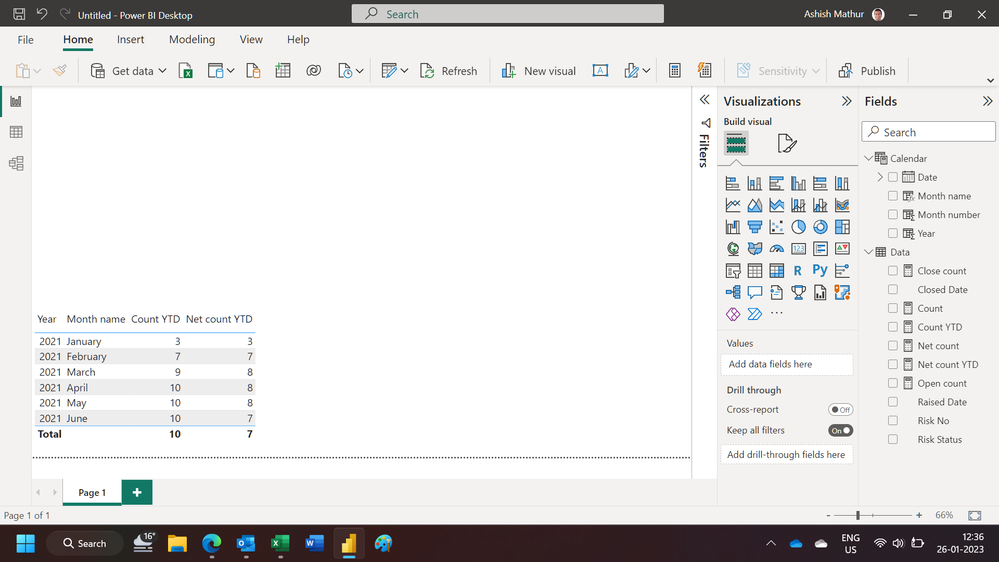
Regards,
Ashish Mathur
http://www.ashishmathur.com
https://www.linkedin.com/in/excelenthusiasts/
- Mark as New
- Bookmark
- Subscribe
- Mute
- Subscribe to RSS Feed
- Permalink
- Report Inappropriate Content
Hi Ashish, Could you please share this file?
- Mark as New
- Bookmark
- Subscribe
- Mute
- Subscribe to RSS Feed
- Permalink
- Report Inappropriate Content
Hi,
I do not have that file. Share data in a format that can be pasted in an MS Excel file, explain the question and show the expected result.
Regards,
Ashish Mathur
http://www.ashishmathur.com
https://www.linkedin.com/in/excelenthusiasts/
- Mark as New
- Bookmark
- Subscribe
- Mute
- Subscribe to RSS Feed
- Permalink
- Report Inappropriate Content
Hi,
Share some data in a format that can be pasted in an MS Excel file and show the expected result clearly in a Table format.
Regards,
Ashish Mathur
http://www.ashishmathur.com
https://www.linkedin.com/in/excelenthusiasts/
- Mark as New
- Bookmark
- Subscribe
- Mute
- Subscribe to RSS Feed
- Permalink
- Report Inappropriate Content
Hi Ashish,
Thanks for the reply. I've shared sample data and expected output above.
Below is the expected output for requirement B which is mainly a cumulative total:
| Expected output in table format for "B": | ||
| Month | Year | Total Identified |
| Jan | 2021 | 3 |
| Feb | 2021 | 7 |
| Mar | 2021 | 9 |
| Apr | 2021 | 10 |
| May | 2021 | 10 |
| Jun | 2021 | 10 |
- Mark as New
- Bookmark
- Subscribe
- Mute
- Subscribe to RSS Feed
- Permalink
- Report Inappropriate Content
| SAMPLE FACT DATA: | |||
| Risk No | Risk Status | Raised Date | Closed Date |
| A0001 | Open | 1/1/2021 | |
| A0002 | Open | 1/1/2021 | |
| A0003 | Closed | 1/1/2021 | 3/15/2021 |
| A0004 | Open | 2/1/2021 | |
| A0005 | Open | 2/1/2021 | |
| A0006 | Closed | 2/1/2021 | 4/12/2021 |
| A0007 | Open | 2/1/2021 | |
| A0008 | Open | 3/1/2021 | |
| A0009 | Closed | 3/1/2021 | 6/2/2021 |
| A0010 | Open | 4/1/2021 |
|
| |||
|
| Expected output in table format for "A": | |||
| Month | Year | Total Open | Notes (fyi) |
| Jan | 2021 | 3 | three raised in jan, all open |
| Feb | 2021 | 7 | three raised in jan, 4 raised in feb, all open by end of feb |
| Mar | 2021 | 8 | three raised in jan, 4 raised in feb, 2 raised in march = 9. Of these, one was closed in march so total open are 8 |
| Apr | 2021 | 8 | compared to March, one more added and one closed so still 8 open |
| May | 2021 | 8 | no change |
| Jun | 2021 | 7 | one more closed |
- Mark as New
- Bookmark
- Subscribe
- Mute
- Subscribe to RSS Feed
- Permalink
- Report Inappropriate Content
Hi,
You may download my PBI file from here.
Hope this helps.
Regards,
Ashish Mathur
http://www.ashishmathur.com
https://www.linkedin.com/in/excelenthusiasts/
- Mark as New
- Bookmark
- Subscribe
- Mute
- Subscribe to RSS Feed
- Permalink
- Report Inappropriate Content
Hi @Ashish_Mathur ,
This was fantastic. Thank you very mcuh.
It was brilliant to think of finding total raised - total closed = net open.
I was complcating the whole process with trying to use opened before and closed after for filters... still surprised why i didn'tt hink of it this way!
Also, it was good learning for me how u used the risk status = closed as a filter as it automatically got rid of the blank dates (cause again i would have tried to build a filter date no blank.. whereas it is easier to just used the status column as the filter)
I needed running totals instead of YTD, I was able to modify the formulas you provided with the help of this link: https://www.sqlbi.com/articles/computing-running-totals-in-dax/
Once again, really appreciate it!
Regards,
Aisha
- Mark as New
- Bookmark
- Subscribe
- Mute
- Subscribe to RSS Feed
- Permalink
- Report Inappropriate Content
You are welcome.
Regards,
Ashish Mathur
http://www.ashishmathur.com
https://www.linkedin.com/in/excelenthusiasts/

- Mark as New
- Bookmark
- Subscribe
- Mute
- Subscribe to RSS Feed
- Permalink
- Report Inappropriate Content
Hi,
I believe I have a very similar problem as the original poster. Unfortunately I am unable to download the .pbix files attached to the solution. Could you kindly please share the process you used to arrive to your solution (can be a general outline/guidance) for users that cannot download the file?
Thank you,
Elizabeth
- Mark as New
- Bookmark
- Subscribe
- Mute
- Subscribe to RSS Feed
- Permalink
- Report Inappropriate Content
Hi Elizabeth,
There are the 4 measures I used to bring the whole thing together - with the help of Ashish, of course. The measures rely on two inactive relationships:
Fact Table called "CRITER_Risk Data" which has the two date columns.
Date Table with Dates
Created two inactive relationships (date -> raised date) and ( date -> closed date)

Helpful resources

Power BI Dataviz World Championships
The Power BI Data Visualization World Championships is back! Get ahead of the game and start preparing now!

Power BI Monthly Update - November 2025
Check out the November 2025 Power BI update to learn about new features.

FabCon Atlanta 2026
Join us at FabCon Atlanta, March 16-20, for the ultimate Fabric, Power BI, AI and SQL community-led event. Save $200 with code FABCOMM.

| User | Count |
|---|---|
| 59 | |
| 43 | |
| 42 | |
| 23 | |
| 17 |


| User | Count |
|---|---|
| 190 | |
| 122 | |
| 96 | |
| 66 | |
| 47 |


