
cancel
Showing results for 
Search instead for 
Did you mean: 

The Power BI Data Visualization World Championships is back! Get ahead of the game and start preparing now! Learn more

Reply
Anonymous
Not applicable

Count of names based on condition

Hi,


I have a dataset similar to the below


NameJobdate
JohnUnit rate01/01/2022
AlanUnit rate01/01/2022
JohnDay work01/01/2022
MarcDay work01/01/2022


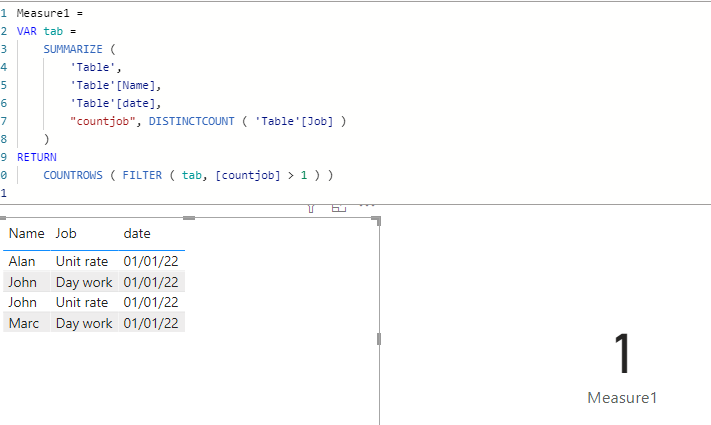
I want to calculate a count of employees who have worked jobs on unit rate and day work in the same day.


The caluclation based on the above dataset will give me a count of 1 because John has worked a unit rate job and a day work job on the same day.


Any ideas how I can calculate this with DAX?


Many thanks

1 ACCEPTED SOLUTION

Hi, @Anonymous 

You can try measure as below:

Measure1 = 
VAR tab =
    SUMMARIZE (
        'Table',
        'Table'[Name],
        'Table'[date],
        "countjob", DISTINCTCOUNT ( 'Table'[Job] )
    )
RETURN
    COUNTROWS ( FILTER ( tab, [countjob] > 1 ) )

Screenshot 2022-01-19 142839.png

Best Regards,
Community Support Team _ Eason


View solution in original post

3 REPLIES 3
amitchandak
Super User
Super User

@Anonymous , Plot the measure with name


countx(filter(summarize(Table, Table[Name], "_1", countx(filter(Table, Table[Job] = "Unit rate"),[Job])
, "_2", countx(filter(Table, Table[Job] = " Day work"),[Job]) )
not(isblank(_1)) && not(isblank(_2)) && [_1] >0 && [_2]>0), [Name] )


Share with Power BI Enthusiasts: Full Power BI Video (20 Hours) YouTube
Microsoft Fabric Series 60+ Videos YouTube
Microsoft Fabric Hindi End to End YouTube
Anonymous
Not applicable

Thanks for the speedy response.


I have copied the DAX (please note, some column names are different in my real dataset.


I am experiencing the below seen errors.


Serdet_0-1642084303138.png

Any ideas as to why it is not working?

Hi, @Anonymous 

You can try measure as below:

Measure1 = 
VAR tab =
    SUMMARIZE (
        'Table',
        'Table'[Name],
        'Table'[date],
        "countjob", DISTINCTCOUNT ( 'Table'[Job] )
    )
RETURN
    COUNTROWS ( FILTER ( tab, [countjob] > 1 ) )

Screenshot 2022-01-19 142839.png

Best Regards,
Community Support Team _ Eason


Helpful resources

Announcements
November Power BI Update Carousel

Power BI Monthly Update - November 2025

Check out the November 2025 Power BI update to learn about new features.

Fabric Data Days Carousel

Fabric Data Days

Advance your Data & AI career with 50 days of live learning, contests, hands-on challenges, study groups & certifications and more!

FabCon Atlanta 2026 carousel

FabCon Atlanta 2026

Join us at FabCon Atlanta, March 16-20, for the ultimate Fabric, Power BI, AI and SQL community-led event. Save $200 with code FABCOMM.

Top Kudoed Authors