cancel
Showing results for 
Search instead for 
Did you mean: 

The Power BI Data Visualization World Championships is back! Get ahead of the game and start preparing now! Learn more

Reply
JMWDBA
Advocate II
Advocate II

Count of Registrations by AY

In the attached file (file link below) I have the student ID, Academic Year of the Registration, Course they registered for in that AY, and the start and end dates of the particular course.  This is a sample file so that I am not releasing real student data. 


File: https://drive.google.com/file/d/0BxvqEMoNpMLiY1hqcnh3UkFnc0E/view?usp=sharing 


Each occurrence of the student ID is considered a registration so it's a count instead of a distinct count.  


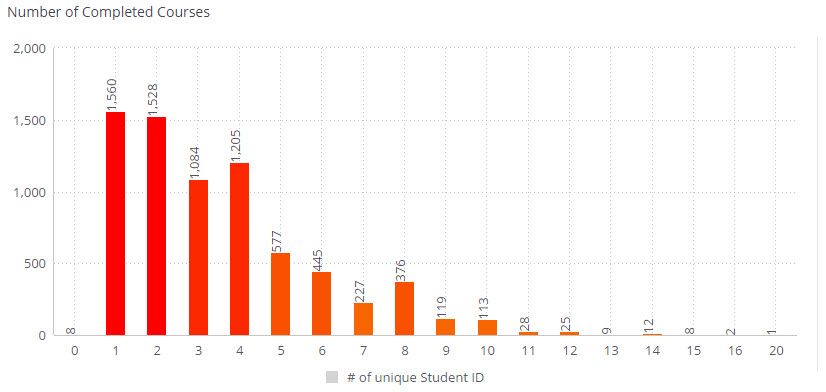
What I am trying to figure out is how to take a count of registrations by student.  The goal is to show the number of registrations by academic year to present in a visual like seen below.  The visual shows the number of courses and the count of students by AY that completed that many courses.  So in the image, you see that 1,560 students completed 1 course during what represents the current AY (2016-2017)


Note: Academic years always start July 1 and end June 30. 
 

2017-05-15_11-50-24.jpg

1 ACCEPTED SOLUTION
Eric_Zhang
Microsoft Employee
Microsoft Employee


@JMWDBA wrote:

In the attached file (file link below) I have the student ID, Academic Year of the Registration, Course they registered for in that AY, and the start and end dates of the particular course.  This is a sample file so that I am not releasing real student data. 


File: https://drive.google.com/file/d/0BxvqEMoNpMLiY1hqcnh3UkFnc0E/view?usp=sharing 


Each occurrence of the student ID is considered a registration so it's a count instead of a distinct count.  


What I am trying to figure out is how to take a count of registrations by student.  The goal is to show the number of registrations by academic year to present in a visual like seen below.  The visual shows the number of courses and the count of students by AY that completed that many courses.  So in the image, you see that 1,560 students completed 1 course during what represents the current AY (2016-2017)


Note: Academic years always start July 1 and end June 30. 


2017-05-15_11-50-24.jpg


@JMWDBA

Could you try to create a calculate table


Table =
SUMMARIZE (
    yourTable,
    yourTable[Academic Year],
    yourTable[Student ID],
    "completedCourse", COUNTA ( yourTable[Course] )
)


And then put the column completedCourse x-axis and SUM(completedCourse) as y-axis?

View solution in original post

2 REPLIES 2
Eric_Zhang
Microsoft Employee
Microsoft Employee


@JMWDBA wrote:

In the attached file (file link below) I have the student ID, Academic Year of the Registration, Course they registered for in that AY, and the start and end dates of the particular course.  This is a sample file so that I am not releasing real student data. 


File: https://drive.google.com/file/d/0BxvqEMoNpMLiY1hqcnh3UkFnc0E/view?usp=sharing 


Each occurrence of the student ID is considered a registration so it's a count instead of a distinct count.  


What I am trying to figure out is how to take a count of registrations by student.  The goal is to show the number of registrations by academic year to present in a visual like seen below.  The visual shows the number of courses and the count of students by AY that completed that many courses.  So in the image, you see that 1,560 students completed 1 course during what represents the current AY (2016-2017)


Note: Academic years always start July 1 and end June 30. 


2017-05-15_11-50-24.jpg


@JMWDBA

Could you try to create a calculate table


Table =
SUMMARIZE (
    yourTable,
    yourTable[Academic Year],
    yourTable[Student ID],
    "completedCourse", COUNTA ( yourTable[Course] )
)


And then put the column completedCourse x-axis and SUM(completedCourse) as y-axis?

That worked like a charm!!!! THANK YOU!!!!! Smiley Happy

Helpful resources

Announcements
Power BI DataViz World Championships

Power BI Dataviz World Championships

The Power BI Data Visualization World Championships is back! Get ahead of the game and start preparing now!

December 2025 Power BI Update Carousel

Power BI Monthly Update - December 2025

Check out the December 2025 Power BI Holiday Recap!

FabCon Atlanta 2026 carousel

FabCon Atlanta 2026

Join us at FabCon Atlanta, March 16-20, for the ultimate Fabric, Power BI, AI and SQL community-led event. Save $200 with code FABCOMM.