cancel
Showing results for 
Search instead for 
Did you mean: 

The Power BI Data Visualization World Championships is back! Get ahead of the game and start preparing now! Learn more

Reply
MarkMellink
Frequent Visitor

Showing cumulative sums of different dynamic time periods

Hi,


I'm relatively new to DAX and Power BI. I'm struggling to do the following:


I have sales data from several different years. I want to create a cumulative area graph that is responsive to a slicer. I want it to be responsive based on a selected time period. Eg. If I selected Quarter 2 of 2017, I want it to show the cumulative sales of Q2 2017. If I selected All Quarters 2017, I want it to show cumulative sales of All Quarters 2017. 


The slicers look like this: 

powerbiquestion.png

 I have the following measures that calculate the cumulative sales for each period:


Cumulative Won Sales Month = CALCULATE(SUM(SalesData[Sales_Euro]), 
FILTER(ALL(DataSheet),
  DataSheet[Date] <= MAX(DataSheet[Date]) &&
  DataSheet[Month] = MAX(DataSheet[Month]) &&
  DataSheet[Year] = MAX(DataSheet[YEAR])
))
Cumulative Won Sales Quarter = CALCULATE(SUM(SalesData[Sales_Euro]), 
FILTER(ALL(DataSheet),
  DataSheet[Date] <= MAX(DataSheet[Date]) &&
  DataSheet[Quarter] = MAX(DataSheet[Quarter]) &&
  DataSheet[Year] = MAX(DataSheet[YEAR])
))
Cumulative Won Sales Year = CALCULATE(SUM(SalesData[Sales_Euro]), 
FILTER(ALL(DataSheet),
  DataSheet[Date] <= MAX(DataSheet[Date]) &&
  DataSheet[Year] = MAX(DataSheet[YEAR])
))

And then I have one measure which should select the correct measure depending on what I have selected in the slicer:

Cumulative Won Sales = IF([PeriodSelected] = "Year", [Cumulative Won Sales Year], IF([PeriodSelected] = "Quarter", [Cumulative Won Sales Quarter], [Cumulative Won Sales Month]))

The period selected measure is calculated as follows:

PeriodSelected = IF([NumberOfQuarters] = 1, IF([NumberOfMonths] = 1, "Month", "Quarter"), "Year")

And the number of quarters and number of months are calculated as follows:

NumberOfQuarters = DISTINCTCOUNT(SalesData[CloseDate_Quarter])
NumberOfMonths = DISTINCTCOUNT(SalesData[CloseDate_Month])

This however, does not work. For example when I select Q1 2017, the Cumulative Won Sales plot looks like this:
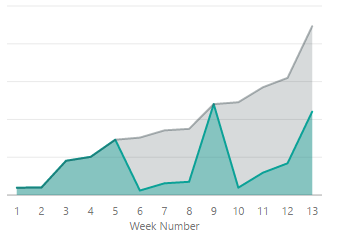
powerbiquestion2.png

The grey line is "Cumulative Won Sales Quarter", and the blue line is "Cumulative Won Sales". I want the plot to look like the grey line for this selection, however for some reason the Cumulative Won Sales does not select the right measure within the graph.


I have the same problem with year, if I select the entire year of 2017 I get the following:
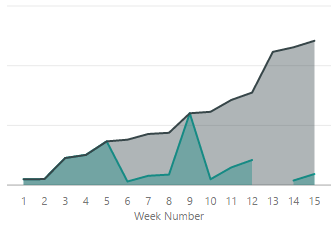
 

powerbiquestion3.png

Again the blue line is "Cumulative Won Sales" and the grey line is what I want "Cumulative Won Sales Year".


My question therefore is: How do I get the area graph to switch between the right cumulative sales measure, depending on the slicer selection?

1 ACCEPTED SOLUTION

Yes, 


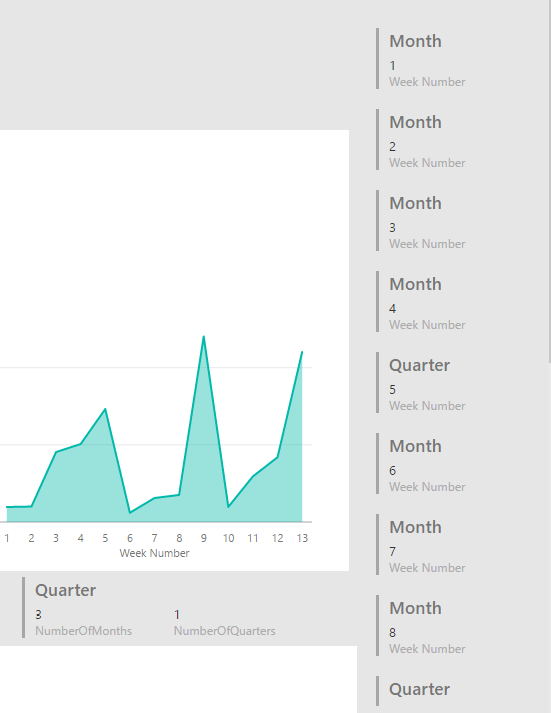
At first it looked like it was doing it okay. But if I split the variables per week, I found what the problem was. For each week it was recalculating the PeriodSelected variables. Which means that for some weeks it was showing the monthly metric, and for some the quarter metric. See the picture below:

powerbiquestion4.png

To make sure I choose the right PeriodSelected I changed the "Cumulative Won Sales" IF statement to get the PeriodSelected for ALLSELECTED(SalesData). Changes are bolded:


Cumulative Won Sales = IF(CALCULATE([PeriodSelected], ALLSELECTED(SalesData)) = "Year", [Cumulative Won Sales Year], IF(CALCULATE([PeriodSelected], ALLSELECTED(SalesData)) = "Quarter", [Cumulative Won Sales Quarter], [Cumulative Won Sales Month]))


This works!

View solution in original post

3 REPLIES 3
Greg_Deckler
Community Champion
Community Champion

Have you displayed you PeriodSelected and other supporting measures in card visualizations to make sure that they are coming up with the right values?


Follow on LinkedIn
@ me in replies or I'll lose your thread!!!
Instead of a Kudo, please vote for this idea
Become an expert!: Enterprise DNA
External Tools: MSHGQM
YouTube Channel!: Microsoft Hates Greg
Latest book!:
DAX For Humans

DAX is easy, CALCULATE makes DAX hard...

Yes, 


At first it looked like it was doing it okay. But if I split the variables per week, I found what the problem was. For each week it was recalculating the PeriodSelected variables. Which means that for some weeks it was showing the monthly metric, and for some the quarter metric. See the picture below:

powerbiquestion4.png

To make sure I choose the right PeriodSelected I changed the "Cumulative Won Sales" IF statement to get the PeriodSelected for ALLSELECTED(SalesData). Changes are bolded:


Cumulative Won Sales = IF(CALCULATE([PeriodSelected], ALLSELECTED(SalesData)) = "Year", [Cumulative Won Sales Year], IF(CALCULATE([PeriodSelected], ALLSELECTED(SalesData)) = "Quarter", [Cumulative Won Sales Quarter], [Cumulative Won Sales Month]))


This works!

Old school debugging, love it!!


Follow on LinkedIn
@ me in replies or I'll lose your thread!!!
Instead of a Kudo, please vote for this idea
Become an expert!: Enterprise DNA
External Tools: MSHGQM
YouTube Channel!: Microsoft Hates Greg
Latest book!:
DAX For Humans

DAX is easy, CALCULATE makes DAX hard...

Helpful resources

Announcements
Power BI DataViz World Championships

Power BI Dataviz World Championships

The Power BI Data Visualization World Championships is back! Get ahead of the game and start preparing now!

November Power BI Update Carousel

Power BI Monthly Update - November 2025

Check out the November 2025 Power BI update to learn about new features.

FabCon Atlanta 2026 carousel

FabCon Atlanta 2026

Join us at FabCon Atlanta, March 16-20, for the ultimate Fabric, Power BI, AI and SQL community-led event. Save $200 with code FABCOMM.