Don't miss your chance to take the Fabric Data Engineer (DP-600) exam for FREE! Find out how by attending the DP-600 session on April 23rd (pacific time), live or on-demand.
Learn moreJoin the FabCon + SQLCon recap series. Up next: Power BI, Real-Time Intelligence, IQ and AI, and Data Factory take center stage. All sessions are available on-demand after the live show. Register now
I created at table from the data imported and whenever I chose the count feature it replaces the actual data with a "1" in order to provide a total count. Is there a way I can have the column maintain the data while still providing a total Count?
Example:
I have a column of Employee names, and I want to know how many employees there are total. If I turn on the Count feature, it replaces each name with a "1" and gives the total number at the bottom, but I still want to see the Employee Name for each record.
Solved! Go to Solution.
hi, @beardsleys
This relates to the row context and filter context in calculation
You could use COUNTA Function to create a measure, then drag Employee Name and this measure into visual together
For example:
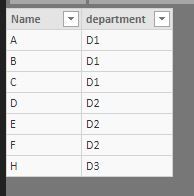
basic data
Measure = CALCULATE(COUNTA(Table1[Name]))
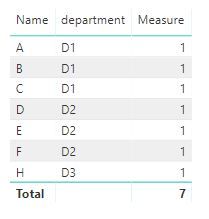
Result:
Best Regards,
Lin
hi, @beardsleys
This relates to the row context and filter context in calculation
You could use COUNTA Function to create a measure, then drag Employee Name and this measure into visual together
For example:
basic data
Measure = CALCULATE(COUNTA(Table1[Name]))
Result:
Best Regards,
Lin
in Power Query, you can go to Add Column -->Index Column-->From 1
Or you can create a measure :
Count = COUNTROWS( Table )
Check out the April 2026 Power BI update to learn about new features.
If you have recently started exploring Fabric, we'd love to hear how it's going. Your feedback can help with product improvements.
A new Power BI DataViz World Championship is coming this June! Don't miss out on submitting your entry.
| User | Count |
|---|---|
| 48 | |
| 40 | |
| 37 | |
| 20 | |
| 16 |
| User | Count |
|---|---|
| 68 | |
| 67 | |
| 30 | |
| 26 | |
| 26 |