This is best Fabric, Power BI, SQL and AI community event. How do we know? The last event sold out! Save €200 with code FABCMTY200.
Register nowA new Data Days event is coming soon! This time we’re going bigger than ever. Fabric, Power BI, SQL, AI and more. Don't miss out.
I created at table from the data imported and whenever I chose the count feature it replaces the actual data with a "1" in order to provide a total count. Is there a way I can have the column maintain the data while still providing a total Count?
Example:
I have a column of Employee names, and I want to know how many employees there are total. If I turn on the Count feature, it replaces each name with a "1" and gives the total number at the bottom, but I still want to see the Employee Name for each record.
Solved! Go to Solution.
hi, @beardsleys
This relates to the row context and filter context in calculation
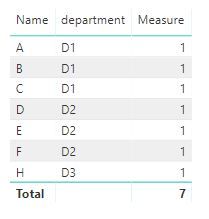
You could use COUNTA Function to create a measure, then drag Employee Name and this measure into visual together
For example:
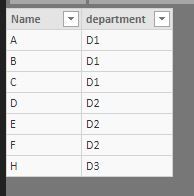
basic data
Measure = CALCULATE(COUNTA(Table1[Name]))
Result:
Best Regards,
Lin
hi, @beardsleys
This relates to the row context and filter context in calculation
You could use COUNTA Function to create a measure, then drag Employee Name and this measure into visual together
For example:
basic data
Measure = CALCULATE(COUNTA(Table1[Name]))
Result:
Best Regards,
Lin
in Power Query, you can go to Add Column -->Index Column-->From 1
Or you can create a measure :
Count = COUNTROWS( Table )
Check out the May 2026 Power BI update to learn about new features.
Sign up to receive a private message when registration opens and key events begin.
If you have recently started exploring Fabric, we'd love to hear how it's going. Your feedback can help with product improvements.
| User | Count |
|---|---|
| 31 | |
| 26 | |
| 23 | |
| 22 | |
| 15 |
| User | Count |
|---|---|
| 63 | |
| 45 | |
| 28 | |
| 24 | |
| 22 |