cancel
Showing results for 
Search instead for 
Did you mean: 

We've captured the moments from FabCon & SQLCon that everyone is talking about, and we are bringing them to the community, live and on-demand. Starts on April 14th. Register now

Reply
Anonymous
Not applicable

Count/export empty and duplicate value

Hi,


I have the following table: 

NameSerial numer
A2DC25F
BF3DGG
C 
D 
E5GERG
F6XDBD
G89DBBE
H6XDBD

Could you please help to count Names which have duplicate and empty Serial Number 

The result would be 4  here. I would like to display the result in a card and can export these names.


Thank you in advance. 


1 ACCEPTED SOLUTION
johnt75
Super User
Super User

You can create a measure like

Duplicates and blanks =
VAR SummaryTable =
	ADDCOLUMNS(
		SUMMARIZE( 'Table', 'Table'[Serial numer] ),
		"@num rows", CALCULATE( COUNTROWS( 'Table' ) )
	)
RETURN
	SUMX(
		FILTER(
			SummaryTable,
			[@num rows] > 1 || ISBLANK( 'Table'[Serial numer] )
		),
		[@num rows]
	)

View solution in original post

3 REPLIES 3
v-jingzhang
Community Support
Community Support

Hi @Anonymous 


You can use this measure to count

Count Measure = SUMX(FILTER(SUMMARIZE('Table','Table'[Serial numer],"Count",COUNT('Table'[Name])),[Count]>1),[Count])

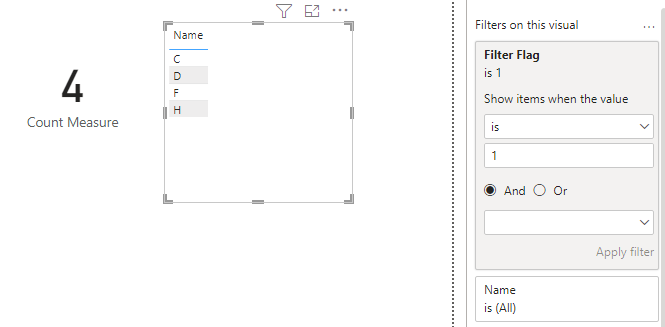
If you want to display the names in the report, you can use another measure as a filter. Add Name column to a table visual in the report, then add below measure to filter pane as a visual-level filter on this table visual. Set it to show items when value is 1. 

Filter Flag = 
var vSNs = SELECTCOLUMNS(FILTER(SUMMARIZE(ALL('Table'),'Table'[Serial numer],"Count",COUNT('Table'[Name])),[Count]>1),"SN",[Serial numer])
return
IF(SELECTEDVALUE('Table'[Serial numer]) IN vSNs, 1, 0)

vjingzhang_0-1674725207406.png

Best Regards,
Community Support Team _ Jing
If this post helps, please Accept it as Solution to help other members find it.

johnt75
Super User
Super User

You can create a measure like

Duplicates and blanks =
VAR SummaryTable =
	ADDCOLUMNS(
		SUMMARIZE( 'Table', 'Table'[Serial numer] ),
		"@num rows", CALCULATE( COUNTROWS( 'Table' ) )
	)
RETURN
	SUMX(
		FILTER(
			SummaryTable,
			[@num rows] > 1 || ISBLANK( 'Table'[Serial numer] )
		),
		[@num rows]
	)
Anonymous
Not applicable

Thank you for your advice. 


Helpful resources

Announcements
New to Fabric survey Carousel

New to Fabric Survey

If you have recently started exploring Fabric, we'd love to hear how it's going. Your feedback can help with product improvements.

Power BI DataViz World Championships carousel

Power BI DataViz World Championships - June 2026

A new Power BI DataViz World Championship is coming this June! Don't miss out on submitting your entry.

Join our Fabric User Panel

Join our Fabric User Panel

Share feedback directly with Fabric product managers, participate in targeted research studies and influence the Fabric roadmap.

March Power BI Update Carousel

Power BI Community Update - March 2026

Check out the March 2026 Power BI update to learn about new features.