cancel
Showing results for 
Search instead for 
Did you mean: 

Learn from the best! Meet the four finalists headed to the FINALS of the Power BI Dataviz World Championships! Register now

Reply
datanau001
Helper III
Helper III

Count duplicated values

Dear all,


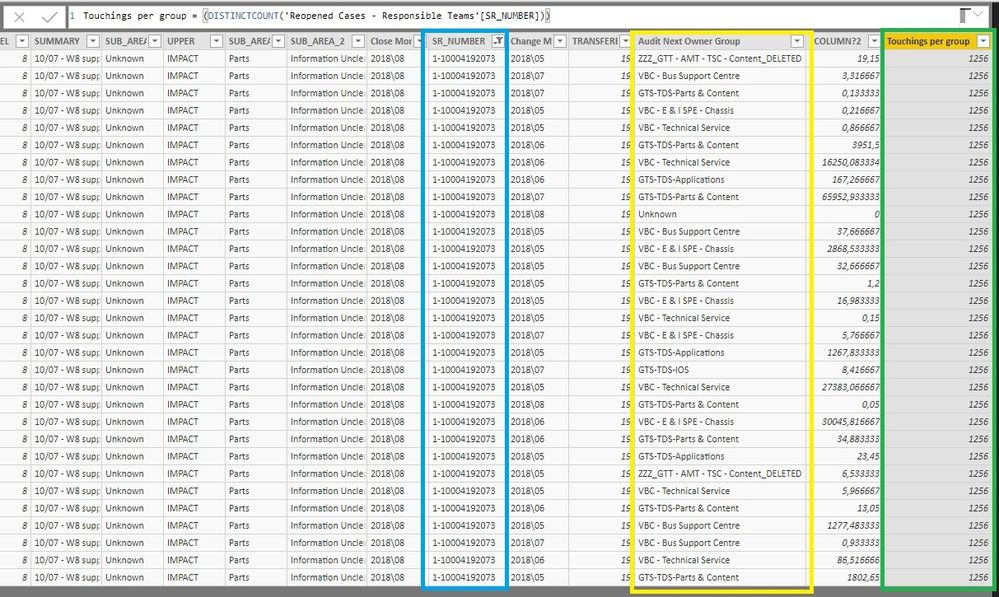
I would like to create a column that shows for each line of a ticket number the total times this ticket was handled by a support group.


For this, I have three columns:


  • “Touching’s per group” (total times a ticket was handled by the group);
  • “Audit Next Owner Group” (group that handled the ticket)
  • “SR_Number” (ticket number)


However, I’m managing to get this result ( tried to use countx, distinctcount).


Would be possible to have you support on this question?


Please, find attached a print with the above mentioned columns.


E.g: the result concerning to group “ZZZ_GTT- AMT – TSC - Content_Deleted” would be 2.


Thank you.

Marcelo


Counting of touchings.jpg

2 ACCEPTED SOLUTIONS
Stachu
Community Champion
Community Champion

wouldn't it be better to use measure instead of column? that way you could present the correct number in the visuals, with the column it would add 2+2 and show 4 in the Table/Matrix visuals (unless you don't aggregate)
How do you want to present that data in the end?


Did I answer your question? Mark my post as a solution!
Thank you for the kudos 🙂

View solution in original post

v-lili6-msft
Community Support
Community Support

HI, @datanau001

After my test, you may try this formula as below:

Touching’s per group = CALCULATE(COUNTA('Table'[Audit]),FILTER('Table','Table'[SR_NUMBER]=EARLIER('Table'[SR_NUMBER])&&'Table'[Audit]=EARLIER('Table'[Audit])))

If it is not your case, please share some data sample and expected output. Do mask sensitive data before uploading.


Best Regards,

Lin

Community Support Team _ Lin
If this post helps, then please consider Accept it as the solution to help the other members find it more quickly.

View solution in original post

4 REPLIES 4
v-lili6-msft
Community Support
Community Support

HI, @datanau001

After my test, you may try this formula as below:

Touching’s per group = CALCULATE(COUNTA('Table'[Audit]),FILTER('Table','Table'[SR_NUMBER]=EARLIER('Table'[SR_NUMBER])&&'Table'[Audit]=EARLIER('Table'[Audit])))

If it is not your case, please share some data sample and expected output. Do mask sensitive data before uploading.


Best Regards,

Lin

Community Support Team _ Lin
If this post helps, then please consider Accept it as the solution to help the other members find it more quickly.

Hello Lin,

Your formula resolved the issue.


Thank for the support.

Marcelo

themistoklis
Community Champion
Community Champion

@datanau001


First a new column and not measure using this formula:

Concatenated_Values = CONCATENATE(CONCATENATE('Table'[Audit Next Owner Group],'Table'[Touchings per group]),'Table'[SR_NUMBER])

Then create a measure to count the values from this new column:

COUNT VALUES = COUNT('Table'[Concatenated_Values])


Stachu
Community Champion
Community Champion

wouldn't it be better to use measure instead of column? that way you could present the correct number in the visuals, with the column it would add 2+2 and show 4 in the Table/Matrix visuals (unless you don't aggregate)
How do you want to present that data in the end?


Did I answer your question? Mark my post as a solution!
Thank you for the kudos 🙂

Helpful resources

Announcements
Join our Fabric User Panel

Join our Fabric User Panel

Share feedback directly with Fabric product managers, participate in targeted research studies and influence the Fabric roadmap.

February Power BI Update Carousel

Power BI Monthly Update - February 2026

Check out the February 2026 Power BI update to learn about new features.

FabCon Atlanta 2026 carousel

FabCon Atlanta 2026

Join us at FabCon Atlanta, March 16-20, for the ultimate Fabric, Power BI, AI and SQL community-led event. Save $200 with code FABCOMM.