cancel
Showing results for 
Search instead for 
Did you mean: 

The Power BI Data Visualization World Championships is back! Get ahead of the game and start preparing now! Learn more

Reply
vnqtrang
Helper I
Helper I

Count data between days

Hi,


I have a list of snapshots and the created dates. I would like to have the list (to export) and total of snapshots that were created between > 5d - 10d, >10d - 30d, >30d - 3months, >3 months.


createdsnapshot
> 5d - 10d20
>10d - 30d40
>30d - 3months10

>3 months.

4


Thank you in advance.

Tg

2 ACCEPTED SOLUTIONS
v-jingzhang
Community Support
Community Support

Hi @vnqtrang 


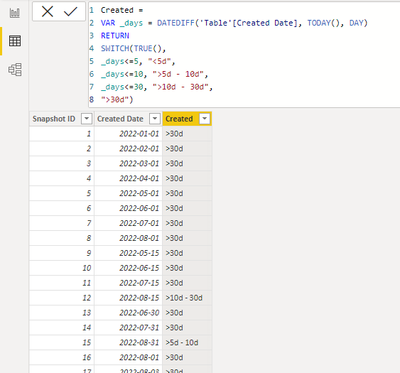
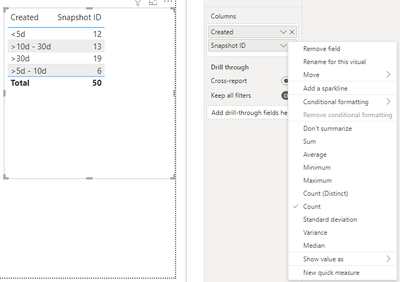
Assume you want to calculate the days between created date and today, you can add a new column similar to below column. Then add a table visual to the report, add Created and Snapshot ID columns to it and select Count aggregation on Snapshot ID. 

Created = 
VAR _days = DATEDIFF('Table'[Created Date], TODAY(), DAY)
RETURN
SWITCH(TRUE(),
_days<=5, "<5d",
_days<=10, ">5d - 10d",
_days<=30, ">10d - 30d",
">30d")

vjingzhang_0-1662429386272.png

vjingzhang_1-1662429597141.png


Best Regards,
Community Support Team _ Jing
If this post helps, please Accept it as Solution to help other members find it.

View solution in original post

Hi @vnqtrang 


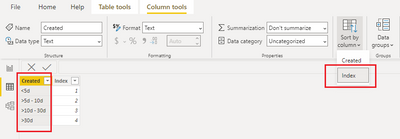
Enter a table with Index column. Then sort Created by Index. Sort one column by another column in Power BI - Power BI | Microsoft Docs

vjingzhang_0-1662457952773.pngvjingzhang_1-1662458041098.png


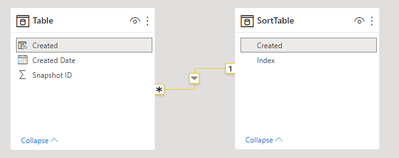
Create a relationship between tables on Created column. Then use SortTable's Created column in the table visual instead. 

vjingzhang_2-1662458058780.pngvjingzhang_3-1662458078715.png


Best Regards,
Community Support Team _ Jing
If this post helps, please Accept it as Solution to help other members find it.

View solution in original post

5 REPLIES 5
v-jingzhang
Community Support
Community Support

Hi @vnqtrang 


Assume you want to calculate the days between created date and today, you can add a new column similar to below column. Then add a table visual to the report, add Created and Snapshot ID columns to it and select Count aggregation on Snapshot ID. 

Created = 
VAR _days = DATEDIFF('Table'[Created Date], TODAY(), DAY)
RETURN
SWITCH(TRUE(),
_days<=5, "<5d",
_days<=10, ">5d - 10d",
_days<=30, ">10d - 30d",
">30d")

vjingzhang_0-1662429386272.png

vjingzhang_1-1662429597141.png


Best Regards,
Community Support Team _ Jing
If this post helps, please Accept it as Solution to help other members find it.

HI, 

Is it possible to filter the option in order of time: 

<=5d 
> 5d - 10d 
>10d - 30d 
>30d - 3months 

>3 months.


Because the option "> 5d - 10d" is at the end, i should be below <=5d


Tg

Hi @vnqtrang 


Enter a table with Index column. Then sort Created by Index. Sort one column by another column in Power BI - Power BI | Microsoft Docs

vjingzhang_0-1662457952773.pngvjingzhang_1-1662458041098.png


Create a relationship between tables on Created column. Then use SortTable's Created column in the table visual instead. 

vjingzhang_2-1662458058780.pngvjingzhang_3-1662458078715.png


Best Regards,
Community Support Team _ Jing
If this post helps, please Accept it as Solution to help other members find it.

Thank you  it works as I wish.


ryan_mayu
Super User
Super User

@vnqtrang 

could you pls provide the sample data?


Did I answer your question? Mark my post as a solution!

Proud to be a Super User!


Helpful resources

Announcements
Power BI DataViz World Championships

Power BI Dataviz World Championships

The Power BI Data Visualization World Championships is back! Get ahead of the game and start preparing now!

December 2025 Power BI Update Carousel

Power BI Monthly Update - December 2025

Check out the December 2025 Power BI Holiday Recap!

FabCon Atlanta 2026 carousel

FabCon Atlanta 2026

Join us at FabCon Atlanta, March 16-20, for the ultimate Fabric, Power BI, AI and SQL community-led event. Save $200 with code FABCOMM.