Join us at FabCon Atlanta from March 16 - 20, 2026, for the ultimate Fabric, Power BI, AI and SQL community-led event. Save $200 with code FABCOMM.
Register now!The Power BI Data Visualization World Championships is back! Get ahead of the game and start preparing now! Learn more
Hi community,
I hope you are doing well; I am trying to count the number of consecutive days employees take vacation. I have a data set with an ID identifier and the date when they took a vacation. Is there a way to know how many consecutive days an employee was on vacation for without breaking the count if there were weekends?
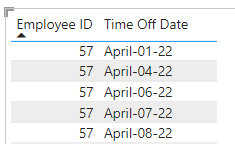
In this example below an example the employee number 57 had taken April 1st and April 4th of 2022, the weekend would be between these two days, the result here would be 2. Below we have 6,7 and 8 of April, so the result here would be 3.
I've tried this in excel and didn't work, also I've gave it a try in power bi, but I don't know how to make it work. I do have a dim date table that has the weekends dates, but I am unsure how to build a DAX measure or a code that can bring these results.
Any suggestions would be greatly appreciated.
Thank you,
J
@jcru1999 Depending on how you want to do it, NETWORKDAYS might get you there or perhaps 2 columns like below. See PBIX attached below signature.
Consequetive =
VAR __ID = [Employ ID]
VAR __Date = [Time Off Date]
VAR __PrevDate = MAXX(FILTER(ALL('Table'), [Time Off Date] < __Date),[Time Off Date])
VAR __Diff = ( __Date - __PrevDate ) * 1.
VAR __Result =
SWITCH( TRUE(),
__Diff = 1, 1,
WEEKDAY(__Date, 2) = 1 && __Diff = 3, 1,
0
)
RETURN
__Result
Consequetive Days =
VAR __Date = [Time Off Date]
VAR __Next = MINX(FILTER(ALL('Table'), [Time Off Date] > __Date && [Consequetive] = 0),[Time Off Date])
VAR __NextFinal = IF(__Next = BLANK(), TODAY(), __Next)
VAR __Table = FILTER(ALL('Table'),[Time Off Date] >= __Date && [Time Off Date] < __NextFinal && [Consequetive] = 1)
VAR __ConsequetiveDays = COUNTROWS(__Table) + 1
VAR __Result = IF([Consequetive] = 0, __ConsequetiveDays, BLANK())
RETURN
__Result
Hi @Greg_Deckler Thank you so much for your help with this, it looks like a great solution, If you could just help me with this last part, somehow the "Consequetive" column is retriving most of the dates as consecutive, could you please advise me what I am doing wrong here? Should I sort the columns in another way?
Thank you so much for all your help!
J
The Power BI Data Visualization World Championships is back! Get ahead of the game and start preparing now!
| User | Count |
|---|---|
| 39 | |
| 35 | |
| 33 | |
| 32 | |
| 27 |
| User | Count |
|---|---|
| 136 | |
| 96 | |
| 77 | |
| 67 | |
| 65 |