cancel
Showing results for 
Search instead for 
Did you mean: 

July 7 - July 17 | Round 2 of the Power BI Dataviz World Championships. Don't miss your chance! Learn more

Reply
jcru1999
Frequent Visitor

Count continuous dates from a data set without weekends

Hi community,
I hope you are doing well; I am trying to count the number of consecutive days employees take vacation. I have a data set with an ID identifier and the date when they took a vacation. Is there a way to know how many consecutive days an employee was on vacation for without breaking the count if there were weekends?
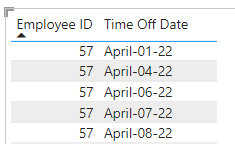
In this example below an example the employee number 57 had taken April 1st and April 4th of 2022, the weekend would be between these two days, the result here would be 2. Below we have 6,7 and 8 of April, so the result here would be 3.

jcru1999_1-1677194869197.png

I've tried this in excel and didn't work, also I've gave it a try in power bi, but I don't know how to make it work. I do have a dim date table that has the weekends dates, but I am unsure how to build a DAX measure or a code that can bring these results.

Any suggestions would be greatly appreciated. 

Thank you, 

J

@amitchandak 

@Greg_Deckler 

2 REPLIES 2
Greg_Deckler
Community Champion
Community Champion

@jcru1999 Depending on how you want to do it, NETWORKDAYS might get you there or perhaps 2 columns like below. See PBIX attached below signature.

Consequetive = 
    VAR __ID = [Employ ID]
    VAR __Date = [Time Off Date]
    VAR __PrevDate = MAXX(FILTER(ALL('Table'), [Time Off Date] < __Date),[Time Off Date])
    VAR __Diff = ( __Date - __PrevDate ) * 1.
    VAR __Result = 
        SWITCH( TRUE(),
            __Diff = 1, 1,
            WEEKDAY(__Date, 2) = 1 && __Diff = 3, 1,
            0
        )
RETURN
    __Result


Consequetive Days = 
    VAR __Date = [Time Off Date]
    VAR __Next = MINX(FILTER(ALL('Table'), [Time Off Date] > __Date && [Consequetive] = 0),[Time Off Date])
    VAR __NextFinal = IF(__Next = BLANK(), TODAY(), __Next)
    VAR __Table = FILTER(ALL('Table'),[Time Off Date] >= __Date && [Time Off Date] < __NextFinal && [Consequetive] = 1)
    VAR __ConsequetiveDays = COUNTROWS(__Table) + 1
    VAR __Result = IF([Consequetive] = 0, __ConsequetiveDays, BLANK())
RETURN
    __Result


Follow on LinkedIn
@ me in replies or I'll lose your thread!!!
Instead of a Kudo, please vote for this idea
Become an expert!: Enterprise DNA
External Tools: MSHGQM
YouTube Channel!: Microsoft Hates Greg
Latest book!:
DAX For Humans

DAX is easy, CALCULATE makes DAX hard...

Hi @Greg_Deckler Thank you so much for your help with this, it looks like a great solution, If you could just help me with this last part, somehow the "Consequetive" column is retriving most of the dates as consecutive, could you please advise me what I am doing wrong here? Should I sort the columns in another way? 


jcru1999_0-1677202791430.png

Thank you so much for all your help! 

J

Helpful resources

Announcements
FabCon and SQLCon Barcelona 2026

FabCon & SQLCon – Barcelona 2026

Join us in Barcelona for FabCon and SQLCon, the Fabric, Power BI, SQL, and AI community event. Save €200 with code FABCMTY200.

60 days of Data Days Carousel

Data Days 2026

Join Fabric Data Days 2026: 60 days of free live/on-demand sessions, challenges, study groups, and certification opportunities.

Power BI DataViz World Championships carousel

Power BI DataViz World Championships - June 2026

A new Power BI DataViz World Championship is coming this June! Don't miss out on submitting your entry.

Top Solution Authors