cancel
Showing results for 
Search instead for 
Did you mean: 

The Power BI Data Visualization World Championships is back! Get ahead of the game and start preparing now! Learn more

Reply
Anonymous
Not applicable

Count all function not influenced by date

Hi,

Hi,


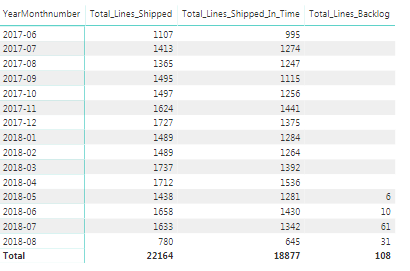
I am trying to calculate the total lines backlog in the relating table not influenced by any date.


Backlog is a filter on OTD category. This DAX function which is active now (output in beneeth table):

Total_Lines_Backlog = CALCULATE(COUNT(PD_vs_shipped_date[Item_Number]), PD_vs_shipped_date[OTD_category] = "Backlog")


So what I want is that the total lines backlog is always calculated at the full total of the table, not influenced by any date or slicer, which is 108 lines. I tried to use the ALL function, but not successfully. Can anyone help?


OTD_test - Power BI Desktop_2018-08-23_09-58-32.png

2 ACCEPTED SOLUTIONS
v-piga-msft
Resident Rockstar
Resident Rockstar

Hi @Anonymous,


You could have a try with the formula below.


Total_Lines_Backlog =
CALCULATE (
    COUNT ( PD_vs_shipped_date[Item_Number] ),
    FILTER (
        ALL ( PD_vs_shipped_date ),
        PD_vs_shipped_date[OTD_category] = "Backlog"
    )
)

If you still need help, please share some data sample and your desired output so that we can help further investigate on it?


Best Regards,

Cherry

Community Support Team _ Cherry Gao
If this post helps, then please consider Accept it as the solution to help the other members find it more quickly.

View solution in original post

Ashish_Mathur
Super User
Super User

Hi,


Try this measure


=CALCULATE(COUNT(PD_vs_shipped_date[Item_Number]),PD_vs_shipped_date[OTD_category] = "Backlog",ALL(Calendar))


I have assumed that:


  1. There is a Calendar Table
  2. There is a relationship from the Date column of your PD_vs_shipped_date Table to the Date column of your Calendar Table
  3. In the Calendar Table, you have the YearMonthnumber column
  4. In your visual, you will drag the YearMonthnumber field from the Calendar Table

Regards,
Ashish Mathur
http://www.ashishmathur.com
https://www.linkedin.com/in/excelenthusiasts/

View solution in original post

2 REPLIES 2
Ashish_Mathur
Super User
Super User

Hi,


Try this measure


=CALCULATE(COUNT(PD_vs_shipped_date[Item_Number]),PD_vs_shipped_date[OTD_category] = "Backlog",ALL(Calendar))


I have assumed that:


  1. There is a Calendar Table
  2. There is a relationship from the Date column of your PD_vs_shipped_date Table to the Date column of your Calendar Table
  3. In the Calendar Table, you have the YearMonthnumber column
  4. In your visual, you will drag the YearMonthnumber field from the Calendar Table

Regards,
Ashish Mathur
http://www.ashishmathur.com
https://www.linkedin.com/in/excelenthusiasts/
v-piga-msft
Resident Rockstar
Resident Rockstar

Hi @Anonymous,


You could have a try with the formula below.


Total_Lines_Backlog =
CALCULATE (
    COUNT ( PD_vs_shipped_date[Item_Number] ),
    FILTER (
        ALL ( PD_vs_shipped_date ),
        PD_vs_shipped_date[OTD_category] = "Backlog"
    )
)

If you still need help, please share some data sample and your desired output so that we can help further investigate on it?


Best Regards,

Cherry

Community Support Team _ Cherry Gao
If this post helps, then please consider Accept it as the solution to help the other members find it more quickly.

Helpful resources

Announcements
Power BI DataViz World Championships

Power BI Dataviz World Championships

The Power BI Data Visualization World Championships is back! Get ahead of the game and start preparing now!

December 2025 Power BI Update Carousel

Power BI Monthly Update - December 2025

Check out the December 2025 Power BI Holiday Recap!

FabCon Atlanta 2026 carousel

FabCon Atlanta 2026

Join us at FabCon Atlanta, March 16-20, for the ultimate Fabric, Power BI, AI and SQL community-led event. Save $200 with code FABCOMM.