cancel
Showing results for 
Search instead for 
Did you mean: 

The Power BI Data Visualization World Championships is back! Get ahead of the game and start preparing now! Learn more

Reply
Anonymous
Not applicable

Nested If Q

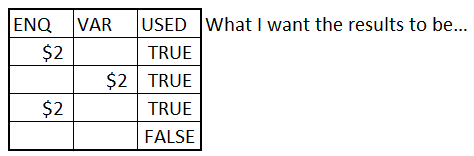
I am trying to find out how to get the desired results.  In my TEST_TABLE, the USED column is what I want to place my results.  If there is a value in the ENQ or VAR column I want it flagged as TRUE.  I am sure this is a nested IF statement, but I am very new to Power BI. Any help is greatly appreciated.


if statement q.PNG

1 ACCEPTED SOLUTION
Ashish_Mathur
Super User
Super User

Hi,


Try this calculated column formula


=OR(ISNUMBER(Data[ENQ]),ISNUMBER(Data[VAR]))


Regards,
Ashish Mathur
http://www.ashishmathur.com
https://www.linkedin.com/in/excelenthusiasts/

View solution in original post

2 REPLIES 2
Ashish_Mathur
Super User
Super User

Hi,


Try this calculated column formula


=OR(ISNUMBER(Data[ENQ]),ISNUMBER(Data[VAR]))


Regards,
Ashish Mathur
http://www.ashishmathur.com
https://www.linkedin.com/in/excelenthusiasts/
Seward12533
Solution Sage
Solution Sage

Using a calculated column

Used = IF([ENQ]||[Var],True,False)

If you want the text TRUE or FALSE rather than the Boolean put them in quotes.

Helpful resources

Announcements
Power BI DataViz World Championships

Power BI Dataviz World Championships

The Power BI Data Visualization World Championships is back! Get ahead of the game and start preparing now!

December 2025 Power BI Update Carousel

Power BI Monthly Update - December 2025

Check out the December 2025 Power BI Holiday Recap!

FabCon Atlanta 2026 carousel

FabCon Atlanta 2026

Join us at FabCon Atlanta, March 16-20, for the ultimate Fabric, Power BI, AI and SQL community-led event. Save $200 with code FABCOMM.