Get certified for free when you join Fabric Data Days 2026 and dive into Fabric, Power BI, SQL, AI, and other essential data skills.
Join nowData Days is here! Join us now for 60+ days of learning, challenges, and connection. Learn more
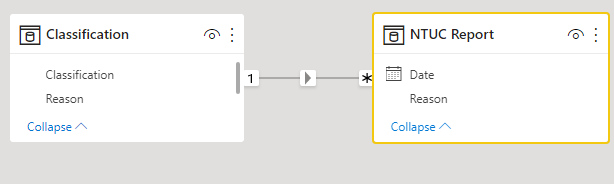
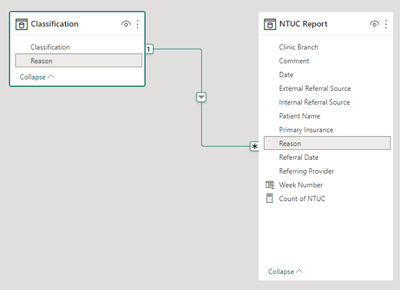
I have 2 tables connected by a 1 to Many relationship for "Reason"
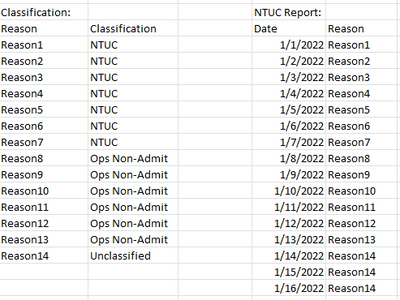
The Classification Table looks like this:
I'm trying to create a measures that allows me to count the Reason column in the NTUC Report table, filtered by the Classification column in the Classification table.
So, the desired result would be
Count the rows in 'NTUC Report' where the 'Reason' is Classification: NTUC
Count the rows in 'NTUC Report' where the 'Reason' is Classification: Ops Non-Admit
Count the rows in 'NTUC Report' where the 'Reason' is Classification: Not Classified
I cannot figure out how to use the relationship as the filter. My only other thought is to enter a really long conditional formula in a helper column.
All help is appreciated
Solved! Go to Solution.
Hi, @aflintdepm
You can try the following methods.
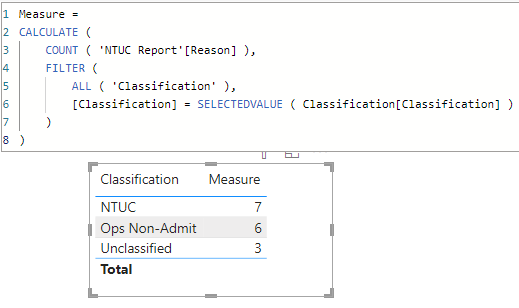
Sample data:
Measure =
CALCULATE (
COUNT ( 'NTUC Report'[Reason] ),
FILTER (
ALL ( 'Classification' ),
[Classification] = SELECTEDVALUE ( Classification[Classification] )
)
)
Is this the result you expect?
Best Regards,
Community Support Team _Charlotte
If this post helps, then please consider Accept it as the solution to help the other members find it more quickly.
Hi, @aflintdepm
You can try the following methods.
Sample data:
Measure =
CALCULATE (
COUNT ( 'NTUC Report'[Reason] ),
FILTER (
ALL ( 'Classification' ),
[Classification] = SELECTEDVALUE ( Classification[Classification] )
)
)
Is this the result you expect?
Best Regards,
Community Support Team _Charlotte
If this post helps, then please consider Accept it as the solution to help the other members find it more quickly.
Hi @aflintdepm ,
Since you have a relationship between the two tables, you could try these approaches :
Approach 1
1) On the 'NTUC Report' table, create a new column called 'Classification' as
Classification = RELATED(Classfication[Classfication])
Using the related function, you can add the classification column directly to your 'NTUC Report' table and hence everything you need to create your measure is now on the same table.
2) Create mesaures such as
Classification_NTUC =
COUNTROWS(
FILTER('NTUC Report', 'NTUC Report'[Classfication] = "NTUC")
)
and so on
Approach 2
Directly use the COUNTROWS and RELATEDTABLE functions as explained in Example2 here :
COUNTROWS function (DAX) - DAX | Microsoft Learn
Kind regards,
Rohit
Please mark this answer as the solution if it resolves your issue.
Appreciate your kudos! 🙂
Don't miss out on Data Days, June 15 through August 7. Learn Fabric, Power BI, SQL, AI and more.
Check out the May 2026 Power BI update to learn about new features.
| User | Count |
|---|---|
| 23 | |
| 23 | |
| 21 | |
| 17 | |
| 13 |
| User | Count |
|---|---|
| 58 | |
| 50 | |
| 38 | |
| 29 | |
| 24 |