Learn from the best! Meet the four finalists headed to the FINALS of the Power BI Dataviz World Championships! Register now
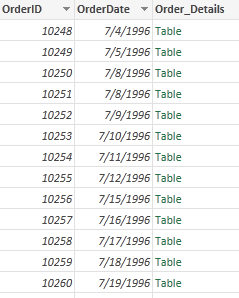
Hello, I am attempting to count the total number of rows in a series of related tables. How would I go about creating a calculated column that would calculate the total number of rows in each related table.
E.G. I would like to know how many rows is in each ORDER_DETAILS table.
Solved! Go to Solution.
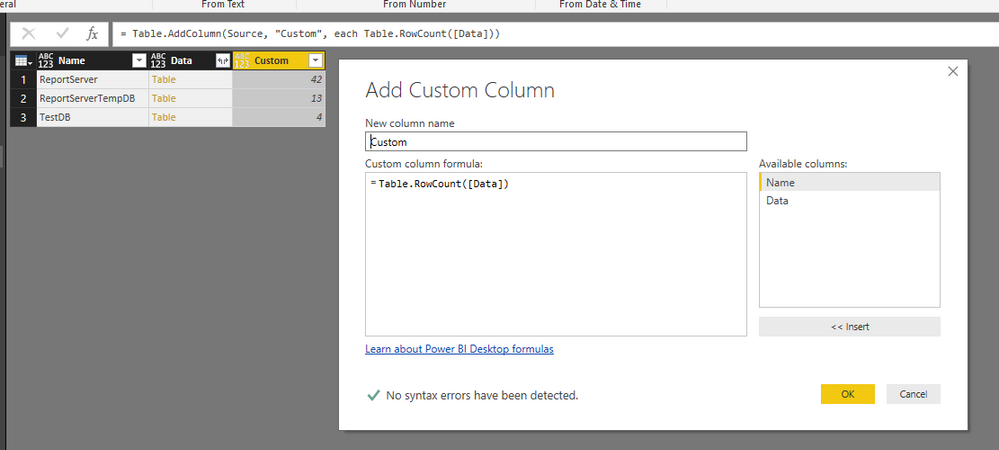
You can directly add a custom column using Table.RowCount() function to get the row count of each table.
Regards,
You can directly add a custom column using Table.RowCount() function to get the row count of each table.
Regards,
You would probably have to do a count on them separately and then merge them back with the table you wanting to store the information in.
Proud to be a Super User!
| User | Count |
|---|---|
| 55 | |
| 37 | |
| 23 | |
| 17 | |
| 17 |
| User | Count |
|---|---|
| 69 | |
| 58 | |
| 39 | |
| 21 | |
| 21 |