This time we’re going bigger than ever. Fabric, Power BI, SQL, AI and more. We're covering it all. You won't want to miss it.
Learn moreDid you hear? There's a new SQL AI Developer certification (DP-800). Start preparing now and be one of the first to get certified. Register now
Hello
I'm having the below problem I just can't seem to get my head around. I know the solution is simple but I'm having a complete mental block as to what it could be.
Data is set out like:
| Number Plate | Site |
| NP 1 | Site 1 |
| NP 2 | Site 2 |
| NP 3 | Site 3 |
| NP 4 | Site 1 |
| NP 1 | Site 2 |
| NP 2 | Site 1 |
| NP 2 | Site 3 |
| NP 1 | Site 1 |
| NP 3 | Site 1 |
| NP 4 | Site 1 |
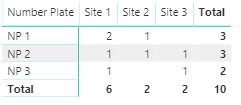
I'd like to count the number plates that have parked at more that one site (could be two, could be all three), ignoring those that have only parked at one (even multiple times). So I'd have an output matrix (or any other visual) like this:
| Number Plate | Site 1 | Site 2 | Site 3 |
| NP 1 | 2 | 1 | |
| NP 2 | 1 | 1 | 1 |
| NP 3 | 1 | 1 |
Thank you
Solved! Go to Solution.
I have used the following logic:
more than 2 sites =
VAR __validation = IF( CALCULATE( DISTINCTCOUNT('Table'[Site]); ALL( 'Table'[Site])) > 1; TRUE(); FALSE())
RETURN
IF(
__validation;
COUNTROWS( 'Table');
BLANK()
)Which returns the following matrix
If this also works for you then please mark it as the solution. Kudos is also appreciated ![]()
I have used the following logic:
more than 2 sites =
VAR __validation = IF( CALCULATE( DISTINCTCOUNT('Table'[Site]); ALL( 'Table'[Site])) > 1; TRUE(); FALSE())
RETURN
IF(
__validation;
COUNTROWS( 'Table');
BLANK()
)Which returns the following matrix
If this also works for you then please mark it as the solution. Kudos is also appreciated ![]()
Yes! That's it, thank you. I was doing similar but doing the count on the wrong column.
Hi @Socrates
You can just place Number Plate and Site in the rows and columns of a matrix visual and then place Site in values, selecting Count (i.e., implicit measure) or create an explicit measure and place it in values:
Measure = COUNT(Table1[Site])
Hello, @Socrates
Create measure like this:
Count = COUNTROWS(<YourTableName>)
And add this measure in matrix, in rows place column Number Plate, in columns place column Site
Check out the April 2026 Power BI update to learn about new features.
Sign up to receive a private message when registration opens and key events begin.
If you have recently started exploring Fabric, we'd love to hear how it's going. Your feedback can help with product improvements.
| User | Count |
|---|---|
| 36 | |
| 33 | |
| 31 | |
| 21 | |
| 16 |
| User | Count |
|---|---|
| 66 | |
| 55 | |
| 31 | |
| 24 | |
| 23 |