cancel
Showing results for 
Search instead for 
Did you mean: 

The Power BI Data Visualization World Championships is back! Get ahead of the game and start preparing now! Learn more

Reply
zeke101
Helper II
Helper II

Count IFS Help!

Hey Guys,

Needs some help with a new calculated column..... I have a set of events that must go through 6 tasks before they are considered completed through the entire process.......   In excel, I was able to determine which events were completed by doing a COUNTIFS statement:

i.e. CountIfs = If Event ID had a Reject in any task + Countif the Event ID was Accepted at the last task. Calc would provide a 1 or 0, 1 meaning that the event was completed.

Screenshot provided.

zeke101_0-1595019851833.png

I'm looking to do this exact same calculation, but in PowerBI.... Any ideas on how to do this?


1 ACCEPTED SOLUTION
mahoneypat
Microsoft Employee
Microsoft Employee

Please see if this approach meets your need in a calculated column expression.


Completed Process =
VAR rejections =
    NOT (
        ISBLANK (
            CALCULATE (
                COUNTROWS ( Review ),
                ALLEXCEPT ( Review, Review[VIOLATION_ID] ),
                Review[QR_ACTIONTYPE] = "REJECT"
            )
        )
    )
VAR accepted =
    NOT (
        ISBLANK (
            CALCULATE (
                COUNTROWS ( Review ),
                ALLEXCEPT ( Review, Review[VIOLATION_ID] ),
                Review[QUEUECODE] = "WF_REVIEW_IMAGES",
                Review[QR_ACTIONTYPE] = "ACCEPT"
            )
        )
    )
RETURN
    IF ( OR ( rejections, accepted ), 1, 0 )


If this works for you, please mark it as the solution.  Kudos are appreciated too.  Please let me know if not.

Regards,

Pat


Did I answer your question? Mark my post as a solution! Kudos are also appreciated!

To learn more about Power BI, follow me on Twitter or subscribe on YouTube.


@mahoneypa HoosierBI on YouTube


View solution in original post

4 REPLIES 4
mahoneypat
Microsoft Employee
Microsoft Employee

Please see if this approach meets your need in a calculated column expression.


Completed Process =
VAR rejections =
    NOT (
        ISBLANK (
            CALCULATE (
                COUNTROWS ( Review ),
                ALLEXCEPT ( Review, Review[VIOLATION_ID] ),
                Review[QR_ACTIONTYPE] = "REJECT"
            )
        )
    )
VAR accepted =
    NOT (
        ISBLANK (
            CALCULATE (
                COUNTROWS ( Review ),
                ALLEXCEPT ( Review, Review[VIOLATION_ID] ),
                Review[QUEUECODE] = "WF_REVIEW_IMAGES",
                Review[QR_ACTIONTYPE] = "ACCEPT"
            )
        )
    )
RETURN
    IF ( OR ( rejections, accepted ), 1, 0 )


If this works for you, please mark it as the solution.  Kudos are appreciated too.  Please let me know if not.

Regards,

Pat


Did I answer your question? Mark my post as a solution! Kudos are also appreciated!

To learn more about Power BI, follow me on Twitter or subscribe on YouTube.


@mahoneypa HoosierBI on YouTube


@mahoneypat 


To perfection!! Thanks Pat!

harshnathani
Community Champion
Community Champion

Hi @zeke101 ,


Try


Measure =

   COUNTROWS (
        FILTER (
            Table,
            Table[QR_ActionType] IN {"Accept","Reject","WF_Review_Images"}
    )
)


or


Measure =

CALCULATE(DISCTINCTCOUNT(Table[Violation_Id]),
FILTER (
Table,
Table[QR_ActionType] IN {"Accept","Reject","WF_Review_Images"}
)
)


Regards,

Harsh Nathani


Appreciate with a Kudos!! (Click the Thumbs Up Button)

Did I answer your question? Mark my post as a solution!


Hi @harshnathani 

Not quite what I was expecting --- I was expecting a result of 1 or 0 for each row (similar to screen shot of my excel below). This will help me pinpoint the ID's that made it through the entire process (1=Completed process, 0=Not completed process)

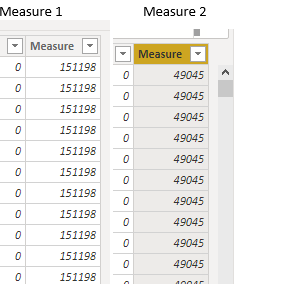
The results from your 2 formulas appears to count based on those criterias and at each row. 

zeke101_0-1595029553750.png

Also, to clarify, I just need a count if the ID was rejected (at any task including WF_REJECT_IMAGES) or if the Event was Accepted or Rejected but only at WF_REJECT_IMAGES (this is the last task in the process).  Hope I'm making sense. 

Helpful resources

Announcements
Power BI DataViz World Championships

Power BI Dataviz World Championships

The Power BI Data Visualization World Championships is back! Get ahead of the game and start preparing now!

December 2025 Power BI Update Carousel

Power BI Monthly Update - December 2025

Check out the December 2025 Power BI Holiday Recap!

FabCon Atlanta 2026 carousel

FabCon Atlanta 2026

Join us at FabCon Atlanta, March 16-20, for the ultimate Fabric, Power BI, AI and SQL community-led event. Save $200 with code FABCOMM.