cancel
Showing results for 
Search instead for 
Did you mean: 

The Power BI Data Visualization World Championships is back! Get ahead of the game and start preparing now! Learn more

Reply
Anonymous
Not applicable

Count IDs which Increased/Decreased

Hi all,


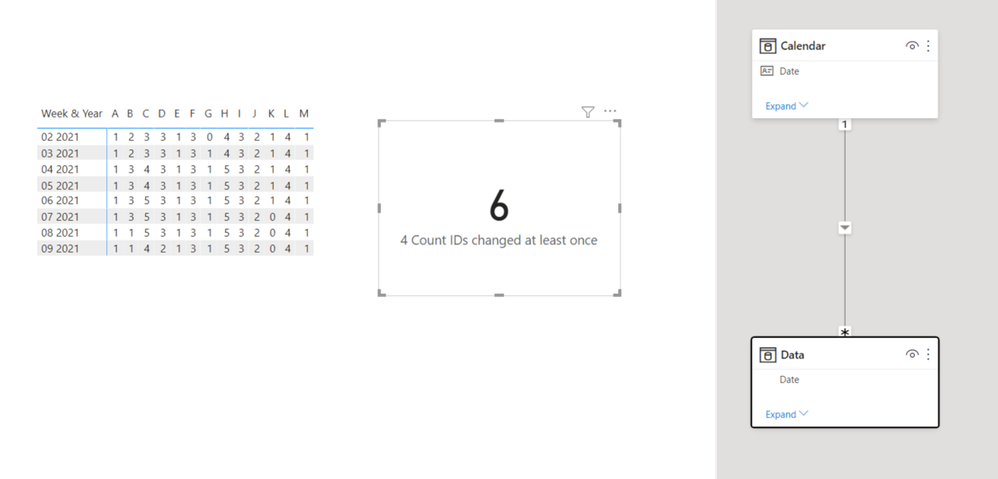
Please please help me out with this. So this is my table (made using the power BI visual matrix). The rows are IDs and the columns are Dates, usually a week apart (but not always). The values are sum of the quantity of each ID (PDQ). I want to count the number of IDs, which have at leaste ONE change across these 8 weeks.


SKU1/6/20211/13/20211/20/20211/27/20212/3/20212/10/20212/17/20212/24/2021
A11111111
B22333311
C33445554
D33333332
E11111111
F33333333
G01111111
H44555555
I33333333
J22222222
K11111000
L44444444
M11111111


I have a measure which calculates the previous week's PDQ:


lastpdq = 
var latestDate = MAX(Append1[MinDate])
VAR prevDate = CALCULATE(MAX(Append1[MinDate]),Append1[MinDate]<latestDate,ALLSELECTED(Append1[MinDate]))
RETURN
CALCULATE(
SUM(Append1[PDQ]),
Append1[MinDate]=prevDate, ALLSELECTED(Append1[MinDate]))


Using this I calculated the Variance between previous and current week. I used this to apply condiitional formatting as well and it works perfectly fine.

I tried using this (and much more) to get the count, but nothing is working:


Count = CALCULATE(
    COUNTROWS( SUMMARIZE( Append1, Append1[SELL_ID] )),
    FILTER( SUMMARIZE( Append1,Append1[SELL_ID] ),[Variance]>0||[Variance]<0))


1 ACCEPTED SOLUTION
v-deddai1-msft
Community Support
Community Support

Hi @Anonymous ,


Use something like:


Count IDs changed at least once =
VAR a =
    ADDCOLUMNS (
        SUMMARIZE ( 'Table', 'Table'[SKU] ),
        "VALUE",
            COUNTROWS (
                DISTINCT (
                    SELECTCOLUMNS (
                        FILTER (
                            SUMMARIZE (
                                'Table',
                                'Table'[SKU],
                                'Table'[Date],
                                "PDQ", COUNT ( 'Table'[SKU] )
                            ),
                            'Table'[SKU] = EARLIER ( 'Table'[SKU] )
                        ),
                        "VAUE1", [PDQ]
                    )
                )
            )
    )
RETURN
    COUNTX ( FILTER ( a, [VALUE] >= 2 ), 'Table'[SKU] )


If this post helps, then please consider Accept it as the solution to help the other members find it more quickly.


Best Regards,

Dedmon Dai


View solution in original post

3 REPLIES 3
v-deddai1-msft
Community Support
Community Support

Hi @Anonymous ,


Use something like:


Count IDs changed at least once =
VAR a =
    ADDCOLUMNS (
        SUMMARIZE ( 'Table', 'Table'[SKU] ),
        "VALUE",
            COUNTROWS (
                DISTINCT (
                    SELECTCOLUMNS (
                        FILTER (
                            SUMMARIZE (
                                'Table',
                                'Table'[SKU],
                                'Table'[Date],
                                "PDQ", COUNT ( 'Table'[SKU] )
                            ),
                            'Table'[SKU] = EARLIER ( 'Table'[SKU] )
                        ),
                        "VAUE1", [PDQ]
                    )
                )
            )
    )
RETURN
    COUNTX ( FILTER ( a, [VALUE] >= 2 ), 'Table'[SKU] )


If this post helps, then please consider Accept it as the solution to help the other members find it more quickly.


Best Regards,

Dedmon Dai


Jihwan_Kim
Super User
Super User

Hi, @Anonymous 

Please check the below picture and the sample pbix file's link down below.

All measures are in the sample pbix file. And all steps are numbered in front of each measure.


Picture4.png


https://www.dropbox.com/s/h2grahj4hvbmm90/et1995.pbix?dl=0 


Hi, My name is Jihwan Kim.


If this post helps, then please consider accept it as the solution to help other members find it faster, and give a big thumbs up.


Linkedin: linkedin.com/in/jihwankim1975/

Twitter: twitter.com/Jihwan_JHKIM


If this post helps, then please consider accepting it as the solution to help other members find it faster, and give a big thumbs up.


Click here to visit my LinkedIn page

Click here to schedule a short Teams meeting to discuss your question.
Anonymous
Not applicable

@MFelix can you help with this?  

Helpful resources

Announcements
Power BI DataViz World Championships

Power BI Dataviz World Championships

The Power BI Data Visualization World Championships is back! Get ahead of the game and start preparing now!

December 2025 Power BI Update Carousel

Power BI Monthly Update - December 2025

Check out the December 2025 Power BI Holiday Recap!

FabCon Atlanta 2026 carousel

FabCon Atlanta 2026

Join us at FabCon Atlanta, March 16-20, for the ultimate Fabric, Power BI, AI and SQL community-led event. Save $200 with code FABCOMM.