cancel
Showing results for 
Search instead for 
Did you mean: 

The Power BI Data Visualization World Championships is back! Get ahead of the game and start preparing now! Learn more

Reply
Anonymous
Not applicable

PowerBI MySQL UUID Error (Non-negative Number Error)

Hi all,


When using a MySQL dataset within PowerBI that contains a UUID with a foreign key, I get the following error:

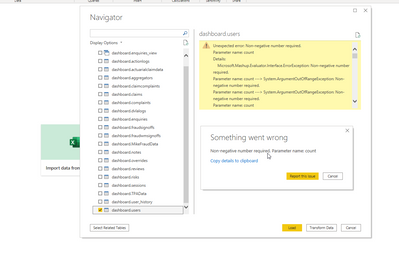
Non-negative number required. Parameter name: count


Is there any fixes for this both PowerBI side or MySQL?

4 REPLIES 4
v-robertq-msft
Community Support
Community Support

Hi, @Anonymous 

According to my research, the order of the Appended Queries in the Power query seem to be possible to cause this kind of problem. Have you done any operations in the Power query?


If not, the problem should exist on the MySQL side, the large dataset can also be the possible reason, you can refer to these links:

https://community.powerbi.com/t5/Desktop/Non-negative-number-required-error-while-appending-tables/td-p/490901

https://social.technet.microsoft.com/Forums/en-US/77d9826f-4511-444d-b89e-865b0e8a282e/power-query-nonnegative-number-required?forum=powerquery

https://community.powerbi.com/t5/Desktop/OLE-DB-or-ODBC-error-DataSource-Error-MySQL-Fatal-error/td-p/512516


Thank you very much!


Best Regards,

Community Support Team _Robert Qin

If this post helps, then please consider Accept it as the solution to help the other members find it more quickly.

Anonymous
Not applicable

Hi Robert,


Appreciate the reply! The dataset sadly is very small, 300 rows to be exact roughly speaking. I'm still new to PowerBI, and I have solely just created a new report and added the database (please see below reply where I show screenshot of such).

amitchandak
Super User
Super User

@Anonymous , do have any field count? or any parameter you have created?

Share with Power BI Enthusiasts: Full Power BI Video (20 Hours) YouTube
Microsoft Fabric Series 60+ Videos YouTube
Microsoft Fabric Hindi End to End YouTube
Anonymous
Not applicable

I don't, which is very odd..


I literally create a new PowerBI document, add my MySQL data source and select one of my tables that contains the foreign key

CharlieBI_0-1620221294722.png


This is a fresh PowerBI document

Helpful resources

Announcements
Power BI DataViz World Championships

Power BI Dataviz World Championships

The Power BI Data Visualization World Championships is back! Get ahead of the game and start preparing now!

December 2025 Power BI Update Carousel

Power BI Monthly Update - December 2025

Check out the December 2025 Power BI Holiday Recap!

FabCon Atlanta 2026 carousel

FabCon Atlanta 2026

Join us at FabCon Atlanta, March 16-20, for the ultimate Fabric, Power BI, AI and SQL community-led event. Save $200 with code FABCOMM.