cancel
Showing results for 
Search instead for 
Did you mean: 

July 7 - July 17 | Round 2 of the Power BI Dataviz World Championships. Don't miss your chance! Learn more

Reply
rufinosilverio
Regular Visitor

Count Each Row Value in a Filtered Rows (Only for Visible Rows)

Hi Everyone! I am new here and with Power BI.


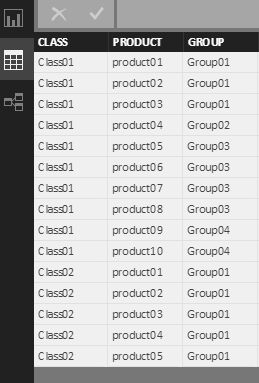
I have a table as follow:

 Querry_Table.jpg


In my report I have I filter where I Select for Class01 or Class02 or both.

I need to count, how many times each [GROUP} row is visible (Only visible values) when I select Class Filter.

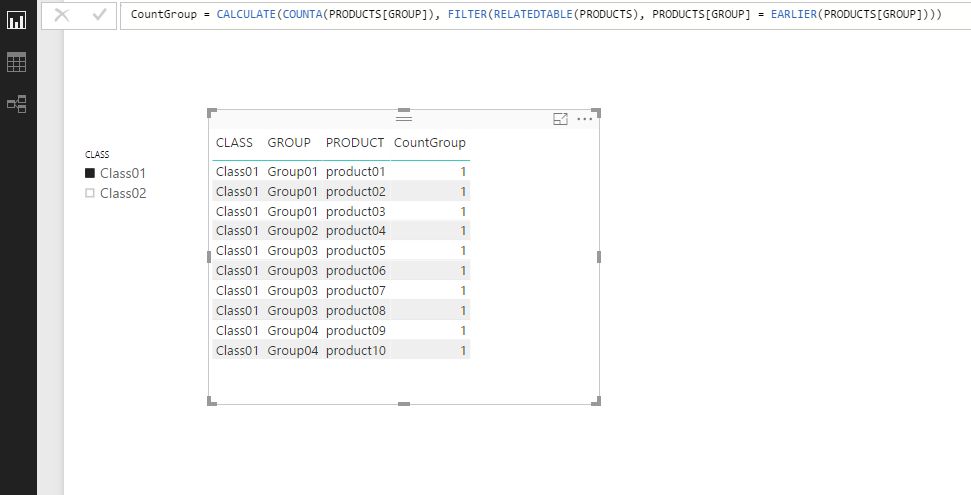
I tried this, with Class01 selected in filter: 


CountGroup = CALCULATE(COUNTA(PRODUCTS[GROUP]), FILTER(RELATEDTABLE(PRODUCTS), PRODUCTS[GROUP] = EARLIER(PRODUCTS[GROUP])))


but Dont work, as follow showing only a value 1:

Visual_Filter-Related.jpg


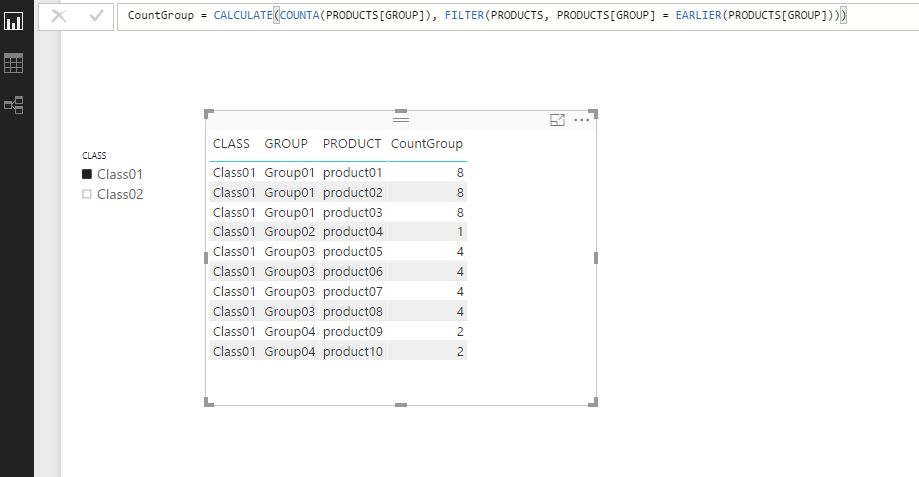
And I tried without RELATED, but it gave me the TOTAL of each Group ocurrences in the original table (8 for three first rows), that is not what I want.


CountGroup = CALCULATE(COUNTA(PRODUCTS[GROUP]), FILTER(PRODUCTS, PRODUCTS[GROUP] = EARLIER(PRODUCTS[GROUP])))


Visual_Filter.jpg


I need this Collumn [CountGroup] result when Class01 is selected in filter:

3

3

3

1

4

4

4

4

2

2


Thanks in advance!

1 ACCEPTED SOLUTION
v-chuncz-msft
Community Support
Community Support

@rufinosilverio,


You may use DAX below to add a measure.

CountGroup =
CALCULATE (
    COUNT ( PRODUCTS[GROUP] ),
    ALLSELECTED ( PRODUCTS[CLASS] ),
    ALL ( PRODUCTS[PRODUCT] )
)
Community Support Team _ Sam Zha
If this post helps, then please consider Accept it as the solution to help the other members find it more quickly.

View solution in original post

2 REPLIES 2
v-chuncz-msft
Community Support
Community Support

@rufinosilverio,


You may use DAX below to add a measure.

CountGroup =
CALCULATE (
    COUNT ( PRODUCTS[GROUP] ),
    ALLSELECTED ( PRODUCTS[CLASS] ),
    ALL ( PRODUCTS[PRODUCT] )
)
Community Support Team _ Sam Zha
If this post helps, then please consider Accept it as the solution to help the other members find it more quickly.

@v-chuncz-msft,


Thank you so much!


It worked for me!!!

Regards!!!

Helpful resources

Announcements
FabCon and SQLCon Barcelona 2026

FabCon & SQLCon – Barcelona 2026

Join us in Barcelona for FabCon and SQLCon, the Fabric, Power BI, SQL, and AI community event. Save €200 with code FABCMTY200.

60 days of Data Days Carousel

Data Days 2026

Join Fabric Data Days 2026: 60 days of free live/on-demand sessions, challenges, study groups, and certification opportunities.

Power BI DataViz World Championships carousel

Power BI DataViz World Championships - June 2026

A new Power BI DataViz World Championship is coming this June! Don't miss out on submitting your entry.