Share feedback directly with Fabric product managers, participate in targeted research studies and influence the Fabric roadmap.
Sign up nowGet Fabric certified for FREE! Don't miss your chance! Learn more
Hi,
This is a very simple thing but I cant seem to get to the bottom of it.
I need to create a measure that gives me the count distinct by a grouping.
For example
TableA
Group Attributes
1 A
1 B
2 C
2 C
3 D
So the measure should say,
Group Attributes Measure (distinct values)
1 A 2
1 B 2
2 C 1
2 C 1
3 D 1
So not that dissimilar to what a count distinct and group by clause would do in SQL.
Thanks a bunch!
Solved! Go to Solution.
@Majad_Chowdhury , Try a measure
calculate(distinctcount(Table[Attributes]), filter(allselected(Table), Table[Group] = max(Table[Group] ) ) )
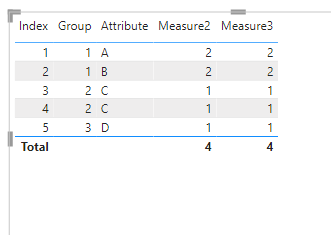
@Majad_Chowdhury try this
Measure2 =
CALCULATE (
COUNTX ( SUMMARIZE ( t2, t2[Group], t2[Attribute] ), t2[Group] ),
ALLEXCEPT ( t2, t2[Group] )
)
Measure3 =
CALCULATE (
SUMX ( VALUES ( t2[Group] ), CALCULATE ( DISTINCTCOUNT ( t2[Attribute] ) ) ),
ALLEXCEPT ( t2, t2[Group] )
)
nothing wrong with @amitchandak 's solution. But for large tables I find ALLSELECTED not to be performant and I would only use that where it can't be avoided.
@smpa01 Is there a reason for the iterators rather than writing this?
CALCULATE ( DISTINCTCOUNT ( t2[Attributes] ), ALLEXCEPT ( t2, t2[Group] ) )
@AlexisOlson great..skipped my mind.
@Majad_Chowdhury , Try a measure
calculate(distinctcount(Table[Attributes]), filter(allselected(Table), Table[Group] = max(Table[Group] ) ) )
Share feedback directly with Fabric product managers, participate in targeted research studies and influence the Fabric roadmap.
| User | Count |
|---|---|
| 63 | |
| 62 | |
| 42 | |
| 19 | |
| 16 |
| User | Count |
|---|---|
| 113 | |
| 105 | |
| 36 | |
| 28 | |
| 28 |