cancel
Showing results for 
Search instead for 
Did you mean: 

We've captured the moments from FabCon & SQLCon that everyone is talking about, and we are bringing them to the community, live and on-demand. Starts on April 14th. Register now

Reply
Majad_Chowdhury
Advocate II
Advocate II

Count Distinct by Grouping

Hi,

This is a very simple thing but I cant seem to get to the bottom of it.


I need to create a measure that gives me the count distinct by a grouping.


For example

TableA

Group   Attributes

1               A

1               B

2               C

2               C

3               D


So the measure should say,


Group   Attributes    Measure (distinct values)

1               A                       2

1               B                       2

2               C                       1

2               C                       1

3               D                       1


So not that dissimilar to what a count distinct and group by clause would do in SQL.


Thanks a bunch!


1 ACCEPTED SOLUTION
amitchandak
Super User
Super User

@Majad_Chowdhury , Try a measure 

calculate(distinctcount(Table[Attributes]), filter(allselected(Table), Table[Group] = max(Table[Group] ) ) )

Share with Power BI Enthusiasts: Full Power BI Video (20 Hours) YouTube
Microsoft Fabric Series 60+ Videos YouTube
Microsoft Fabric Hindi End to End YouTube

View solution in original post

4 REPLIES 4
smpa01
Community Champion
Community Champion

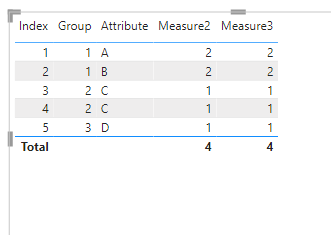
@Majad_Chowdhury  try this


Measure2 =
CALCULATE (
    COUNTX ( SUMMARIZE ( t2, t2[Group], t2[Attribute] ), t2[Group] ),
    ALLEXCEPT ( t2, t2[Group] )
)
Measure3 = 
CALCULATE (
    SUMX ( VALUES ( t2[Group] ), CALCULATE ( DISTINCTCOUNT ( t2[Attribute] ) ) ),
    ALLEXCEPT ( t2, t2[Group] )
)


smpa01_2-1637167925678.png

nothing wrong with @amitchandak 's solution. But for large tables I find ALLSELECTED not to be performant and I would only use that where it can't be avoided.


Did I answer your question? Mark my post as a solution!
Proud to be a Super User!
My custom visualization projects
Plotting Live Sound: Viz1
Beautiful News:Viz1, Viz2, Viz3
Visual Capitalist: Working Hrs

@smpa01 Is there a reason for the iterators rather than writing this?

CALCULATE ( DISTINCTCOUNT ( t2[Attributes] ), ALLEXCEPT ( t2, t2[Group] ) )


@AlexisOlson  great..skipped my mind.

Did I answer your question? Mark my post as a solution!
Proud to be a Super User!
My custom visualization projects
Plotting Live Sound: Viz1
Beautiful News:Viz1, Viz2, Viz3
Visual Capitalist: Working Hrs
amitchandak
Super User
Super User

@Majad_Chowdhury , Try a measure 

calculate(distinctcount(Table[Attributes]), filter(allselected(Table), Table[Group] = max(Table[Group] ) ) )

Share with Power BI Enthusiasts: Full Power BI Video (20 Hours) YouTube
Microsoft Fabric Series 60+ Videos YouTube
Microsoft Fabric Hindi End to End YouTube

Helpful resources

Announcements
New to Fabric survey Carousel

New to Fabric Survey

If you have recently started exploring Fabric, we'd love to hear how it's going. Your feedback can help with product improvements.

Power BI DataViz World Championships carousel

Power BI DataViz World Championships - June 2026

A new Power BI DataViz World Championship is coming this June! Don't miss out on submitting your entry.

Join our Fabric User Panel

Join our Fabric User Panel

Share feedback directly with Fabric product managers, participate in targeted research studies and influence the Fabric roadmap.

March Power BI Update Carousel

Power BI Community Update - March 2026

Check out the March 2026 Power BI update to learn about new features.