Join us at FabCon Atlanta from March 16 - 20, 2026, for the ultimate Fabric, Power BI, AI and SQL community-led event. Save $200 with code FABCOMM.
Register now!Vote for your favorite vizzies from the Power BI Dataviz World Championship submissions. Vote now!
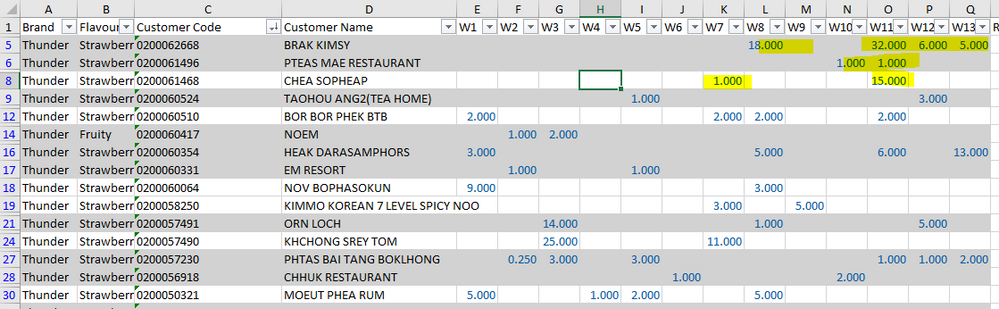
HI All , I have W1 W2 until W13 ,
and i wanna Count W1 until W13 ,
it is like we count the Column, In Column
as example below :
Customer Name BRAK KIMSY , Total Count : 4
Customer Name PTEAS MAE RESTAURANT , Total Count 2
Do you have any idea how to settle this ? I have explored for 4 hours , and no result.
Solved! Go to Solution.
In theory, your code is correct. Is a measure or a calculated column?
Ok, the problem is custumer name has several rows, is that possible? Do you want a new table just a custumber name and count?
In the lookupvalue code, you need to add as many search column name as columns you have:
Total Count = var _UserName= CountColumns[Customer Name] var _Flavour= CountColumns[Flavour] return IF(LOOKUPVALUE(CountColumns[W1];CountColumns[Customer Name];_UserName;CountColumns[Flavour];_Flavour)>0;1;0)+IF(LOOKUPVALUE(CountColumns[W2];CountColumns[Customer Name];_UserName;CountColumns[Flavour];_Flavour)>0;1;0)+IF(LOOKUPVALUE(CountColumns[W3];CountColumns[Customer Name];_UserName;CountColumns[Flavour];_Flavour)>0;1;0)+IF(LOOKUPVALUE(CountColumns[W4];CountColumns[Customer Name];_UserName;CountColumns[Flavour];_Flavour)>0;1;0)+IF(LOOKUPVALUE(CountColumns[W5];CountColumns[Customer Name];_UserName;CountColumns[Flavour];_Flavour)>0;1;0)+IF(LOOKUPVALUE(CountColumns[W6];CountColumns[Customer Name];_UserName;CountColumns[Flavour];_Flavour)>0;1;0)
Hi @Chanleakna123 , maybe there are better solutions (a loop would be great), but this works, is a calculated column:
Total Count = var _UserName= CountColumns[Customer Name] return IF(LOOKUPVALUE(CountColumns[W1];CountColumns[Customer Name];_UserName)>0;1;0)+IF(LOOKUPVALUE(CountColumns[W2];CountColumns[Customer Name];_UserName)>0;1;0)+IF(LOOKUPVALUE(CountColumns[W3];CountColumns[Customer Name];_UserName)>0;1;0)+IF(LOOKUPVALUE(CountColumns[W4];CountColumns[Customer Name];_UserName)>0;1;0)+IF(LOOKUPVALUE(CountColumns[W5];CountColumns[Customer Name];_UserName)>0;1;0)+IF(LOOKUPVALUE(CountColumns[W6];CountColumns[Customer Name];_UserName)>0;1;0)
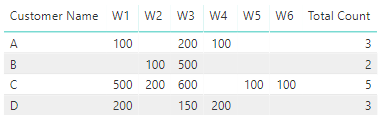
I have simplified with just 6 columns.
The result:
Best Regards,
Miguel
If this post helps, then please consider Accept it as the solution to help the other members find it more quickly.
hi @ZunzunUOC
there was a message pop up as per below.
can you help me to acheive this ?
this is my first try with 2 week only , and the message turn out as per below
In theory, your code is correct. Is a measure or a calculated column?
Ok, the problem is custumer name has several rows, is that possible? Do you want a new table just a custumber name and count?
In the lookupvalue code, you need to add as many search column name as columns you have:
Total Count = var _UserName= CountColumns[Customer Name] var _Flavour= CountColumns[Flavour] return IF(LOOKUPVALUE(CountColumns[W1];CountColumns[Customer Name];_UserName;CountColumns[Flavour];_Flavour)>0;1;0)+IF(LOOKUPVALUE(CountColumns[W2];CountColumns[Customer Name];_UserName;CountColumns[Flavour];_Flavour)>0;1;0)+IF(LOOKUPVALUE(CountColumns[W3];CountColumns[Customer Name];_UserName;CountColumns[Flavour];_Flavour)>0;1;0)+IF(LOOKUPVALUE(CountColumns[W4];CountColumns[Customer Name];_UserName;CountColumns[Flavour];_Flavour)>0;1;0)+IF(LOOKUPVALUE(CountColumns[W5];CountColumns[Customer Name];_UserName;CountColumns[Flavour];_Flavour)>0;1;0)+IF(LOOKUPVALUE(CountColumns[W6];CountColumns[Customer Name];_UserName;CountColumns[Flavour];_Flavour)>0;1;0)
Vote for your favorite vizzies from the Power BI World Championship submissions!
If you love stickers, then you will definitely want to check out our Community Sticker Challenge!
Check out the January 2026 Power BI update to learn about new features.
| User | Count |
|---|---|
| 63 | |
| 53 | |
| 42 | |
| 20 | |
| 17 |
| User | Count |
|---|---|
| 124 | |
| 105 | |
| 44 | |
| 32 | |
| 24 |