Join us at FabCon Atlanta from March 16 - 20, 2026, for the ultimate Fabric, Power BI, AI and SQL community-led event. Save $200 with code FABCOMM.
Register now!The Power BI Data Visualization World Championships is back! Get ahead of the game and start preparing now! Learn more
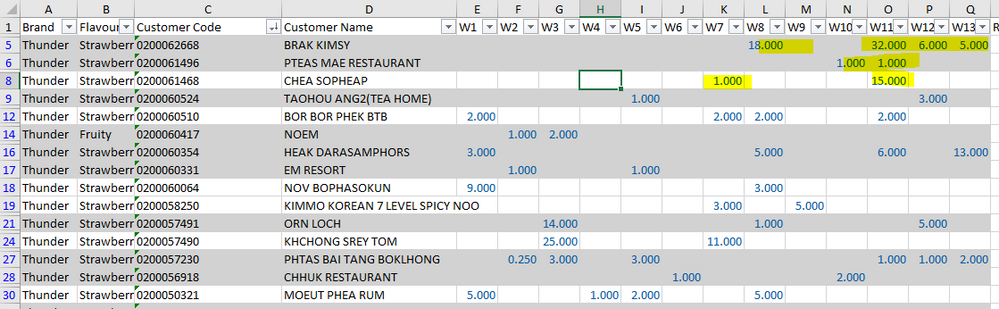
HI All , I have W1 W2 until W13 ,
and i wanna Count W1 until W13 ,
it is like we count the Column, In Column
as example below :
Customer Name BRAK KIMSY , Total Count : 4
Customer Name PTEAS MAE RESTAURANT , Total Count 2
Do you have any idea how to settle this ? I have explored for 4 hours , and no result.
Solved! Go to Solution.
In theory, your code is correct. Is a measure or a calculated column?
Ok, the problem is custumer name has several rows, is that possible? Do you want a new table just a custumber name and count?
In the lookupvalue code, you need to add as many search column name as columns you have:
Total Count = var _UserName= CountColumns[Customer Name] var _Flavour= CountColumns[Flavour] return IF(LOOKUPVALUE(CountColumns[W1];CountColumns[Customer Name];_UserName;CountColumns[Flavour];_Flavour)>0;1;0)+IF(LOOKUPVALUE(CountColumns[W2];CountColumns[Customer Name];_UserName;CountColumns[Flavour];_Flavour)>0;1;0)+IF(LOOKUPVALUE(CountColumns[W3];CountColumns[Customer Name];_UserName;CountColumns[Flavour];_Flavour)>0;1;0)+IF(LOOKUPVALUE(CountColumns[W4];CountColumns[Customer Name];_UserName;CountColumns[Flavour];_Flavour)>0;1;0)+IF(LOOKUPVALUE(CountColumns[W5];CountColumns[Customer Name];_UserName;CountColumns[Flavour];_Flavour)>0;1;0)+IF(LOOKUPVALUE(CountColumns[W6];CountColumns[Customer Name];_UserName;CountColumns[Flavour];_Flavour)>0;1;0)
Hi @Chanleakna123 , maybe there are better solutions (a loop would be great), but this works, is a calculated column:
Total Count = var _UserName= CountColumns[Customer Name] return IF(LOOKUPVALUE(CountColumns[W1];CountColumns[Customer Name];_UserName)>0;1;0)+IF(LOOKUPVALUE(CountColumns[W2];CountColumns[Customer Name];_UserName)>0;1;0)+IF(LOOKUPVALUE(CountColumns[W3];CountColumns[Customer Name];_UserName)>0;1;0)+IF(LOOKUPVALUE(CountColumns[W4];CountColumns[Customer Name];_UserName)>0;1;0)+IF(LOOKUPVALUE(CountColumns[W5];CountColumns[Customer Name];_UserName)>0;1;0)+IF(LOOKUPVALUE(CountColumns[W6];CountColumns[Customer Name];_UserName)>0;1;0)
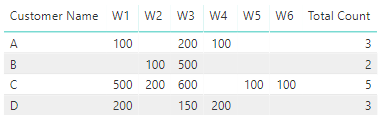
I have simplified with just 6 columns.
The result:
Best Regards,
Miguel
If this post helps, then please consider Accept it as the solution to help the other members find it more quickly.
hi @ZunzunUOC
there was a message pop up as per below.
can you help me to acheive this ?
this is my first try with 2 week only , and the message turn out as per below
In theory, your code is correct. Is a measure or a calculated column?
Ok, the problem is custumer name has several rows, is that possible? Do you want a new table just a custumber name and count?
In the lookupvalue code, you need to add as many search column name as columns you have:
Total Count = var _UserName= CountColumns[Customer Name] var _Flavour= CountColumns[Flavour] return IF(LOOKUPVALUE(CountColumns[W1];CountColumns[Customer Name];_UserName;CountColumns[Flavour];_Flavour)>0;1;0)+IF(LOOKUPVALUE(CountColumns[W2];CountColumns[Customer Name];_UserName;CountColumns[Flavour];_Flavour)>0;1;0)+IF(LOOKUPVALUE(CountColumns[W3];CountColumns[Customer Name];_UserName;CountColumns[Flavour];_Flavour)>0;1;0)+IF(LOOKUPVALUE(CountColumns[W4];CountColumns[Customer Name];_UserName;CountColumns[Flavour];_Flavour)>0;1;0)+IF(LOOKUPVALUE(CountColumns[W5];CountColumns[Customer Name];_UserName;CountColumns[Flavour];_Flavour)>0;1;0)+IF(LOOKUPVALUE(CountColumns[W6];CountColumns[Customer Name];_UserName;CountColumns[Flavour];_Flavour)>0;1;0)
The Power BI Data Visualization World Championships is back! Get ahead of the game and start preparing now!
| User | Count |
|---|---|
| 39 | |
| 37 | |
| 33 | |
| 32 | |
| 29 |
| User | Count |
|---|---|
| 133 | |
| 88 | |
| 85 | |
| 68 | |
| 64 |